Loading
Form preview
  • US Legal Forms
  • Form Library
  • More Forms
  • More Uncategorized Forms
  • Ms 150 Form

Get Ms 150 Form

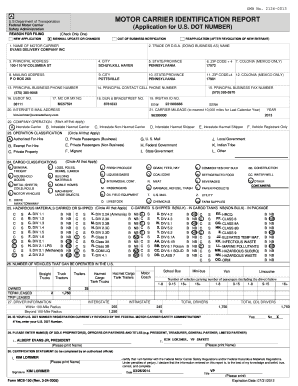
29. PLEASE ENTER NAME S OF SOLE PROPRIETOR S OFFICERS OR PARTNERS AND TITLES e.g. PRESIDENT TREASURER GENERAL PARTNER LIMITED PARTNER 2. KIM LORIMER VP SAFETY Please print Name 1. ALBERT EVANS JR PRESIDENT 30. CERTIFICATION STATEMENT to be completed by an authorized official I KIM LORIMER Signature KIM LORIMER Form MCS-150 Rev. 3-24-2005 certify that I am familiar with the Federal Motor Carrier Safety Regulations and/or Federal Hazardous Material.

How it works

  1. Open form

    Open form follow the instructions

  2. Easily sign form

    Easily sign the form with your finger

  3. Share form

    Send filled & signed form or save

How to fill out the Ms 150 Form online

Completing the Ms 150 Form online can streamline the process of registration and ensure accuracy. This guide will walk you through each section of the form, providing clear and supportive instructions to help you successfully fill it out.

Follow the steps to complete the Ms 150 Form online.

  1. Click ‘Get Form’ button to obtain the form and open it in the editor.
  2. Review the reason for filing. Check only one option that best applies: New application for a U.S. DOT number, biennial update or changes, out of business notification, or reapplication after revocation.
  3. Fill in the name of the motor carrier in the designated field.
  4. Enter the trade or doing business as (D.B.A.) name, if applicable.
  5. Provide the principal address, including street, city, state or province, and zip code.
  6. Fill out the mailing address if different from the principal address.
  7. Enter the principal business phone number and any additional phone numbers, including a cell phone where applicable.
  8. Complete the sections for registration details, including USDOT number and IRS/TAX ID number, if applicable.
  9. Indicate the type of carrier operation (interstate or intrastate) and the classification of operations.
  10. List any hazardous materials carried or shipped, circling all that apply.
  11. Specify the number of vehicles that can be operated in the U.S. and provide details about driver information as required.
  12. Complete the section regarding the current status of your U.S. DOT number registration and add names of sole proprietors, officers, or partners.
  13. Complete the certification statement by printing your name, signing the form, and dating it.
  14. Once the form has been filled completely and carefully, you can save changes, download, print, or share the form as needed.

Complete your Ms 150 Form online now to ensure a smooth filing process.

Get form

Experience a faster way to fill out and sign forms on the web. Access the most extensive library of templates available.
Get form

Related content

Form MCS-150 and Instructions - Motor Carrier...
About this Form. Please note: After December 12, 2015, MCS-150 forms can ONLY be used to...
Learn more
Multiple Sclerosis
This event provides me with a way of combining my favorite hobby and form of exercise with...
Learn more
FA150C-1 PROGRAMMING FORM - The Alarm Store
FA150C-1 PROGRAMMING FORM ... [0 = 400 ms nominal]; 1 = 10 ms nominal ... number other...
Learn more

Related links form

IA Rhythm City Casino Resort Win/Loss Form 2018 MA Basic Firearms Safety Certificate 2016 TX Sheep And Goat Validation Change Of Address Request Form 2022 AZ Chandler Unified School District Kids Express Program Change Request Form 2016

Questions & Answers

Get answers to your most pressing questions about US Legal Forms API.

Contact support

You need to file the MCS-150 form every two years to keep your information current and accurate. It's important to submit an updated MS 150 Form whenever there are significant changes to your business, such as a new address or a change in vehicle information. This regular filing helps maintain compliance with federal regulations and assists in tracking your operations. By staying proactive, you prevent potential issues with law enforcement and ensure that you remain an active participant in the transportation industry.

The MCS-150 form is used to provide the Federal Motor Carrier Safety Administration with essential information about your vehicle and operations. This form plays a critical role in registering motor carriers and updating their data regularly. By accurately completing the MS 150 Form, you help ensure compliance with safety regulations and facilitate smoother interstate operations. Therefore, whether you're operating a truck or a fleet, using this form effectively supports the safety of your operations.

Typically, the MCS-150 form is filled out by motor carriers operating commercial vehicles. This includes owners of trucking companies, bus services, and other transport entities. If you are the business owner or an authorized representative, you should complete the form. To ensure accuracy and compliance, consider using the resources available on the US Legal Forms platform when filling out the Ms 150 Form.

To submit the MCS-150 form, start by completing all required fields accurately. Once you have filled out the form, you can submit it online through the Federal Motor Carrier Safety Administration's website. Alternatively, you can mail a printed copy of the form to the designated address. Using the US Legal Forms platform can help simplify this process by providing a streamlined way to complete and submit the Ms 150 Form.

To file an MCS-150 form, you should first visit the official FMCSA website, where you can find the necessary resources. Start by creating an account or logging in if you already have one. Then, complete the form with accurate information regarding your business and operations. After you finish, make sure to review your details, and submit the MCS-150 form for processing. If you prefer a more guided approach, consider using the UsLegalForms platform, which simplifies the process and ensures you meet all requirements.

An assembly line is an arrangement of workers and machines in a factory, where each worker deals with only one part of a product. The product passes from one worker to another until it is finished. To speed up production, he set up an assembly line, with each worker producing a different part of the tool.

The Assembly process is a way of manufacturing a product where parts or materials are added in a sequence by various workers. For instance, A can put an engine in the car and send it to B, who can fix the doors. Then, B sends it to C for applying the wheels.

How to Set Up a Simple Production Line Set up an adequate work area. You'll need to have enough physical space in which to set up your production line. ... Assemble all necessary materials. ... Designate start and end points. ... Create small work stations. ... Distribute materials to each workstation. ... Get to work.

What Is an Assembly Line? An assembly line is a production process that breaks the manufacture of a good into steps that are completed in a pre-defined sequence. Assembly lines are the most commonly used method in the mass production of products.

Assembly lines are common methods of assembling complex items such as automobiles and other transportation equipment, household appliances and electronic goods. Workers in charge of the works of assembly line are called assemblers.

Get This Form Now!

Use professional pre-built templates to fill in and sign documents online faster. Get access to thousands of forms.
Get form
If you believe that this page should be taken down, please follow our DMCA take down processhere.

Industry-leading security and compliance

US Legal Forms protects your data by complying with industry-specific security standards.
  • In businnes since 1997
    25+ years providing professional legal documents.
  • Accredited business
    Guarantees that a business meets BBB accreditation standards in the US and Canada.
  • Secured by Braintree
    Validated Level 1 PCI DSS compliant payment gateway that accepts most major credit and debit card brands from across the globe.
Get Ms 150 Form
Get form
  • Adoption
  • Bankruptcy
  • Contractors
  • Divorce
  • Home Sales
  • Employment
  • Identity Theft
  • Incorporation
  • Landlord Tenant
  • Living Trust
  • Name Change
  • Personal Planning
  • Small Business
  • Wills & Estates
  • Packages A-Z
  • Affidavits
  • Bankruptcy
  • Bill of Sale
  • Corporate - LLC
  • Divorce
  • Employment
  • Identity Theft
  • Internet Technology
  • Landlord Tenant
  • Living Wills
  • Name Change
  • Power of Attorney
  • Real Estate
  • Small Estates
  • Wills
  • All Forms
  • Forms A-Z
  • Form Library
  • Legal Hub
  • About Us
  • Help Portal
  • Legal Resources
  • Blog
  • Affiliates
  • Contact Us
  • Delete My Account
  • Site Map
  • Industries
  • Forms in Spanish
  • Localized Forms
  • State-specific Forms
  • Forms Kit
  • Real Estate Handbook
  • All Guides
  • Notarize
  • Incorporation services
  • For Consumers
  • For Small Business
  • For Attorneys
  • USLegal
  • FormsPass
  • pdfFiller
  • signNow
  • altaFlow
  • DocHub
  • Instapage
Form Packages
  • Adoption
  • Bankruptcy
  • Contractors
  • Divorce
  • Home Sales
  • Employment
  • Identity Theft
  • Incorporation
  • Landlord Tenant
  • Living Trust
  • Name Change
  • Personal Planning
  • Small Business
  • Wills & Estates
  • Packages A-Z
Form Categories
  • Affidavits
  • Bankruptcy
  • Bill of Sale
  • Corporate - LLC
  • Divorce
  • Employment
  • Identity Theft
  • Internet Technology
  • Landlord Tenant
  • Living Wills
  • Name Change
  • Power of Attorney
  • Real Estate
  • Small Estates
  • Wills
  • All Forms
  • Forms A-Z
  • Form Library
Customer Service
  • Legal Hub
  • About Us
  • Help Portal
  • Legal Resources
  • Blog
  • Affiliates
  • Contact Us
  • Delete My Account
  • Site Map
  • Industries
  • Forms in Spanish
  • Localized Forms
  • State-specific Forms
  • Forms Kit
Legal Guides
  • Real Estate Handbook
  • All Guides
Prepared for you
  • Notarize
  • Incorporation services
Our Customers
  • For Consumers
  • For Small Business
  • For Attorneys
Our Sites
  • USLegal
  • FormsPass
  • pdfFiller
  • signNow
  • altaFlow
  • DocHub
  • Instapage
Social Media
Call us now toll free:
+1 833 426 79 33
As seen in:
© Copyright 1999-2026 airSlate Legal Forms, Inc. 3720 Flowood Dr, Flowood, Mississippi 39232
  • Your Privacy Choices
  • Terms of Service
  • Privacy Notice
  • Content Takedown Policy
  • Bug Bounty Program