Loading
Form preview
  • US Legal Forms
  • Form Library
  • More Forms
  • More Uncategorized Forms
  • Yamaha Ns Ap8800blf

Get Yamaha Ns Ap8800blf

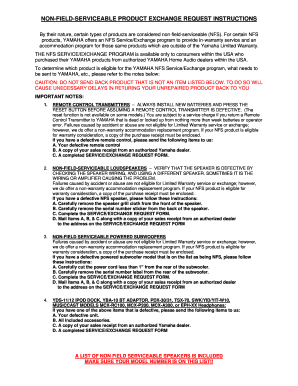
Program to provide in-warranty service and an accommodation program for those same products which are outside of the Yamaha Limited Warranty. THE NFS SERVICE/EXCHANGE PROGRAM is available only to consumers within the USA who purchased their YAMAHA products from authorized YAMAHA Home Audio dealers within the USA. To determine which product is eligible for the YAMAHA NFS Service/Exchange program, what needs to be sent to YAMAHA, etc., please refer to the notes below: CAUTION: DO NOT SEND BACK PR.

How it works

  1. Open form

    Open form follow the instructions

  2. Easily sign form

    Easily sign the form with your finger

  3. Share form

    Send filled & signed form or save

How to fill out the Yamaha Ns Ap8800blf online

The Yamaha Ns Ap8800blf is an essential form for users seeking to participate in the NFS Service/Exchange program for non-field-serviceable products. This guide will provide clear instructions on how to effectively complete this form online.

Follow the steps to fill out the Yamaha Ns Ap8800blf online.

  1. Click ‘Get Form’ button to obtain the Yamaha Ns Ap8800blf form and open it in the editor.
  2. Enter your name clearly in the designated space at the top of the form to ensure proper identification.
  3. Fill in the date of the request by writing the current date in the appropriate field.
  4. Provide the return-shipping address, including street address, city, state, and ZIP code, ensuring accuracy for any future correspondence.
  5. Input your daytime phone number to facilitate communication regarding your request.
  6. Write the product model number, accurately reflecting the item you are returning for service or exchange.
  7. Fill in the product serial number to help track the specific unit you are having issues with.
  8. Indicate the status of your unit by circling either 'in warranty' or 'out of warranty' based on your purchase details.
  9. Describe your complaint or symptom in the provided space, providing as much detail as possible to help the service team address the issue.
  10. Review all filled-out information to ensure accuracy before finalizing the form.
  11. Once completed, save your changes, then download or print the form for your records.
  12. Compile all required items listed in the instructions, including any defective units and a copy of your sales receipt, and send them to the specified Yamaha address on the form.

Complete your NFS document online and ensure your Yamaha product receives the support it needs.

Get form

Experience a faster way to fill out and sign forms on the web. Access the most extensive library of templates available.
Get form

Related content

NS-AP8805
fix the speaker cables to the wall, etc. ○. Secure placement or installation is the...
Learn more

Related links form

Vehicle Hiring Agra - GAIL (India) Ltd. REQUEST FOR PROPOSAL (RFP) FOR EMPANELMENT OF ... 12000270-HA-CTC Format Supplies PAT.pdf - Hindustan ... RFQ-20014103 - ARC FOR SERVICING & MAINTENANCE OF ACs LT

Questions & Answers

Get answers to your most pressing questions about US Legal Forms API.

Contact support

To connect a subwoofer to your Yamaha receiver, identify the subwoofer output on the back of the receiver. Use an RCA cable to connect this output to the input of your subwoofer. Ensure that your Yamaha NS Ap8800blf is also set up properly for the best sound integration. Finally, adjust the receiver's settings to balance the audio output and enhance your listening experience.

To get your zone 2 working on your Yamaha receiver, you will first need to ensure that you have the right settings configured. Navigate to the receiver's menu and look for the 'Zone' options. You can activate zone 2 from there by assigning the appropriate source. Additionally, make sure your Yamaha NS Ap8800blf is connected correctly to provide the best audio experience.

If you need to factory reset your Yamaha speaker, begin by locating the reset button, usually found on the back or bottom of the device. Press and hold the reset button for a few seconds until the speaker’s LED indicator flashes, signaling that the reset is successful. This process will restore the Yamaha NS Ap8800blf to its original settings, allowing you to start fresh. Remember to reconfigure your audio settings after the reset for the best performance.

Connecting the Yamaha NS 555 speakers to your audio setup can enhance your listening experience significantly. Start by ensuring that your Yamaha NS Ap8800blf is powered off. Use high-quality speaker wire to connect the positive and negative terminals of your speaker to the corresponding outputs on your receiver. Finally, once all connections are secure, power on your system and adjust your settings for optimal sound quality.

The Yamaha NS10 is a passive speaker, meaning it requires an external amplifier to function. This design has contributed to its popularity in professional studios, as users can pair it with various amplification options. By customizing your setup, you can enhance the speaker's performance based on your requirements. If you are considering integrating it with modern technologies, the Yamaha Ns Ap8800blf provides options that can elevate your audio experience.

The discontinuation of the NS-10 was influenced by various industry shifts towards digital audio and new monitoring technologies. As the market changed, Yamaha focused on developing newer models that catered to modern needs while retaining the NS-10’s core qualities. The NS-10 still holds a revered status, inspiring newer innovations. Meanwhile, products like Yamaha Ns Ap8800blf reflect advancements that keep up with changing preferences.

Yamaha discontinued the NS10 in the early 2000s due to changes in technology and market demand. The audio landscape evolved, with new speaker technologies emerging that offered different features and sound profiles. However, the NS10's legacy continues through its influence on modern studio monitors. If you value this legacy, exploring models like Yamaha Ns Ap8800blf could be beneficial.

Choosing between Yamaha and Bose often depends on your specific needs and preferences. Yamaha products, including the NS10 speakers, emphasize accurate sound reproduction and professional quality. Meanwhile, Bose focuses on creating user-friendly audio solutions that enhance everyday listening experiences. Therefore, when considering Yamaha Ns Ap8800blf, think about what features matter most to your audio setup.

Yes, NS10s remain a solid choice for audio professionals today. Many audio experts still use them because they provide a reliable reference for mixing. Their straightforward design and clarity allow users to make informed choices about sound. Complementing your setup with Yamaha Ns Ap8800blf can further enhance your audio experience.

The Yamaha NS10 was first introduced in 1978, quickly establishing a reputation in the professional audio community. This speaker became a staple in recording studios around the world over the decades. Its long-standing presence in the market speaks to its effectiveness and reliability. For those interested in Yamaha Ns Ap8800blf, it's interesting to see how legacy products shape modern designs.

Get This Form Now!

Use professional pre-built templates to fill in and sign documents online faster. Get access to thousands of forms.
Get form
If you believe that this page should be taken down, please follow our DMCA take down processhere.
Get Yamaha Ns Ap8800blf
Get form
  • Adoption
  • Bankruptcy
  • Contractors
  • Divorce
  • Home Sales
  • Employment
  • Identity Theft
  • Incorporation
  • Landlord Tenant
  • Living Trust
  • Name Change
  • Personal Planning
  • Small Business
  • Wills & Estates
  • Packages A-Z
  • Affidavits
  • Bankruptcy
  • Bill of Sale
  • Corporate - LLC
  • Divorce
  • Employment
  • Identity Theft
  • Internet Technology
  • Landlord Tenant
  • Living Wills
  • Name Change
  • Power of Attorney
  • Real Estate
  • Small Estates
  • Wills
  • All Forms
  • Forms A-Z
  • Form Library
  • Legal Hub
  • About Us
  • Help Portal
  • Legal Resources
  • Blog
  • Affiliates
  • Contact Us
  • Delete My Account
  • Site Map
  • Industries
  • Forms in Spanish
  • Localized Forms
  • State-specific Forms
  • Forms Kit
  • Real Estate Handbook
  • All Guides
  • Notarize
  • Incorporation services
  • For Consumers
  • For Small Business
  • For Attorneys
  • USLegal
  • FormsPass
  • pdfFiller
  • signNow
  • altaFlow
  • DocHub
  • Instapage
Form Packages
  • Adoption
  • Bankruptcy
  • Contractors
  • Divorce
  • Home Sales
  • Employment
  • Identity Theft
  • Incorporation
  • Landlord Tenant
  • Living Trust
  • Name Change
  • Personal Planning
  • Small Business
  • Wills & Estates
  • Packages A-Z
Form Categories
  • Affidavits
  • Bankruptcy
  • Bill of Sale
  • Corporate - LLC
  • Divorce
  • Employment
  • Identity Theft
  • Internet Technology
  • Landlord Tenant
  • Living Wills
  • Name Change
  • Power of Attorney
  • Real Estate
  • Small Estates
  • Wills
  • All Forms
  • Forms A-Z
  • Form Library
Customer Service
  • Legal Hub
  • About Us
  • Help Portal
  • Legal Resources
  • Blog
  • Affiliates
  • Contact Us
  • Delete My Account
  • Site Map
  • Industries
  • Forms in Spanish
  • Localized Forms
  • State-specific Forms
  • Forms Kit
Legal Guides
  • Real Estate Handbook
  • All Guides
Prepared for you
  • Notarize
  • Incorporation services
Our Customers
  • For Consumers
  • For Small Business
  • For Attorneys
Our Sites
  • USLegal
  • FormsPass
  • pdfFiller
  • signNow
  • altaFlow
  • DocHub
  • Instapage
Social Media
Call us now toll free:
+1 833 426 79 33
As seen in:
© Copyright 1999-2026 airSlate Legal Forms, Inc. 3720 Flowood Dr, Flowood, Mississippi 39232
  • Your Privacy Choices
  • Terms of Service
  • Privacy Notice
  • Content Takedown Policy
  • Bug Bounty Program