We use cookies to improve security, personalize the user experience, enhance our marketing activities (including cooperating with our marketing partners) and for other business use.
Click "here" to read our Cookie Policy. By clicking "Accept" you agree to the use of cookies. Read less
Read more
Accept
Loading
Form preview
  • US Legal Forms
  • Form Library
  • More Forms
  • More Uncategorized Forms
  • Mychart Utmb

Get Mychart Utmb

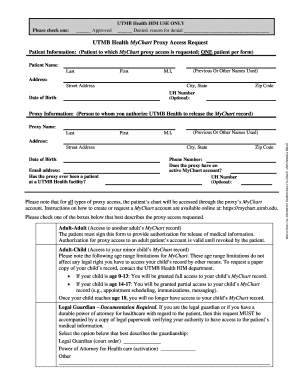
Please check one: Approved UTMB Health HIM USE ONLY Denied, reason for denial UTMB Health MyChart Proxy Access Request Patient Information: (Patient to which MyChart proxy access is requested; ONE.

How it works

  1. Open form

    Open form follow the instructions

  2. Easily sign form

    Easily sign the form with your finger

  3. Share form

    Send filled & signed form or save

How to fill out the MyChart UTMB online

Filling out the MyChart UTMB Proxy Access Request form is a straightforward process designed to facilitate authorized access to a patient's medical information. This guide will provide you with detailed instructions on how to complete each section of the form accurately and efficiently.

Follow the steps to complete the MyChart UTMB form online.

  1. Click ‘Get Form’ button to download the MyChart UTMB Proxy Access Request form and open it for editing.
  2. Enter the patient information in the designated fields, which includes the patient's name (last, first, middle initial), any previous names used, address, date of birth, and optional UH number.
  3. Provide the proxy information in the next section by entering the proxy's name, address, date of birth, email address, phone number, and UH number if available. Indicate whether the proxy has an active MyChart account.
  4. Select the appropriate type of proxy access you are requesting by checking one of the following options: Adult-Adult, Adult-Child, or Legal Guardian. Ensure you provide any required documentation if selecting Legal Guardian.
  5. Read the disclosures regarding protected health information and understand the implications of granting proxy access. Acknowledge your understanding by signing and dating the form in the specified areas.
  6. If you have provided documentation supporting your authority to access the patient’s health information, ensure these documents are accurate and include them with your submission.
  7. Finally, save your changes to the form, and choose to download, print, or share the completed MyChart UTMB Proxy Access Request form as needed.

Complete your MyChart UTMB Proxy Access Request form online to ensure timely access to necessary medical information.

Get form

Experience a faster way to fill out and sign forms on the web. Access the most extensive library of templates available.
Get form

Related content

Plan 2 document (PDF) - Texas Health and Human...
anchor, the University of Texas Medical Branch (UTMB) has served as facilitator for...
Learn more
MyChart - Login Page - UTMB Health
Welcome to the UTMB Health MyChart Patient Portal. When you need care, we're here. Log in...
Learn more

Related links form

How To Install An SSL/TLS Certificate In Jetty Java HTTPS Servlet Web ... All Participants Finding Their Own Job Must Complete This Job Offer, Including Required Signatures The Measuring Converters Of Temperature And Humidity - - Elemer You Save The Workbook In The CData Folder As An OpenXML Package

Questions & Answers

Get answers to your most pressing questions about US Legal Forms API.

Contact support

To upload documents to a document portal, first, access the specific portal you are using. Most portals, including Mychart Utmb, have an 'Upload' button prominently displayed. After selecting it, choose the files from your device, and follow any additional prompts to complete your upload.

Yes, you can easily upload documents to MyChart. After logging in, navigate to the 'Documents' section and select the option to upload. This feature is useful for sharing important health information securely with your providers at Mychart Utmb.

To submit documents on MyChart, log into your account and navigate to the 'Documents' section. You can upload files directly from your device by selecting the appropriate option, ensuring your healthcare provider has all the information needed when you use Mychart Utmb.

Yes, there is a UTMB MyChart app available for download on both iOS and Android devices. This app enables you to manage your health on-the-go, access your medical records, and communicate with your providers conveniently. Simply download the app and log in to your Mychart Utmb account to get started.

To submit pictures on MyChart, log in to your account and go to the 'Messages' section. You can attach photos by choosing the appropriate option when composing a new message. This feature allows you to share important visual information with your healthcare provider at Mychart Utmb.

To send records on MyChart, log in to your account and navigate to the 'Messages' section. From there, you can choose to compose a new message and attach the necessary documents. Remember to specify the recipient clearly to ensure your records reach the correct provider at Mychart Utmb.

Getting the MyChart app on your phone is a straightforward process. Simply open the App Store for iOS or Google Play for Android. Search for 'MyChart', download the app, and follow the instructions to log in or create your account. With the app, you can manage your health, appointments, and messages effortlessly.

To access your MyChart UTMB, go to the MyChart website or open the app. Enter your username and password, then click 'Login'. If you forget your password, you can easily reset it through the login page.

You can access UTMB MyChart through the official UTMB website or by downloading the MyChart app. Once logged in, you’ll have access to your health information, appointment scheduling, and messaging your healthcare team. This makes it simple to stay connected with your health.

To gain access to MyChart UTMB, you typically need an activation code provided by your healthcare provider. If you don’t have a code, contact your UTMB provider’s office to request one. After obtaining it, you can easily set up your MyChart account.

Get This Form Now!

Use professional pre-built templates to fill in and sign documents online faster. Get access to thousands of forms.
Get form
If you believe that this page should be taken down, please follow our DMCA take down processhere.

Industry-leading security and compliance

US Legal Forms protects your data by complying with industry-specific security standards.
  • In businnes since 1997
    25+ years providing professional legal documents.
  • Accredited business
    Guarantees that a business meets BBB accreditation standards in the US and Canada.
  • Secured by Braintree
    Validated Level 1 PCI DSS compliant payment gateway that accepts most major credit and debit card brands from across the globe.
Get Mychart Utmb
Get form
Form Packages
Adoption
Bankruptcy
Contractors
Divorce
Home Sales
Employment
Identity Theft
Incorporation
Landlord Tenant
Living Trust
Name Change
Personal Planning
Small Business
Wills & Estates
Packages A-Z
Form Categories
Affidavits
Bankruptcy
Bill of Sale
Corporate - LLC
Divorce
Employment
Identity Theft
Internet Technology
Landlord Tenant
Living Wills
Name Change
Power of Attorney
Real Estate
Small Estates
Wills
All Forms
Forms A-Z
Form Library
Customer Service
Terms of Service
Privacy Notice
Legal Hub
Content Takedown Policy
Bug Bounty Program
About Us
Help Portal
Legal Resources
Blog
Affiliates
Contact Us
Delete My Account
Site Map
Industries
Forms in Spanish
Localized Forms
State-specific Forms
Forms Kit
Legal Guides
Real Estate Handbook
All Guides
Prepared for You
Notarize
Incorporation services
Our Customers
For Consumers
For Small Business
For Attorneys
Our Sites
US Legal Forms
USLegal
FormsPass
pdfFiller
signNow
airSlate WorkFlow
DocHub
Instapage
Social Media
Call us now toll free:
+1 833 426 79 33
As seen in:
  • USA Today logo picture
  • CBC News logo picture
  • LA Times logo picture
  • The Washington Post logo picture
  • AP logo picture
  • Forbes logo picture
© Copyright 1997-2025
airSlate Legal Forms, Inc.
3720 Flowood Dr, Flowood, Mississippi 39232
Form Packages
Adoption
Bankruptcy
Contractors
Divorce
Home Sales
Employment
Identity Theft
Incorporation
Landlord Tenant
Living Trust
Name Change
Personal Planning
Small Business
Wills & Estates
Packages A-Z
Form Categories
Affidavits
Bankruptcy
Bill of Sale
Corporate - LLC
Divorce
Employment
Identity Theft
Internet Technology
Landlord Tenant
Living Wills
Name Change
Power of Attorney
Real Estate
Small Estates
Wills
All Forms
Forms A-Z
Form Library
Customer Service
Terms of Service
Privacy Notice
Legal Hub
Content Takedown Policy
Bug Bounty Program
About Us
Help Portal
Legal Resources
Blog
Affiliates
Contact Us
Delete My Account
Site Map
Industries
Forms in Spanish
Localized Forms
State-specific Forms
Forms Kit
Legal Guides
Real Estate Handbook
All Guides
Prepared for You
Notarize
Incorporation services
Our Customers
For Consumers
For Small Business
For Attorneys
Our Sites
US Legal Forms
USLegal
FormsPass
pdfFiller
signNow
airSlate WorkFlow
DocHub
Instapage
Social Media
Call us now toll free:
+1 833 426 79 33
As seen in:
  • USA Today logo picture
  • CBC News logo picture
  • LA Times logo picture
  • The Washington Post logo picture
  • AP logo picture
  • Forbes logo picture
© Copyright 1997-2025
airSlate Legal Forms, Inc.
3720 Flowood Dr, Flowood, Mississippi 39232