Loading
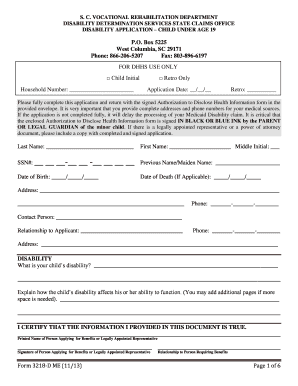
Get Dhhs Form 3218 Me
How it works
-

Open form follow the instructions
-

Easily sign the form with your finger
-

Send filled & signed form or save
How to fill out the Dhhs Form 3218 Me online
Filling out the Dhhs Form 3218 Me can seem daunting, but with the right guidance, it can be a straightforward process. This guide provides step-by-step instructions to help you complete the form accurately and efficiently.
Follow the steps to fill out the Dhhs Form 3218 Me online
- Click ‘Get Form’ button to obtain the form and open it in the editor. This action will allow you to access the necessary online document.
- Begin by indicating whether the application is for Child Initial or Retro Only. Mark the checkbox corresponding to the appropriate category.
- Fill in the application date in the provided format (__/__/__). If applying retroactively, include the retro date.
- Complete the household number field. This is essential for establishing context for your application.
- Provide the last name, first name, middle initial, and social security number of the child. Ensure all names are spelled correctly.
- Indicate the child’s date of birth and, if applicable, the date of death. If the date of death is not applicable, leave it blank.
- Enter the address and phone number of the applicant. Include complete details to avoid delays.
- Provide the contact person’s information along with their relationship to the applicant and their phone number.
- Describe the child’s disability in detail, explaining how it affects their functionality. Feel free to use additional pages if necessary.
- Sign the document as the person applying for benefits or as the legally appointed representative. Ensure the signature is in black or blue ink.
- List all medical and therapy providers the child has seen in the last 15 months. Include complete contact and visit details for each provider.
- Specify any additional places where tests or imaging have been performed recently. Provide relevant details for each facility.
- Complete the school or training information section if applicable, including the child’s current grade, primary teacher’s name, and additional services received.
- Utilize the remarks section to provide any extra information that may assist in the disability claim process.
- After completing the form, save your changes. You can then download, print, or share the completed application as needed.
Take the next step in securing benefits by completing the Dhhs Form 3218 Me online today.
Get form
Experience a faster way to fill out and sign forms on the web. Access the most extensive library of templates available.
Related links form
To qualify for SC Healthy Connections, your household income must fall within specific guidelines. The exact amount depends on the number of people in your household and other factors. It is essential to check the current federal poverty level as a reference point. Utilizing the Dhhs Form 3218 Me will guide you in understanding eligibility for this program and determining the income needed.
Get This Form Now!
Use professional pre-built templates to fill in and sign documents online faster. Get access to thousands of forms.