Loading
Get Dentist W9
How it works
-

Open form follow the instructions
-

Easily sign the form with your finger
-

Send filled & signed form or save
How to fill out the Dentist W9 online
The Dentist W9 form is a crucial document for tax identification and certification purposes. This guide will help you understand each section of the form and provide step-by-step instructions for completing it online.
Follow the steps to complete the Dentist W9 with ease.
- Click ‘Get Form’ button to obtain the form and open it in your online document editor.
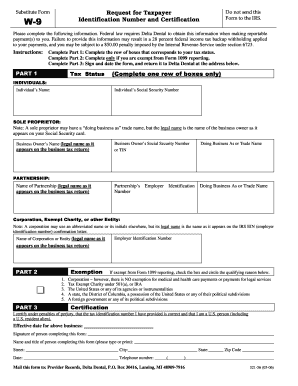
- In Part 1, identify your tax status. You will need to complete the row of boxes corresponding to your status, selecting only one. Provide your name and Social Security Number or Tax Identification Number.
- If you are a sole proprietor, write your legal name as it appears on your Social Security card and include your business name (doing business as) if applicable. If you identify as a partnership or corporation, fill in the respective sections with the legal name and Employer Identification Number.
- Proceed to Part 2 only if you are exempt from Form 1099 reporting. Check the appropriate box and circle the reason for your exemption from the provided options.
- In Part 3, sign and date the form to certify that your tax identification number is correct and that you are a U.S. person (including a U.S. resident alien). Please also provide your name, title, and telephone number.
- Once completed, ensure all information is accurate, then save any changes. You will have options to download, print, or share your completed Dentist W9 form as needed.
Complete your Dentist W9 online today for a smooth filing experience.
The purpose of the W9 form is to collect taxpayer information for accurate reporting of income to the IRS. For dentists and other service providers, it helps facilitate the process of documenting payments received. By utilizing a Dentist W9, both the service provider and the client ensure smooth tax compliance and avoid potential issues with reporting.