Loading
Get International Student Record Form - Oiss Wayne
How it works
-

Open form follow the instructions
-

Easily sign the form with your finger
-

Send filled & signed form or save
How to fill out the INTERNATIONAL STUDENT RECORD FORM - Oiss Wayne online
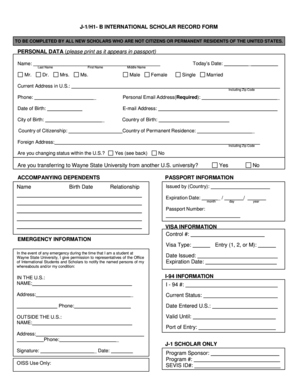
This guide provides a comprehensive overview of how to effectively fill out the International Student Record Form - Oiss Wayne. Whether you are new to the process or looking for a refresher, these step-by-step instructions will help ensure that you complete the form accurately and efficiently.
Follow the steps to fill out the form correctly.
- Click ‘Get Form’ button to obtain the form and open it in the designated online editor.
- Begin with the Personal Data section. Enter your last name, first name, and middle name exactly as they appear in your passport. Include your today's date and select your gender identity.
- In the Current Address in U.S. section, input your complete address, including the zip code, along with your phone number and personal email address. Ensure that the email provided is accurate as it will be an essential point of contact.
- Fill in your Date of Birth, City of Birth, Country of Birth, Country of Citizenship, and Country of Permanent Residence. This information must be precise for immigration records.
- If applicable, provide your Foreign Address in the designated section, including zip code.
- Indicate whether you are changing status within the U.S. by selecting 'Yes' or 'No.' Additionally, indicate if you are transferring to Wayne State University from another U.S. university.
- Complete the Accompanying Dependents section for any dependents, providing their names and birth dates as required.
- In the Passport Information section, fill out the country that issued your passport, the passport number, and its expiration date.
- Provide Visa Information, including your visa type, control number, date issued, and expiration date.
- For emergency contact purposes, fill out the emergency information section with the name, phone number, and entry status of your emergency contact.
- Complete the I-94 Information section. Enter your I-94 number, current status, date entered the U.S., and valid until date.
- For J-1 scholars, include the program sponsor and program number along with your SEVIS ID.
- After filling in all required fields, review your information for accuracy. Make any necessary changes before proceeding.
- Once you have confirmed that all information is correct, you can save your changes, download the form, print it, or share it as required.
Complete your documents online today to ensure a smooth submission process.
On the SEVIS form, enter the physical address where you will be living in the U.S. Make sure this information reflects your accommodation details accurately. Consistency is critical, so it is advisable to refer to the INTERNATIONAL STUDENT RECORD FORM - Oiss Wayne while completing your application.