Loading
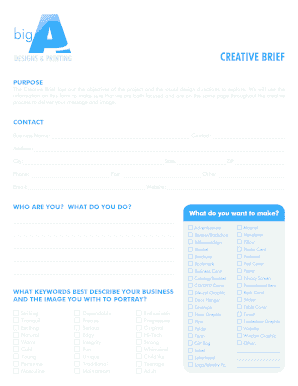
Get Form Biga Creative Brief.indd - Big A Designs & Printing
How it works
-

Open form follow the instructions
-

Easily sign the form with your finger
-

Send filled & signed form or save
How to fill out the Form BigA Creative Brief.indd - Big A Designs & Printing online
Filling out the Form BigA Creative Brief is an essential step in defining your project goals and visual direction with Big A Designs & Printing. This guide provides a comprehensive, step-by-step approach to help you complete the form efficiently online.
Follow the steps to successfully complete the Creative Brief.
- Click the ‘Get Form’ button to access the form and open it in the editor.
- Begin by filling in the contact section, including your business name, contact person, address, city, state, ZIP code, phone number, fax number, other contact info, email, and website.
- Next, identify what you want to create by selecting the relevant options provided, such as advertisement, banner, business card, or any other item from the list.
- Describe your business using keywords that represent the image you wish to portray. Choose from the suggested keywords like 'exciting', 'dependable', or 'whimsical'.
- State your project objectives clearly. Explain what task or function you would like the project to perform.
- Identify your audience demographic by providing details about the people you wish to reach with your project.
- Mention your primary competitor and include their web address if available, to help contextualize your project.
- Articulate what you want the project to convey about your brand or business, emphasizing your key messages.
- Specify your favorite and least favorite colors, along with any established corporate colors you may use.
- Lastly, fill in the deadline for your project and any additional information regarding budget or events as needed.
- After filling the form, review all entries for accuracy. You can save changes, download the completed form, print it, or share it as required.
Complete your Creative Brief online today to start your project with Big A Designs & Printing!
To add a fillable text box in InDesign, first select the 'Rectangle Tool' to draw the area for the text box. Then, navigate to the 'Buttons and Forms' panel to convert your rectangle into a text field. This allows users to enter data directly in the designated area. For additional guidance, explore 'Form BigA Creative Brief.indd - Big A Designs & Printing' for a clear example.
Industry-leading security and compliance
US Legal Forms protects your data by complying with industry-specific security standards.
-
In businnes since 199725+ years providing professional legal documents.
-
Accredited businessGuarantees that a business meets BBB accreditation standards in the US and Canada.
-
Secured by BraintreeValidated Level 1 PCI DSS compliant payment gateway that accepts most major credit and debit card brands from across the globe.