Loading
Get Rtd Bike Locker
How it works
-

Open form follow the instructions
-

Easily sign the form with your finger
-

Send filled & signed form or save
How to fill out the Rtd Bike Locker online
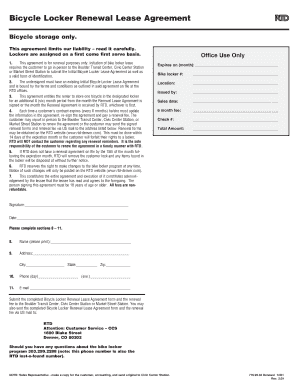
This guide provides users with clear, step-by-step instructions on how to fill out the Rtd Bike Locker Renewal Lease Agreement online. Whether you are renewing your locker lease or updating your information, this comprehensive guide will support you through the process.
Follow the steps to complete your Rtd Bike Locker Renewal Lease Agreement online.
- Press the ‘Get Form’ button to obtain the form which you can then open and edit electronically.
- Begin by reviewing the existing contents of your Initial Bicycle Locker Lease Agreement, as this renewal is contingent upon that agreement.
- Fill in the name field in section 8 with your printed name.
- Complete section 9 by providing your current address, including city, state, and zip code.
- In section 10, enter your phone numbers for both daytime and evening contact.
- Provide your email address in section 11.
- Carefully review all the information you filled in to ensure accuracy.
- Once completed, download the form and sign it at the designated signature line.
- Submit the completed Bicycle Locker Renewal Lease Agreement and the renewal fee in person at the Boulder Transit Center, Civic Center Station, or Market Street Station, or send it via US mail to RTD, Attention: Customer Service – CCS, 1600 Blake Street, Denver, CO 80202.
- Make sure to retain a copy of the form for your records.
Complete your Rtd Bike Locker Renewal Lease Agreement online today!
Using Bart bike lockers is easy and convenient. Find a bike locker at your nearest Bart station and unlock it with your access code. Place your bike inside and secure it before heading to your destination. For extra safety while commuting, consider utilizing an RTD Bike Locker as part of your travel plan.