Loading
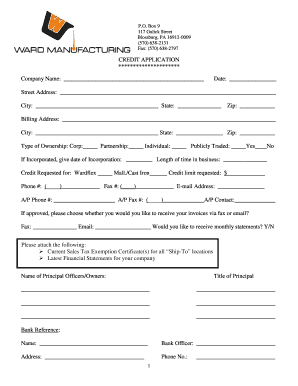
Get Ward Fittings Form
How it works
-

Open form follow the instructions
-

Easily sign the form with your finger
-

Send filled & signed form or save
How to fill out the Ward Fittings Form online
Filling out the Ward Fittings Form online is a streamlined process that allows users to provide important information efficiently. This guide offers step-by-step instructions to help you complete the form accurately and effectively.
Follow the steps to fill out the Ward Fittings Form online:
- Use the ‘Get Form’ button to obtain the Ward Fittings Form. This action will open the form in your preferred editor for easy access.
- Begin by entering the company name in the designated field. This information should reflect the official name of your business.
- Next, fill in the date on which you are submitting the form.
- Provide the street address, city, state, and zip code of your company. Ensure that all details are correct to avoid any processing delays.
- Complete the billing address section with the same level of detail as the company address, indicating if it differs from the previous information.
- Select the type of ownership by checking the appropriate box, indicating whether you are a corporation, partnership, individual, or publicly traded.
- If your company is incorporated, enter the date of incorporation and indicate the length of time your business has been operating.
- Specify the credit requested for Wardflex or Mall/Cast Iron, and indicate the desired credit limit in the respective fields.
- Input your contact information, including phone number, fax number, and email address.
- Provide the accounts payable contact details, including their phone number, fax number, and name.
- Indicate your preference for receiving invoices and monthly statements, providing the necessary contact methods.
- Attach required documents, such as the current sales tax exemption certificates and latest financial statements.
- List the names and titles of the principal officers or owners of the company.
- Fill in the bank reference details, including the name, bank officer, address, and phone number.
- Complete the business reference section, detailing where credit is currently extended, including contact information and amount of credit.
- Read the certification statement carefully. If all information is accurate, sign the form and include the date along with your title.
- Finally, save your changes, download a copy of the completed form, or share it as necessary for further actions.
Complete your Ward Fittings Form online today for a smooth submission process.
Related links form
FORM C Clause 3(c) In The Queen's Bench Judicial Centre Of ... - Qp Gov Sk
Printable Pdf Version Of This Form - Ministry Jobs, Tourism And Skills ... - Labour Gov Bc
STUDENT REGISTRATION FORM - Renfrew County Catholic ...
APPLICATION FOR ADMISSION Part-time Programs - University Of ... - Uwinnipeg
WARDFlex does not require grounding under most standard installations, but if your system has specific electrical considerations, grounding may be beneficial. Always refer to local codes and regulations when completing your Ward Fittings Form. Keeping these details in mind ensures not only compliance but also the long-term safety and functionality of your plumbing system.