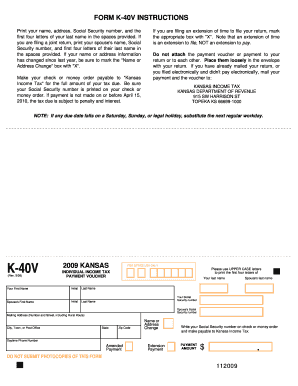
Name, Social Security number, and first four letters of their last name in the spaces provided. If your name or address information has changed since last year, be sure to mark the "Name or Address Change" box with "X". Make your check or money order payable to "Kansas Income Tax" for the full amount of your tax due. Be sure your Social Security number is printed on your check or money order. If payment is not made on or before April 15, 2010, the tax due is subject to penalty and interest. If.
Open form follow the instructions
Easily sign the form with your finger
Send filled & signed form or save
How to fill out the Kansas K 40v Fillable Form online
Filling out the Kansas K 40v Fillable Form online can streamline your income tax payment process. This guide provides comprehensive steps to complete the form accurately and efficiently, ensuring you meet your tax obligations.
Follow the steps to fill out the Kansas K 40v Fillable Form online:
- Click the ‘Get Form’ button to obtain the Kansas K 40v Fillable Form and open it in your preferred online editor.
- Print your name, address, Social Security number, and the first four letters of your last name in the designated fields. If filing jointly, include your partner's information as well.
- If there has been any change in your name or address since the previous year, mark the 'Name or Address Change' box with an 'X'.
- Make your payment by check or money order payable to 'Kansas Income Tax' for the total amount due. Ensure that your Social Security number is included on your payment.
- If you are requesting an extension to file your return, select the appropriate box with an 'X'. Remember, an extension to file does not extend your time to make payment.
- Do not attach the payment voucher or payment to your return; instead, place them loosely in the envelope alongside your return.
- If you have already mailed your return, or filed electronically without electronic payment, send your payment and voucher to: Kansas Income Tax, Kansas Department of Revenue, 915 SW Harrison St, Topeka KS 66699-1000.
- Once completed, you may save your changes, download the form, print it out, or share it as needed.
Start filling out your Kansas K 40v Fillable Form online today!
Experience a faster way to fill out and sign forms on the web. Access the most extensive library of templates available.
Related content
How To Fill In Form 1040-V. Line 1. ... If paying at IRS.gov, don't complete this form...
NEAT RE-FILLABLE CARRIER POWDER-. PUFF. ... dance forms, reveries, songs without words...
Get answers to your most pressing questions about US Legal Forms API.
Does Kansas have an efile form?
Yes, Kansas offers an e-file option for many tax forms, including the K-40V form. This online process is convenient and speeds up the filing experience, helping you avoid mailing delays. E-filing allows you to submit your information securely and receive confirmation of submission. Using the Kansas K 40v Fillable Form enables you to easily access e-filing options and complete your forms online.
Where to mail form k-40V?
When you have completed the K-40V form, you should mail it to the address specified in the instructions provided with the form. Typically, this will be the Kansas Department of Revenue. Be sure to check the latest mailing address, as it can change. If you use the Kansas K 40v Fillable Form, you will find it easier to navigate through the mailing requirements.
How to fill out K-4 form in Kansas withholding?
To complete the K-4 form for Kansas withholding, begin by entering your personal information, such as your name and address. Next, indicate your filing status and the number of allowances you are claiming. Ensure you review the instructions for any specific adjustments related to your tax situation. Utilizing the Kansas K 40v Fillable Form can simplify this process, allowing you to enter information easily and submit it electronically.
At what age do you stop paying property taxes in Kansas?
In Kansas, property taxes do not cease automatically based on age. However, seniors aged 65 or older may qualify for a property tax exemption or a refund under certain conditions. These options can significantly assist older residents in managing their property tax responsibilities. To explore available relief programs, it’s beneficial to review the Kansas K 40v Fillable Form and related documentation.
Is efile still available?
After Oct. 16, 2023, you will no longer be able to e-file 2022 Returns; after April 15, 2026, you will no longer be able to claim your 2022 Tax Refund because it is only available three years following its due date.
What is Kansas form K 40?
Individual Income Tax and/or Food Sales Tax Refund (K-40) Original and Amended. Individual Income Tax Supplemental Schedule (Schedule S) Kansas Payment Voucher (K-40V) Amended, use Individual Income Tax and/or Food Sales Tax Refund (K-40)
Does Kansas have a state tax form?
2021 Forms: Individual Income Tax (K-40) Original and Amended - 2021. Individual Income Tax Supplemental Schedule (Schedule S) - 2012. Kansas Payment Voucher (K-40V) - 2021. Individual Underpayment of Estimated Tax Schedule and instructions (K-210) - 2021.
Where to get Kansas income tax forms?
Kansas Tax Forms To request state forms, call the Kansas Department of Revenue at (785) 296-4937. You can request one Kansas income tax booklet to be sent to your home address. Residents can go to kansas.gov/webfile for free and safe online filing for Kansas Individual Income Tax Returns.
Does Kansas require an efile authorization form?
When the IRS approves you for electronic filing of tax returns, Kansas automatically accepts you. Signature requirements for Kansas are fulfilled through IRS efile procedures. Kansas does not have a signature form.
Where do I mail my Kansas K 40V?
If you have already mailed your return, or you filed electronically, mail your payment and the voucher to: KANSAS INCOME TAX KANSAS DEPARTMENT OF REVENUE 915 SW HARRISON ST. TOPEKA, KS 66699-1000 Print your name(s), address, Social Security number(s), and the first four letters of your last name in the space provided.
Use professional pre-built templates to fill in and sign documents online faster. Get access to thousands of forms.
If you believe that this page should be taken down, please follow our DMCA take down process here.