Loading
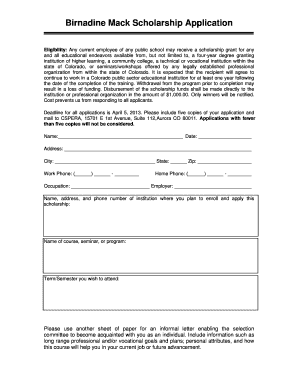
Get Birnadine Mack Scholarship Application - Cspera
How it works
-

Open form follow the instructions
-

Easily sign the form with your finger
-

Send filled & signed form or save
How to fill out the Birnadine Mack Scholarship Application - Cspera online
Filling out the Birnadine Mack Scholarship Application is a critical step for public school employees seeking funding for their educational pursuits. This guide provides a straightforward, step-by-step approach to ensure you complete the application accurately and effectively.
Follow the steps to successfully complete your application.
- Click ‘Get Form’ button to obtain the form and open it in the editor.
- Begin by filling in your personal information. Provide your name, date, address, city, state, and zip code in the designated fields.
- Enter your contact details, including work and home phone numbers. Ensure all numbers are formatted correctly for clarity.
- Specify your current occupation and employer by providing the required details in the appropriate sections.
- Input the name, address, and phone number of the institution where you wish to enroll and apply the scholarship funds.
- Clearly state the name of the course, seminar, or program that you intend to undertake.
- Indicate the term or semester you wish to begin your educational program.
- Prepare an informal letter on a separate sheet of paper. This letter should allow the selection committee to get to know you better. Include your long-term professional goals, personal attributes, and explain how the selected course will assist you in your current role or future advancement.
- Once all fields are completed, review your application to ensure accuracy. Make any necessary edits before proceeding.
- Save your changes, then download, print, or share the completed application as required. Remember to create five copies of your application to meet submission requirements.
Submit your completed application online today to take the next step in your educational journey.
Microsoft Office 365 allows us to create unlicensed users. While an unlicensed user will not have a email address, they are able to access certain office 365 applications, such as SharePoint or the Office 365 Administration page.
Industry-leading security and compliance
US Legal Forms protects your data by complying with industry-specific security standards.
-
In businnes since 199725+ years providing professional legal documents.
-
Accredited businessGuarantees that a business meets BBB accreditation standards in the US and Canada.
-
Secured by BraintreeValidated Level 1 PCI DSS compliant payment gateway that accepts most major credit and debit card brands from across the globe.