Loading
Form preview
  • US Legal Forms
  • Other Templates
  • More Forms
  • More Uncategorized Forms
  • Ivy Tech Special Circumstances Form Do

Get Ivy Tech Special Circumstances Form Do

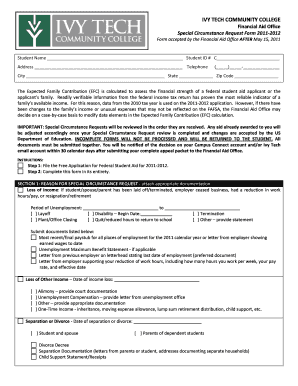
T Name Student ID # C Address Telephone ( ) City State Zip Code The Expected Family Contribution (EFC) is calculated to assess the financial strength of a.

How it works

  1. Open form

    Open form follow the instructions

  2. Easily sign form

    Easily sign the form with your finger

  3. Share form

    Send filled & signed form or save

How to fill out the Ivy Tech Special Circumstances Form Do online

Filling out the Ivy Tech Special Circumstances Form Do online can be a straightforward process when you understand the requirements and steps involved. This guide will provide you with detailed instructions to help you complete the form accurately and efficiently.

Follow the steps to complete the Ivy Tech Special Circumstances Form Do online.

  1. Press the ‘Get Form’ button to access the Ivy Tech Special Circumstances Form Do and open it in your preferred online editor.
  2. Begin filling in your personal information in the designated fields. This includes entering your full name, student ID number, address, and telephone number. Ensure all information is accurate and up-to-date.
  3. Provide the reason for your special circumstance request in Section 1. Select the appropriate checkboxes related to your situation, such as loss of income or unusual expenses, and attach the required documentation that supports your claim.
  4. If applicable, indicate any loss of income by specifying the dates and nature of that loss. Ensure you include supplementary documents like paystubs or letters from your employer as evidence where required.
  5. Complete Section 2 by certifying the accuracy of the information provided. You must sign and date the form to confirm that the information is true to the best of your knowledge.
  6. Lastly, after all fields are filled out and reviewed for completeness, save your changes, and proceed to download, print, or share the completed form with the Financial Aid Office at your regional campus.

Start completing the Ivy Tech Special Circumstances Form Do online today!

Get form

Experience a faster way to fill out and sign forms on the web. Access the most extensive library of templates available.
Get form

Related content

Ivy Tech Community College (PDF) - US Department...
Nov 9, 2016 — initiated at Ivy Tech Community College (College) by the U.S. Department...
Learn more
Special Circumstances - Ivy Tech Community College...
... for a Special Circumstances Review, visit your campus Financial Aid Office to...
Learn more
University of Texas at Austin - Wikipedia
The University of Texas at Austin, often referred to as UT Austin, UT, or Texas, is a...
Learn more

Related links form

Publication 2009 - School Of Medicine - Wayne State University - Med Wayne Upper Moreland Intermediate School - Wcupa Describe Damage To Vehicle #2 - West Chester University ASPE Chapter 51 Scholarship - Weber State University - Weber

Questions & Answers

Get answers to your most pressing questions about US Legal Forms API.

Contact support

Generally, a 60% is not considered a passing grade in most college settings, including Ivy Tech, where a 'C' or higher is required. This standard emphasizes the importance of meeting academic expectations to progress in your education. If you find yourself struggling with your grades, you can explore the Ivy Tech Special Circumstances Form Do, which allows you to seek help or appeal for a review of your situation. Taking proactive steps can lead to better outcomes.

A passing grade at Ivy Tech is usually defined as a 'C' or better, which means a score of at least 70%. It's important to understand this criterion, especially when aiming for graduation or transferring to another institution. Should you experience difficulties that affect your performance, the Ivy Tech Special Circumstances Form Do provides a structured way to request academic assistance or review your situation. Make sure to utilize this resource as needed.

At Ivy Tech, a passing grade is typically a 'C' or higher, which equates to a score of 70% or above. Achieving this benchmark is crucial for advancing in your studies. If you find yourself facing unique challenges, consider using the Ivy Tech Special Circumstances Form Do to appeal for academic support or reconsideration. This form helps you address any special situations that may impact your academic performance.

The Satisfactory Academic Progress (SAP) policy at Ivy Tech requires students to maintain a specific grade point average and complete a certain percentage of their courses. This policy ensures that students are making adequate progress toward their degrees while receiving financial aid. Understanding the SAP policy is essential for managing your educational path, especially when dealing with special circumstances. The Ivy Tech Special Circumstances Form Do can help communicate any issues that might affect your academic performance.

To report special circumstances on FAFSA, visit your financial aid office and discuss your situation with a representative. They can guide you on how to properly annotate your application and submit relevant documentation. Using the Ivy Tech Special Circumstances Form Do can help you organize your thoughts and materials, making it easier to communicate your needs to the appropriate staff.

Documenting special circumstances requires gathering relevant proof, such as termination letters, medical bills, or tax returns that demonstrate your current financial situation. You should compile these documents and clearly explain how these factors impact your ability to afford education. Utilizing the Ivy Tech Special Circumstances Form Do can streamline this process, ensuring that you present your case clearly to financial aid officers.

Qualifying special circumstances for FAFSA typically involve changes that were not accounted for in your initial financial report. Examples include a parent losing a job, high unreimbursed medical expenses, or changes in household size. Understanding these criteria is crucial for effectively filling out the Ivy Tech Special Circumstances Form Do. This way, you can present your case for needing more financial assistance.

Special circumstances can include various factors like job loss, unexpected medical expenses, divorce, or the death of a family member. Each situation is unique and may significantly impact your financial stability. It’s important to provide context and details in your Ivy Tech Special Circumstances Form Do. This form will help you highlight your individual challenges when seeking additional aid.

Whether you need to reapply to Ivy Tech depends on various factors, such as the length of your absence. If you’ve been away for more than a year, reapplying is usually necessary. To understand your specific circumstances better, contact the admissions office for guidance and ensure you have the Ivy Tech Special Circumstances Form Do on hand if required.

Ivy Tech has specific policies regarding course drops, which may vary depending on timing within the semester. Generally, if you drop a course within the designated drop period, it will not affect your academic record. However, you should discuss any implications with your academic advisor, especially if you need to submit the Ivy Tech Special Circumstances Form Do.

Get This Form Now!

Use professional pre-built templates to fill in and sign documents online faster. Get access to thousands of forms.
Get form
If you believe that this page should be taken down, please follow our DMCA take down processhere.
Get Ivy Tech Special Circumstances Form Do
Get form
  • Adoption
  • Bankruptcy
  • Contractors
  • Divorce
  • Home Sales
  • Employment
  • Identity Theft
  • Incorporation
  • Landlord Tenant
  • Living Trust
  • Name Change
  • Personal Planning
  • Small Business
  • Wills & Estates
  • Packages A-Z
  • Affidavits
  • Bankruptcy
  • Bill of Sale
  • Corporate - LLC
  • Divorce
  • Employment
  • Identity Theft
  • Internet Technology
  • Landlord Tenant
  • Living Wills
  • Name Change
  • Power of Attorney
  • Real Estate
  • Small Estates
  • Wills
  • All Forms
  • Forms A-Z
  • Other Templates
  • Legal Hub
  • About Us
  • Help Portal
  • Legal Resources
  • Blog
  • Affiliates
  • Contact Us
  • Delete My Account
  • Site Map
  • Industries
  • Forms in Spanish
  • Localized Forms
  • State-specific Forms
  • Forms Kit
  • Real Estate Handbook
  • All Guides
  • Notarize
  • Incorporation services
  • For Consumers
  • For Small Business
  • For Attorneys
  • USLegal
  • FormsPass
  • pdfFiller
  • signNow
  • altaFlow
  • DocHub
  • Instapage
Form Packages
  • Adoption
  • Bankruptcy
  • Contractors
  • Divorce
  • Home Sales
  • Employment
  • Identity Theft
  • Incorporation
  • Landlord Tenant
  • Living Trust
  • Name Change
  • Personal Planning
  • Small Business
  • Wills & Estates
  • Packages A-Z
Form Categories
  • Affidavits
  • Bankruptcy
  • Bill of Sale
  • Corporate - LLC
  • Divorce
  • Employment
  • Identity Theft
  • Internet Technology
  • Landlord Tenant
  • Living Wills
  • Name Change
  • Power of Attorney
  • Real Estate
  • Small Estates
  • Wills
  • All Forms
  • Forms A-Z
  • Other Templates
Customer Service
  • Legal Hub
  • About Us
  • Help Portal
  • Legal Resources
  • Blog
  • Affiliates
  • Contact Us
  • Delete My Account
  • Site Map
  • Industries
  • Forms in Spanish
  • Localized Forms
  • State-specific Forms
  • Forms Kit
Legal Guides
  • Real Estate Handbook
  • All Guides
Prepared for you
  • Notarize
  • Incorporation services
Our Customers
  • For Consumers
  • For Small Business
  • For Attorneys
Our Sites
  • USLegal
  • FormsPass
  • pdfFiller
  • signNow
  • altaFlow
  • DocHub
  • Instapage
Social Media
Call us now toll free:
+1 833 426 79 33
As seen in:
© Copyright 1999-2026 airSlate Legal Forms, Inc. 17 Station Street, Suite 303, Brookline, MA 02445
  • Your Privacy Choices
  • Terms of Service
  • Privacy Notice
  • Content Takedown Policy
  • Bug Bounty Program