Get Dd Form 93
How it works
-

Open form follow the instructions
-

Easily sign the form with your finger
-

Send filled & signed form or save
How to fill out the Dd Form 93 online
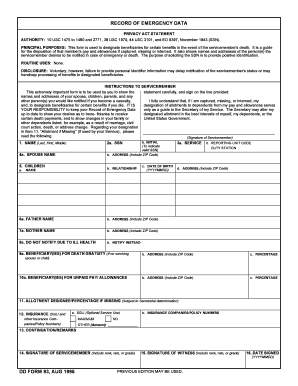
Filling out the Dd Form 93, also known as the Record of Emergency Data, is a vital task for servicemembers. This form designates beneficiaries for certain benefits in the event of a servicemember's death and provides crucial emergency contact information.
Follow the steps to complete the Dd Form 93 online.
- Click ‘Get Form’ button to obtain the form and open it in the editor.
- Fill in your full name in Item 1, including your last name, first name, and middle name.
- Enter your social security number (SSN) in Item 2a. Be sure to verify its accuracy by signing in the space provided in Item 2b.
- Select your service in Item 3a using the appropriate one-letter service code (A for Army, F for Air Force, N for Navy, and M for Marine Corps).
- Provide your Reporting Unit Code/Duty Station in Item 3b according to your service directives.
- Input your spouse's full name and address in Item 4. If you are single, divorced, or widowed, state this condition.
- List all your children in Item 5, including their names, relationship, and date of birth. If you have no children, clearly state 'none'.
- Include information about your parents in Items 6 and 7, or note their status as unknown or deceased if applicable.
- In Item 8, indicate any persons not to be notified of a casualty due to ill health.
- Detail the beneficiary or beneficiaries for death gratuity in Item 9, specifying their names and addresses as well as the percentages to be allocated in Item 9c.
- Document who will receive unpaid pay and allowances in Item 10, recording their details and allocation percentages in Items 10a, 10b, and 10c.
- Designate any allotments if missing in Item 11, stating the names, relationships, and percentages as appropriate.
- Provide insurance information in Item 12, including your SGLI status and any relevant commercial insurance details.
- Utilize Item 13 for any continuations or remarks necessary concerning preceding items.
- Sign the form in Item 14, ensuring you include your rank or grade. A witness must also sign in Item 15.
- Enter the date you are signing the form in Item 16. Ensure all copies are signed and verified.
- Finally, you can save changes, download, print, or share the completed form as needed.
Complete your Dd Form 93 online today to ensure your emergency data is accurate and up-to-date.
No, the SGLV form and DD Form 93 are not the same, although they serve related purposes. The SGLV, or Servicemembers' Group Life Insurance form, focuses on life insurance coverage for military personnel. On the other hand, the DD Form 93 is specifically designed to record emergency contact information. Both forms are important for service members, but they cover different aspects of military service.