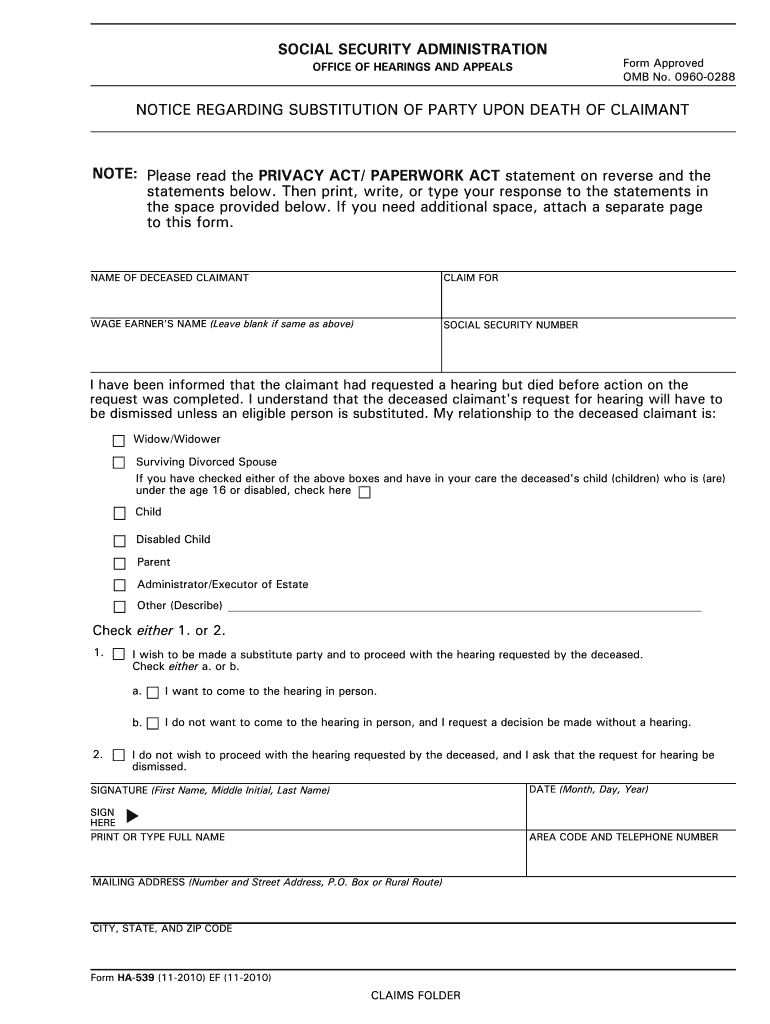
ORK ACT statement on reverse and the statements below. Then print, write, or type your response to the statements in the space provided below. If you need additional space, attach a separate page to this form. NAME OF DECEASED CLAIMANT CLAIM FOR WAGE EARNER'S NAME (Leave blank if same as above) SOCIAL SECURITY NUMBER I have been informed that the claimant had requested a hearing but died before action on the request was completed. I understand that the deceased claimant's request for hearin.
Loading

Open form follow the instructions

Easily sign the form with your finger

Send filled & signed form or save
How to fill out the Form Ha 539pdffillercom online
Filling out the Form Ha 539pdffillercom online can seem daunting, but following a clear and organized approach will help simplify the process. This guide provides step-by-step instructions to assist you in completing the form effectively.
Follow the steps to fill out the form online seamlessly.
- Press the ‘Get Form’ button to access the form and open it in the online editor.
- Enter the name of the deceased claimant in the designated field. Ensure the name is spelled correctly and matches the official documentation.
- Complete the 'Claim for' section by providing the wage earner's name, leaving the space blank if it is the same as the deceased claimant’s name.
- Input the social security number of the deceased claimant in the specified field.
- Indicate your relationship to the deceased claimant by checking the appropriate box (e.g., Widow/Widower or Surviving Divorced Spouse). If applicable, check the box for having children under the age of 16 or disabled.
- Select either option 1 or option 2 regarding your wish to proceed with the hearing. If you choose to proceed, specify whether you want to attend the hearing in person or prefer a decision without a hearing.
- If you do not wish to proceed with the hearing, check the corresponding box to request that the hearing be dismissed.
- Sign the form in the designated area using your first name, middle initial, and last name.
- Provide the date of signing the form in 'Month, Day, Year' format.
- Print or type your full name as it appears on official documents below your signature.
- Enter your area code and telephone number in the corresponding fields.
- Fill in your mailing address completely, including the number and street address, city, state, and zip code.
- Review all filled fields for accuracy before proceeding. Once you have confirmed that the information is correct, you can save changes, download the form, print a copy, or share it as needed.
Start completing your forms online today for a more efficient and organized process.
Experience a faster way to fill out and sign forms on the web. Access the most extensive library of templates available.
Related content
Sep 5, 2017 — their online web form multiple times and now I have even filed a Better...
Chevron U.S.A. Inc., 544 U.S. 528, 539, 125 S.Ct. 2074, 161 L.Ed.2d 876 (2005). ... The...
Get answers to your most pressing questions about US Legal Forms API.
How do I turn a PDF into a fillable form?
Turning a PDF into a fillable form is simple with Form Ha 539pdffillercom. After uploading your PDF, you can select fillable form elements like text boxes, checkboxes, and dropdowns to create an interactive document. This is particularly useful for applications, surveys, and any documents that require user input.
How to make a fillable PDF in PDF filler?
Creating a fillable PDF in PDF filler is straightforward. At Form Ha 539pdffillercom, you can upload your original PDF, and then use the tools to insert fillable fields wherever necessary. This feature enables you to customize your document, allowing users to enter information directly, making it more effective for data gathering.
How do I turn my PDF into an editable PDF?
To turn your PDF into an editable format, visit Form Ha 539pdffillercom and upload your document. The platform provides various editing tools that allow you to modify text, images, and other elements of your PDF. Once your adjustments are complete, you can save the PDF in an editable style, ensuring your document meets your needs.
Can you convert a non-fillable PDF to fillable?
Yes, you can convert a non-fillable PDF to a fillable format easily with the tools available at Form Ha 539pdffillercom. Simply upload your PDF document and use the intuitive editing features to add fillable fields. This process allows you to turn static documents into interactive forms, making data collection much simpler.
How to appeal Social Security underpayment?
The reconsideration, hearing by an administrative law judge, and review by the Appeals Council appeals are online. The fastest and easiest way to request an appeal is to submit a request online, but appeal forms are also available for download at .ssa.gov/forms.
What happens if Social Security makes a mistake?
If you believe you were not overpaid or the amount of the overpayment is incorrect, you may request a reconsideration. If you ask for an appeal within 60 days from the date you receive the notice, any payment we are currently making will continue until we make a determination.
What happens if SSI underpays you?
If an individual to whom an underpayment is due is living, the amount of such underpayment will be paid to such individual either in a single payment (if he is not entitled to a monthly benefit or a lump-sum death payment) or by increasing one or more monthly benefits or a lump-sum death payment to which such ...
Where to send form SSA 1724 F4?
The completed Form SSA-1724-F4 should be sent to the applicant's local Social Security Office. You can fill out your Form SSA-1724-F4 online using . Fill out any form on any desktop or mobile device. Once the document is completed, it's possible to share it in a few clicks.
What happens when social security underpays you?
If an individual to whom an underpayment is due is living, the amount of such underpayment will be paid to such individual either in a single payment (if he is not entitled to a monthly benefit or a lump-sum death payment) or by increasing one or more monthly benefits or a lump-sum death payment to which such ...
Who is responsible for Social Security underpayments?
(A) is living, the Commissioner of Social Security shall make payment to the qualified individual (or the qualified individual's representative payee designated under section 807) of the balance of the amount due the underpaid qualified individual.
Use professional pre-built templates to fill in and sign documents online faster. Get access to thousands of forms.
If you believe that this page should be taken down, please follow our DMCA take down process here.