Get Great Lakes Medical Prior Authorization Form
How it works
-

Open form follow the instructions
-

Easily sign the form with your finger
-

Send filled & signed form or save
How to fill out the Great Lakes Medical Prior Authorization Form online
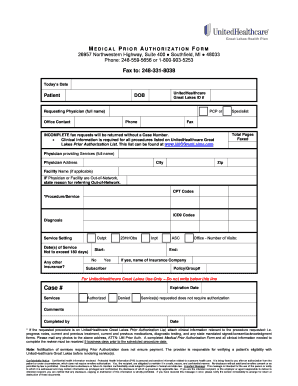
Filling out the Great Lakes Medical Prior Authorization Form online can be a straightforward process if you follow the steps outlined in this guide. This document is essential for obtaining prior authorization for medical services, ensuring seamless communication between providers and insurers.
Follow the steps to complete the form accurately.
- Click ‘Get Form’ button to obtain the form and open it in your selected editor.
- Enter today's date in the designated field at the top of the form.
- Fill in the patient's information, including their name, UnitedHealthcare Great Lakes ID number, and date of birth.
- Provide the name of the requesting physician and their office contact information, including phone and fax numbers.
- Indicate the specialist involved, if applicable, and include their fax number.
- Specify the total number of pages being faxed for reference.
- Include the full name and address of the physician providing the services, along with the city and zip code.
- If the physician or facility is out-of-network, provide the reason for the referral.
- List the CPT codes and corresponding ICD9 codes for the procedure or service being requested, along with the diagnosis.
- Select the service setting (outpatient, inpatient, observation, etc.) and include the start and end dates of service (not exceeding 180 days).
- If applicable, indicate whether there is any other insurance and provide the insurance company's name, subscriber's name, and policy/group number.
- Complete the 'For UnitedHealthcare Great Lakes Use Only' section as instructed, noting the case number and status.
- Attach any required clinical information related to the procedure, such as progress notes and treatment histories.
- Review all provided information for accuracy and completeness before submitting the form.
- Once complete, save your changes, download the document, print a copy, or share it as needed.
Complete your Great Lakes Medical Prior Authorization Form online today to ensure you receive timely care.
Related links form
A prior authorization request form is a document submitted by healthcare providers to insurance companies to obtain approval for specific services before they are provided. This form typically includes patient information, details about the requested service, and medical necessity. The Great Lakes Medical Prior Authorization Form is designed to facilitate this process, ensuring all relevant information is included for quicker review.