Loading
Get Nearby Dental Labs
How it works
-

Open form follow the instructions
-

Easily sign the form with your finger
-

Send filled & signed form or save
How to fill out the Nearby Dental Labs online
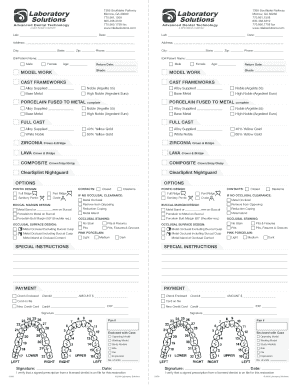
Filling out the Nearby Dental Labs form online is a straightforward process designed to collect essential information for dental lab services. This guide will walk you through each section of the form step-by-step, ensuring you complete it accurately and efficiently.
Follow the steps to complete the Nearby Dental Labs form online.
- Click the ‘Get Form’ button to obtain the form and open it in the online editor.
- Begin filling out the 'Lab' section by entering the name of your dental lab. Include the date for record-keeping purposes.
- In the 'Address' field, provide the complete address of the lab. This is crucial for accurate shipping and communication.
- Enter the 'City,' 'State,' and 'Zip' code for the lab, along with a contact 'Phone' number to ensure efficient communication.
- For the 'ID#/Patient Name' section, clearly indicate the patient's identification number and their full name to maintain proper records.
- Indicate the gender of the patient, if applicable, by selecting either 'Male' or 'Female.'
- Input the patient's 'Age' and 'Return Date' for referencing their treatment schedule.
- Specify the 'Shade' required for the restoration to ensure accurate color matching.
- Complete the 'MODEL WORK' and 'CAST FRAMEWORKS' sections as required, selecting the appropriate 'Alloy Supplied' and 'Base Metal' options.
- Proceed to fill out specific sections for 'FULL CAST' and 'ZIRCONIA Crown & Bridge' as necessary, providing details about alloys and designs.
- If applicable, fill out the 'OPTIONS' section, ensuring to choose 'PONTIC DESIGN' and 'BUCCAL MARGIN DESIGN' as per the lab's specifications.
- In the 'SPECIAL INSTRUCTIONS' section, add any additional clarifications or requests regarding the dental work being ordered.
- Finally, when all fields are completed, proceed to the 'PAYMENT' section to indicate how payment will be made. Review the information for accuracy.
- After reviewing, users can save changes, download, print, or share the completed form as needed.
Complete your dental lab forms online today for seamless processing.
Writing dental clinical notes involves recording essential details about each patient’s treatment visit. Include observations, procedures performed, and any patient feedback. Ensure that the notes are coherent, concise, and follow a consistent format. Nearby Dental Labs can assist in ensuring that your clinical notes meet required standards.