Loading
Get Direct Dental Application
How it works
-

Open form follow the instructions
-

Easily sign the form with your finger
-

Send filled & signed form or save
How to fill out the Direct Dental Application online
Filling out the Direct Dental Application online is a crucial step towards securing your dental coverage. This guide offers a detailed walkthrough to ensure that you complete each section accurately and efficiently, helping to avoid any processing delays.
Follow the steps to successfully complete your Direct Dental Application.
- Click ‘Get Form’ button to obtain the form and open it in the editor.
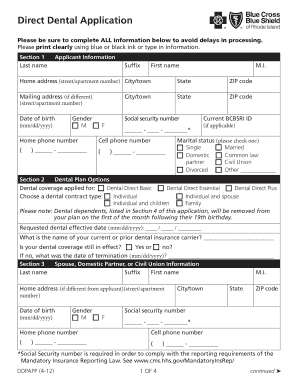
- Provide your last name, first name, middle initial, and suffix under the Applicant Information section. Make sure to input this information clearly.
- Enter your home address including street and apartment number, city or town, state, and ZIP code. If your mailing address is different, include that information as well in the respective fields.
- Fill out your date of birth in the mm/dd/yyyy format and your social security number. Select your gender by marking the appropriate box.
- Provide home and cell phone numbers, ensuring they are formatted correctly for easy contact.
- If applicable, enter your current BCBSRI ID and select your marital status from the options provided.
- In the Dental Plan Options section, choose the dental coverage you desire, either Dental Direct Basic, Dental Direct Essential, or Dental Direct Plus. Specify the dental contract type as individual, individual and spouse, individual and children, or family.
- Indicate your requested dental effective date and provide the name of your current or prior dental insurance carrier. Also, confirm if your dental coverage is still in effect.
- If applicable, complete the Spouse, Domestic Partner, or Civil Union Information section with their details, including name, date of birth, and contact information.
- List all dependents who will be covered under the plan. For each dependent, provide their name, date of birth, relationship to you, and social security number.
- Read and acknowledge the Other Insurance Notice section, ensuring you understand the implications of your existing insurance policies.
- Review the Dental Direct Disclosure Statement, noting the waiting periods for major restorative services.
- Finally, in the Signature section, sign and date the application, ensuring all signatures required are completed.
- Once all sections are filled out, save your changes, and you will have options to download, print, or share the form as needed.
Complete your Direct Dental Application online today to secure your dental coverage without delay.
To write an application for a teeth problem, start by outlining your personal information and the specific issue you are experiencing. Describe the symptoms and any prior treatments you have sought. Make sure to formally request assistance or a consultation, ensuring a solid foundation for your direct dental application.