Loading
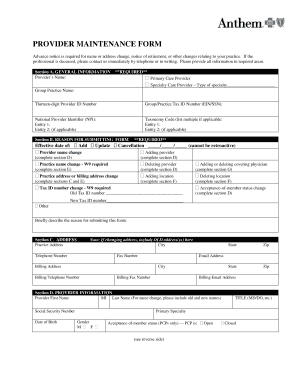
Get Provider Maintenance Form - Anthem
How it works
-

Open form follow the instructions
-

Easily sign the form with your finger
-

Send filled & signed form or save
How to fill out the Provider Maintenance Form - Anthem online
The Provider Maintenance Form - Anthem is a crucial document for updating essential information related to your healthcare practice. This guide provides a comprehensive outline to assist you in completing the form correctly and efficiently.
Follow the steps to successfully complete the Provider Maintenance Form.
- Click ‘Get Form’ button to access the Provider Maintenance Form - Anthem and open it in the editor.
- Begin with Section A, General Information. Provide the required details including the provider’s name, type of provider, group practice name, provider ID number, tax ID number, and national provider identifier. Ensure that you complete all required fields accurately.
- Move to Section B, Reason for Submitting Form. Indicate the effective date and select the applicable reason for submitting the form such as name change, address change, or provider addition. Please provide a brief description if necessary.
- Proceed to Section C, Address. Fill in the practice address, including city, state, zip code, and all related telephone and fax numbers. If applicable, note the old addresses clearly.
- Continue to Section D, Provider Information. Enter the provider’s first and last name along with the middle initial if applicable. Include the social security number, date of birth, title, primary specialty, gender, and acceptance-of-member status for primary care providers.
- In Section E, Address Information Change, input the new practice name and addresses as required. This section is critical if you are making any changes to your practice's location.
- In Section F, Additional Office Location(s), indicate if you are adding or deleting any office locations. Provide the necessary details such as practice name, address, and contact information for each location.
- Section G, Covering Physicians, requires you to add or delete covering physicians as necessary. Ensure to include their contact details and preferences.
- Finally, complete Section H, Contact Signature by entering the provider office contact name, telephone number, and email address. The professional must sign and date the form to confirm the request for changes.
- Review the entire form thoroughly to ensure that all required fields are completed before submission. Save your changes, and then download, print, or share the form as needed.
Ready to complete your Provider Maintenance Form online? Start the process today!
To terminate your contract with Anthem, you should first review your policy for specific instructions regarding cancellation. Generally, contacting their customer service directly or submitting a request through the Provider Maintenance Form - Anthem is advisable. This ensures that you follow the correct procedures and receive confirmation of your contract termination.