Loading
Get Dentpin
How it works
-

Open form follow the instructions
-

Easily sign the form with your finger
-

Send filled & signed form or save
How to fill out the Dentpin online
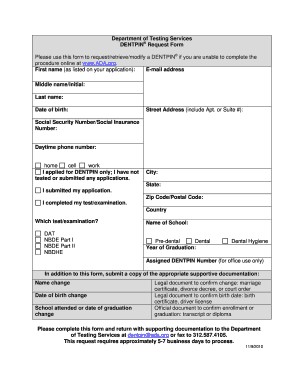
Completing the Dentpin request form online is a straightforward process designed to assist users in retrieving or modifying their Dentpin information. This guide will take you step-by-step through the necessary fields to ensure your submission is accurate and complete.
Follow the steps to successfully fill out the Dentpin form.
- Press the ‘Get Form’ button to access the Dentpin request form and open it in your preferred online editor.
- Fill in your first name as it appears on your application in the designated field. Provide your middle name or initial if applicable, and then enter your last name.
- Input your date of birth in the format requested, ensuring accuracy to avoid processing delays.
- In the next section, enter your street address including any apartment or suite number, followed by your city, state, and zip code or postal code.
- Provide your Social Security Number or Social Insurance Number in the appropriate field for identification purposes.
- Indicate your daytime phone number, specifying whether it is your home, cell, or work number.
- Select the appropriate option regarding your application status, whether you applied for a Dentpin only, submitted your application, or completed your test/examination.
- If applicable, choose the test or examination you have completed from the options listed (DAT, NBDE Part I, NBDE Part II, NBDHE).
- Fill in the name of your school and your year of graduation. If you are a dental hygiene graduate, include that information as well.
- If you have received an assigned Dentpin number, you may enter it for office use. Ensure to submit supportive documentation for any requested changes such as name, date of birth, or school attended.
- After completing all fields, review your information for accuracy and clarity. Save your changes, then proceed to download, print, or share your completed form as needed.
Complete your Dentpin request form online today for a seamless experience.
You can take the DAT at various designated testing centers across the United States. When registering, the ADA provides a list of available locations for your convenience. Choosing a location close to you can minimize stress on exam day, allowing you to focus on doing your best.
Industry-leading security and compliance
US Legal Forms protects your data by complying with industry-specific security standards.
-
In businnes since 199725+ years providing professional legal documents.
-
Accredited businessGuarantees that a business meets BBB accreditation standards in the US and Canada.
-
Secured by BraintreeValidated Level 1 PCI DSS compliant payment gateway that accepts most major credit and debit card brands from across the globe.