Loading
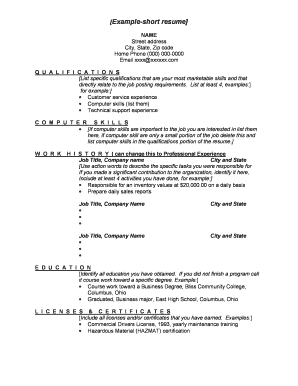
Get Maricopa Short Resume Form
How it works
-

Open form follow the instructions
-

Easily sign the form with your finger
-

Send filled & signed form or save
How to fill out the Maricopa Short Resume Form online
This guide provides clear and concise instructions on how to complete the Maricopa Short Resume Form online. Whether you are seeking a job or updating your information, following these steps will ensure you fill out the form accurately and effectively.
Follow the steps to successfully complete the Maricopa Short Resume Form.
- Click the ‘Get Form’ button to access the Maricopa Short Resume Form and open it in your preferred editor.
- Begin by entering your name, street address, city, state, and zip code in the appropriate fields. This information should be current and accurate to ensure proper communication.
- Provide your home phone number and email address. Ensure that these contacts are ones you check regularly.
- In the qualifications section, list at least four of your most relevant skills. Focus on skills that align with the job requirements you are aiming for.
- If pertinent to the job, include a section describing your computer skills. Be specific and include any software or technical expertise that may enhance your application.
- Under the work history (or professional experience) section, include your job title, company name, and the corresponding city and state for each position held. Use action verbs to clearly outline your responsibilities and achievements, providing at least four specific tasks or contributions for each role.
- Moving on to the education section, list all formal education attained. If you have not completed a program, mention coursework toward a specific degree.
- Finally, in the licenses and certificates section, include any relevant credentials you have earned, such as commercial driver's licenses or specific certifications.
- Review all entered information for accuracy and completeness. Make any necessary adjustments.
- Once you are satisfied with your resume, save the changes made. You have the option to download the form, print it for physical submission, or share it as needed.
Create your Maricopa Short Resume Form online today and take the next step in your career journey.
To save your resume format, simply choose 'Save As' in your document software and select the desired file type, such as .docx or .pdf. If you are using a service like US Legal Forms to create your Maricopa Short Resume Form, you can easily download and save your customized document in your preferred format. This ensures that you can share it conveniently when applying for jobs.