Loading
Form preview
  • US Legal Forms
  • Other Templates
  • More Forms
  • More Uncategorized Forms
  • Truicare Overseas Estate Notification Form

Get Truicare Overseas Estate Notification Form

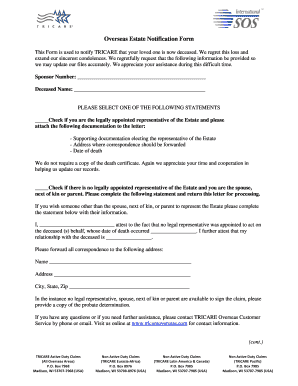
Overseas Estate Notification Form This Form is used to notify TRICARE that your loved one is now deceased. We regret this loss and extend our sincerest condolences.

How it works

  1. Open form

    Open form follow the instructions

  2. Easily sign form

    Easily sign the form with your finger

  3. Share form

    Send filled & signed form or save

How to fill out the Truicare Overseas Estate Notification Form online

The Truicare Overseas Estate Notification Form is an essential document to notify TRICARE of the passing of a loved one. This guide provides you with step-by-step instructions to help you complete the form accurately and efficiently online, ensuring the necessary information is submitted with care and sensitivity.

Follow the steps to complete the form correctly.

  1. Click ‘Get Form’ button to obtain the form and open it in your editor of choice.
  2. Begin by filling in the sponsor number in the designated field. This unique number identifies the individual who was enrolled in TRICARE.
  3. Next, provide the full name of the deceased in the space labeled 'Deceased Name.' Ensure the spelling is accurate, as this information is crucial for record updates.
  4. Select one of the statements regarding legal representation: If you are the legally appointed representative, check the first option and prepare to attach the necessary documentation.
  5. If you are not a legally appointed representative but are a spouse, next of kin, or parent, check the second option. Complete the statement provided, including your relationship to the deceased and the date of death.
  6. For either selection, please provide a mailing address for correspondence, intended to ensure all communications are directed appropriately.
  7. If there is no legal representative available, be ready to submit a copy of the probate determination if required.
  8. Finally, review all entries for accuracy. Save your changes and choose to download or print the document for submission.

Complete your forms online today to ensure timely processing and support.

Get form

Experience a faster way to fill out and sign forms on the web. Access the most extensive library of templates available.
Get form

Related content

Download a Form | TRICARE
Jul 31, 2020 — You can access commonly used forms below or browse the menu on the left...
Learn more
32 CFR § 199.17 - TRICARE program. | CFR | US Law...
Public notice of the initiation of portions of the TRICARE program will be achieved...
Learn more
PUBL074.PS SEC 8058 PLAW 112publ74...
Title V—Multilateral assistance. Title VI—Export and investment assistance. Title...
Learn more

Related links form

ANATOMY LECTURE EXAM 1 - Cameron This Form Allows You To Provide Written Authorization To Your Employer To Begin Or Change The Flu Shot Clinic - Csub Data Compression - Csun

Questions & Answers

Get answers to your most pressing questions about US Legal Forms API.

Contact support

The timely filing limit for TRICARE overseas claims is typically one year from the date of service. It is important to meet this deadline to ensure your claim is processed and reimbursed. To stay informed and organized, consider utilizing resources like the Truicare Overseas Estate Notification Form, which can assist you in managing your claims and deadlines effectively.

Filing a TRICARE overseas claim involves completing the TRICARE Overseas Claim Form accurately. You will need to include all supporting documentation, such as bills, receipts, and a detailed description of services received. Once everything is compiled, submit your claim electronically or via mail, depending on your preference. The Truicare Overseas Estate Notification Form provides guidance on ensuring your submission meets all requirements.

Yes, you can submit TRICARE claims online through the secure TRICARE portal. This system allows you to upload documents directly and track the status of your claim. However, you will need to ensure that you have all necessary information and documentation ready for submission. For more streamlined processes, the Truicare Overseas Estate Notification Form can offer valuable insights.

To submit an overseas TRICARE claim, first, complete the appropriate claim form, typically the TRICARE Overseas Claim Form. Gather all necessary documentation, including receipts and medical records, to support your claim. You can then send your completed claim form and documents to the TRICARE claims processing center. Utilizing the Truicare Overseas Estate Notification Form can guide you through this process seamlessly.

You should mail your DD form 2642 to the designated TRICARE processing center based on your location. Typically, these addresses are listed in the TRICARE documentation or on the official TRICARE website. It's crucial to ensure that you send it to the correct address to avoid delays in processing. The Truicare Overseas Estate Notification Form can help you understand where and how to submit documents efficiently.

Yes, notifying TRICARE of a death is essential for managing the deceased's benefits and any outstanding claims. By completing the TRICARE Overseas Estate Notification Form, you help ensure that TRICARE handles the matters respectfully and according to regulations. Prompt notification also prevents delays in claim processing and helps protect the interests of the surviving family members. Exploring the USLegalForms platform can provide you with guidance and necessary forms for this process.

To notify TRICARE of a death, complete the TRICARE Overseas Estate Notification Form as soon as possible. This form provides TRICARE with the necessary information to process any claims and adjust benefits appropriately. Make sure to include all required documentation, such as the death certificate. Utilizing the resources available on the USLegalForms platform can simplify this procedure for you.

After a death, it is crucial to avoid making hasty decisions regarding the deceased's estate. Do not rush into financial matters or alter any existing wills or documents. Instead, focus on understanding your responsibilities, such as completing the TRICARE Overseas Estate Notification Form. This process is vital to ensure that TRICARE is properly notified and that your loved one's affairs are handled respectfully.

The primary form required for submitting a TRICARE claim is the DD Form 2642, which outlines the necessary details for processing your request. This form must be filled out accurately and submitted along with any supporting documentation from your healthcare provider. Understanding this process will not only support your claim but also aid in managing your estate effectively through the Truicare Overseas Estate Notification Form. You may find additional guidance and resources on platforms like uslegalforms to help streamline your submission.

To notify TRICARE for Life of a death, you should complete the necessary documentation and contact their customer service directly. Providing a copy of the death certificate may also be necessary to facilitate this process. Properly notifying TRICARE ensures that the benefits are correctly updated and can also help manage any estate-related matters through the Truicare Overseas Estate Notification Form. It’s important to handle this promptly to ease the transition for all involved.

Get This Form Now!

Use professional pre-built templates to fill in and sign documents online faster. Get access to thousands of forms.
Get form
If you believe that this page should be taken down, please follow our DMCA take down processhere.
Get Truicare Overseas Estate Notification Form
Get form
  • Adoption
  • Bankruptcy
  • Contractors
  • Divorce
  • Home Sales
  • Employment
  • Identity Theft
  • Incorporation
  • Landlord Tenant
  • Living Trust
  • Name Change
  • Personal Planning
  • Small Business
  • Wills & Estates
  • Packages A-Z
  • Affidavits
  • Bankruptcy
  • Bill of Sale
  • Corporate - LLC
  • Divorce
  • Employment
  • Identity Theft
  • Internet Technology
  • Landlord Tenant
  • Living Wills
  • Name Change
  • Power of Attorney
  • Real Estate
  • Small Estates
  • Wills
  • All Forms
  • Forms A-Z
  • Other Templates
  • Legal Hub
  • About Us
  • Help Portal
  • Legal Resources
  • Blog
  • Affiliates
  • Contact Us
  • Delete My Account
  • Site Map
  • Industries
  • Forms in Spanish
  • Localized Forms
  • State-specific Forms
  • Forms Kit
  • Real Estate Handbook
  • All Guides
  • Notarize
  • Incorporation services
  • For Consumers
  • For Small Business
  • For Attorneys
  • USLegal
  • FormsPass
  • pdfFiller
  • signNow
  • altaFlow
  • DocHub
  • Instapage
Form Packages
  • Adoption
  • Bankruptcy
  • Contractors
  • Divorce
  • Home Sales
  • Employment
  • Identity Theft
  • Incorporation
  • Landlord Tenant
  • Living Trust
  • Name Change
  • Personal Planning
  • Small Business
  • Wills & Estates
  • Packages A-Z
Form Categories
  • Affidavits
  • Bankruptcy
  • Bill of Sale
  • Corporate - LLC
  • Divorce
  • Employment
  • Identity Theft
  • Internet Technology
  • Landlord Tenant
  • Living Wills
  • Name Change
  • Power of Attorney
  • Real Estate
  • Small Estates
  • Wills
  • All Forms
  • Forms A-Z
  • Other Templates
Customer Service
  • Legal Hub
  • About Us
  • Help Portal
  • Legal Resources
  • Blog
  • Affiliates
  • Contact Us
  • Delete My Account
  • Site Map
  • Industries
  • Forms in Spanish
  • Localized Forms
  • State-specific Forms
  • Forms Kit
Legal Guides
  • Real Estate Handbook
  • All Guides
Prepared for you
  • Notarize
  • Incorporation services
Our Customers
  • For Consumers
  • For Small Business
  • For Attorneys
Our Sites
  • USLegal
  • FormsPass
  • pdfFiller
  • signNow
  • altaFlow
  • DocHub
  • Instapage
Social Media
Call us now toll free:
+1 833 426 79 33
As seen in:
© Copyright 1999-2026 airSlate Legal Forms, Inc. 17 Station Street, Suite 303, Brookline, MA 02445
  • Your Privacy Choices
  • Terms of Service
  • Privacy Notice
  • Content Takedown Policy
  • Bug Bounty Program