Get Incident Status Summary ( Ics 209 )
How it works
-

Open form follow the instructions
-

Easily sign the form with your finger
-

Send filled & signed form or save
How to fill out the INCIDENT STATUS SUMMARY (ICS 209) online
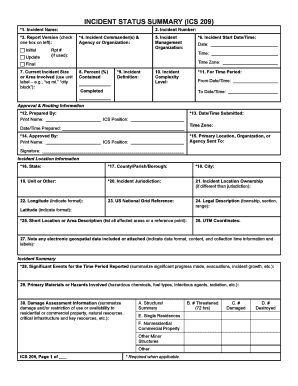
The INCIDENT STATUS SUMMARY (ICS 209) is a crucial document used for reporting information about significant incidents. Understanding how to correctly complete this form online is vital for accurate and timely communication among incident management teams and decision-makers.
Follow the steps to complete the ICS 209 accurately.
- Click ‘Get Form’ button to obtain the form and open it in your preferred online platform.
- Fill in the Incident Name in the first field. This should accurately reflect the full name assigned to the incident. Double-check the spelling for accuracy.
- In the second field, input the Incident Number. Ensure this number corresponds with the current guidelines for your jurisdiction.
- Indicate the Report Version by checking the appropriate box: Initial, Update, or Final. Only check both Initial and Final if only one report is being submitted.
- Fill in the names of the Incident Commander(s) and their respective agencies in the fourth section. If there are multiple commanders, list them accordingly.
- Specify the Incident Management Organization in Section 5. This should be completed only if a recognized management organization is present.
- Enter the Incident Start Date/Time in the designated field, ensuring accuracy with month, day, year, and the 24-hour clock format for time.
- In Section 7, describe the Current Incident Size or Area Involved, using appropriate unit labels to quantify the size (e.g., acres, square miles).
- Input the Percent Contained in the next field, providing a numerical percentage that represents the extent to which the incident is under control.
- Provide a brief Incident Definition in Section 9, summarizing the nature of the incident in clear terms.
- For the time period reported, enter the From Date/Time and To Date/Time in Section 11 to reflect the reporting duration.
- Complete the Approval & Routing Information, filling in the name of the individual preparing the form and the date/time submitted.
- Provide the Incident Location Information, filling out as many fields as possible to ensure accuracy in location details.
- Summarize Significant Events for the Time Period Reported in Section 28, including any noteworthy developments or actions taken.
- After entering all information, review the entire form for accuracy and completeness. Save your changes to your device, and choose to download, print, or share the completed form as necessary.
Take the first step towards effective incident reporting by filling out the ICS 209 online today.
To fill out an incident report sample, follow the predetermined format and input relevant information clearly. Begin with general data, followed by detailed descriptions of the incident's impact and resolution actions taken. Utilizing the INCIDENT STATUS SUMMARY (ICS 209) template can simplify this process, ensuring that your report is both comprehensive and easy to understand.