Loading
Get Hrmeramec Electricalcom Form
How it works
-

Open form follow the instructions
-

Easily sign the form with your finger
-

Send filled & signed form or save
How to fill out the Hrmeramec Electricalcom Form online
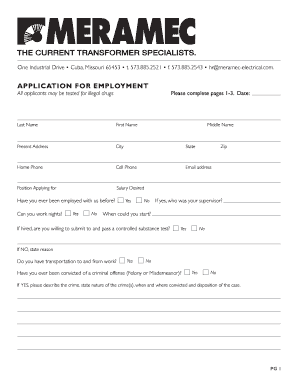
Filling out the Hrmeramec Electricalcom Form online is a straightforward process that allows you to apply for employment conveniently. This guide provides step-by-step instructions to help you complete each section accurately and efficiently.
Follow the steps to complete the application form online.
- Press the ‘Get Form’ button to access the form and open it in your preferred editor.
- Enter your personal information, including your last name, first name, middle name, present address, city, state, ZIP code, home phone, cell phone, and email address in the designated fields.
- Specify the position you are applying for and indicate your salary expectations in the relevant fields.
- Answer the questions regarding your previous employment with the company and your ability to work nights by selecting 'Yes' or 'No'. Provide additional details if necessary.
- If applicable, indicate whether you have transportation to and from work and answer questions about past criminal convictions, providing necessary details if you answer 'Yes'.
- Fill in your educational background by providing details for each school attended, including the name of the school, type of school, number of years completed, major of study, and degree obtained.
- Provide information regarding your military service, including whether you have served in the armed forces, your specialty, and membership in the National Guard.
- Acknowledge your ability to meet the physical demands and general duties of the job by answering the relevant questions.
- Detail your work experience by listing your three most recent jobs, including the company name, job title, business address, phone number, salary/wage, employment dates, and reason for leaving for each position.
- Finally, review the authorization statement regarding the accuracy of your application and provide your signature and date at the bottom of the form.
- After completing the application, save your changes and choose to download, print, or share the completed form as needed.
Start the application process now by completing your Hrmeramec Electricalcom Form online.
Script to append date stamp to file: #!/bin/sh. file_name=test_files. txt. current_time=$(date "+%Y.%m.%d-%H.%M.%S") echo "Current Time : $current_time" new_fileName=$file_name.$current_time. echo "New FileName: " "$new_fileName" cp $file_name $new_fileName. echo "You should see new file generated with timestamp on it.."