Loading
Form preview
  • US Legal Forms
  • Other Templates
  • More Forms
  • More Uncategorized Forms
  • Commonwealth Of Massachusetts Voluntary Administration Form

Get Commonwealth Of Massachusetts Voluntary Administration Form

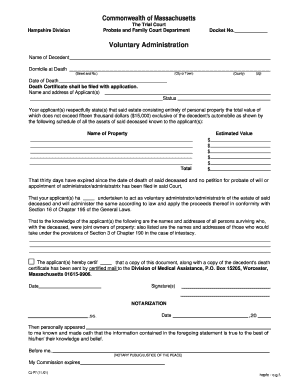
T and No.) (zip) (County) Date of Death Death Certificate shall be filed with application. Name and address of Applicant(s) Status Your applicant(s) respectfully state(s) that said estate consisting entirely of personal property the total value of which does not exceed fifteen thousand dollars ($15,000) exclusive of the decedent's automobile as shown by the following schedule of all the assets of said deceased known to the applicant(s): Name of Property Estimated Value Total $ $ $ $ $ $ T.

How it works

  1. Open form

    Open form follow the instructions

  2. Easily sign form

    Easily sign the form with your finger

  3. Share form

    Send filled & signed form or save

How to fill out the Commonwealth Of Massachusetts Voluntary Administration Form online

Filling out the Commonwealth Of Massachusetts Voluntary Administration Form online can seem overwhelming, but this guide will provide you with clear, step-by-step instructions to ensure the process is straightforward and efficient. This form is crucial for individuals administering the estate of a deceased person when the estate's total value is under $15,000.

Follow the steps to complete the form online

  1. Click ‘Get Form’ button to obtain the form and open it in your online editor.
  2. Begin by filling in the docket number, the name of the decedent, their domicile at death including street address, city or town, county, and zip code.
  3. Indicate the date of death and ensure you have the death certificate ready to file alongside this application.
  4. Enter your name and address as the applicant or applicants. Specify your status (e.g., surviving spouse, child, etc.).
  5. List the decedent's assets in the provided schedule, including asset names and their estimated values. Ensure the total does not exceed $15,000, excluding any motor vehicle.
  6. Confirm that thirty days have passed since the decedent's death and indicate that no petition for probate or appointment of administrator has been filed.
  7. Identify the names and addresses of all individuals who are joint owners of property with the decedent, as well as those who would inherit under intestacy laws.
  8. Certify that a copy of this document, along with the death certificate, has been sent to the Division of Medical Assistance.
  9. Sign and date the form as the applicant. If notarization is required, include the signature of a notary public or justice of the peace and the commission expiration date.
  10. Once all sections are completed, save your changes. You can then download, print, or share the form as needed.

Start filling out your Commonwealth Of Massachusetts Voluntary Administration Form online today.

Get form

Experience a faster way to fill out and sign forms on the web. Access the most extensive library of templates available.
Get form

Related content

File a voluntary administration for an estate |...
Some forms may not display properly in your browser. Please download the forms and open...
Learn more
Employee Relations & Benefit Administration /...
Enrollment Guide to the Commonwealth of Massachusetts Optional ... Note: Transferring...
Learn more
Commonwealth - Wikipedia
A commonwealth is a traditional English term for a political community founded for the...
Learn more

Related links form

Print Form - Usm Maine I Hereby Certify That During The Fall 2004 Semester I Did Not Exceed The School Of Education And Human Development Capital Funding Request Form - University Of South Carolina Upstate - Uscupstate

Questions & Answers

Get answers to your most pressing questions about US Legal Forms API.

Contact support

A company enters voluntary administration by passing a resolution in a board meeting and appointing an administrator. Then, fill out the Commonwealth Of Massachusetts Voluntary Administration Form to guide the process. The appointed administrator will manage the company's dealings with creditors. This process helps restructure the company’s debt while ensuring compliance with legal requirements.

To file a small estate affidavit in Massachusetts, you must first check if the estate qualifies under the state's small estate laws. Once confirmed, complete the Commonwealth Of Massachusetts Voluntary Administration Form provided on legal platforms like USLegalForms. After filling out this form, submit it along with any required documents to the appropriate court. This simplified process allows for a smoother transition of assets to beneficiaries.

In Massachusetts, you generally have up to one year to file probate after a person's death. However, it's advisable to proceed as soon as possible. Delaying may complicate the administration of the estate. If you're facing challenges, consider using the Commonwealth Of Massachusetts Voluntary Administration Form to manage smaller estates more efficiently.

Going into voluntary administration involves several key steps, starting with convening a meeting of directors to pass a resolution. It's crucial to fill out the Commonwealth Of Massachusetts Voluntary Administration Form accurately. After this, you will need to appoint a qualified administrator who will take over the management of the company. Following these steps can help stabilize your business and negotiate with creditors.

To enter voluntary administration, a company must pass a resolution appointing an administrator. Next, it is essential to complete the Commonwealth Of Massachusetts Voluntary Administration Form correctly. This form, along with the appointed administrator's consent, must then be filed with the appropriate court. By doing this, you can initiate the voluntary administration process aimed at resolving the company's financial troubles.

You may not necessarily need a lawyer for probate in Massachusetts, especially if you are filing a straightforward case. However, seeking legal assistance can be valuable in complicated situations, such as disputes among heirs or navigating the Commonwealth Of Massachusetts Voluntary Administration Form. Ultimately, consider your comfort level with the process and your specific case needs when deciding.

To file a voluntary administration in Massachusetts, you must obtain the Commonwealth Of Massachusetts Voluntary Administration Form from the court or an online source. Once you complete the form, you will need to file it in the Probate and Family Court in the county where the deceased resided. Remember to include any required fees and supporting documents, such as a death certificate.

Being in voluntary administration means that a third party has been appointed to manage a company or estate, typically during financial difficulties. For estates, this process can provide a more efficient way to handle assets and debts. The Commonwealth Of Massachusetts Voluntary Administration Form is central to this process, as it initiates the administration. This step helps ensure that everything is settled fairly and legally.

Filing voluntary administration in Massachusetts begins with obtaining the Commonwealth Of Massachusetts Voluntary Administration Form. You need to complete the form with the necessary details about the estate. Ensure that all required documentation is organized before submitting it to the probate court. This step is crucial to initiate the voluntary administration process smoothly.

In person. You can submit the forms and fees in person at the correct Probate & Family Court. If the decedent lived in Massachusetts — File in the county where they lived when they died. If the decedent didn't live in Massachusetts — File in any county where the decedent had property when they died.

Get This Form Now!

Use professional pre-built templates to fill in and sign documents online faster. Get access to thousands of forms.
Get form
If you believe that this page should be taken down, please follow our DMCA take down processhere.
Get Commonwealth Of Massachusetts Voluntary Administration Form
Get form
  • Adoption
  • Bankruptcy
  • Contractors
  • Divorce
  • Home Sales
  • Employment
  • Identity Theft
  • Incorporation
  • Landlord Tenant
  • Living Trust
  • Name Change
  • Personal Planning
  • Small Business
  • Wills & Estates
  • Packages A-Z
  • Affidavits
  • Bankruptcy
  • Bill of Sale
  • Corporate - LLC
  • Divorce
  • Employment
  • Identity Theft
  • Internet Technology
  • Landlord Tenant
  • Living Wills
  • Name Change
  • Power of Attorney
  • Real Estate
  • Small Estates
  • Wills
  • All Forms
  • Forms A-Z
  • Other Templates
  • Legal Hub
  • About Us
  • Help Portal
  • Legal Resources
  • Blog
  • Affiliates
  • Contact Us
  • Delete My Account
  • Site Map
  • Industries
  • Forms in Spanish
  • Localized Forms
  • State-specific Forms
  • Forms Kit
  • Real Estate Handbook
  • All Guides
  • Notarize
  • Incorporation services
  • For Consumers
  • For Small Business
  • For Attorneys
  • USLegal
  • FormsPass
  • pdfFiller
  • signNow
  • altaFlow
  • DocHub
  • Instapage
Form Packages
  • Adoption
  • Bankruptcy
  • Contractors
  • Divorce
  • Home Sales
  • Employment
  • Identity Theft
  • Incorporation
  • Landlord Tenant
  • Living Trust
  • Name Change
  • Personal Planning
  • Small Business
  • Wills & Estates
  • Packages A-Z
Form Categories
  • Affidavits
  • Bankruptcy
  • Bill of Sale
  • Corporate - LLC
  • Divorce
  • Employment
  • Identity Theft
  • Internet Technology
  • Landlord Tenant
  • Living Wills
  • Name Change
  • Power of Attorney
  • Real Estate
  • Small Estates
  • Wills
  • All Forms
  • Forms A-Z
  • Other Templates
Customer Service
  • Legal Hub
  • About Us
  • Help Portal
  • Legal Resources
  • Blog
  • Affiliates
  • Contact Us
  • Delete My Account
  • Site Map
  • Industries
  • Forms in Spanish
  • Localized Forms
  • State-specific Forms
  • Forms Kit
Legal Guides
  • Real Estate Handbook
  • All Guides
Prepared for you
  • Notarize
  • Incorporation services
Our Customers
  • For Consumers
  • For Small Business
  • For Attorneys
Our Sites
  • USLegal
  • FormsPass
  • pdfFiller
  • signNow
  • altaFlow
  • DocHub
  • Instapage
Social Media
Call us now toll free:
+1 833 426 79 33
As seen in:
© Copyright 1999-2026 airSlate Legal Forms, Inc. 17 Station Street, Ste. 203, Brookline, MA 02445
  • Your Privacy Choices
  • Terms of Service
  • Privacy Notice
  • Content Takedown Policy
  • Bug Bounty Program