Loading
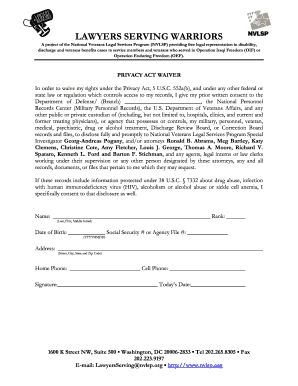
Get Privacy Act Waiver
How it works
-

Open form follow the instructions
-

Easily sign the form with your finger
-

Send filled & signed form or save
How to fill out the Privacy Act Waiver online
The Privacy Act Waiver is an important document that allows individuals to grant access to their personal records under certain legal conditions. Filling this form out online can streamline the process, ensuring your information is accurately shared with the necessary parties.
Follow the steps to complete the Privacy Act Waiver online.
- Click ‘Get Form’ button to obtain the form and open it in an online editor.
- Provide your full name in the designated field. Include your last name, first name, and middle initial to properly identify yourself.
- In the rank section, specify your current rank or title as applicable to your service.
- Enter your date of birth in the format required, ensuring accuracy for identification purposes.
- Fill in your complete address, including street, city, state, and zip code, so that the appropriate agencies can connect with you.
- Provide your Social Security number or agency file number for traceability and record-keeping.
- Indicate your home phone number for contact purposes. If you have a cell phone, you may list that as well.
- Sign the document to authorize the waiver. Ensure your signature is legible and dates your agreement appropriately.
- Finally, review all filled information for accuracy. Once confirmed, save any changes, download, print, or share the completed form as needed.
Complete your documents online today to ensure your legal needs are promptly addressed.
A privacy release is a formal document that permits designated parties to access and use your personal information. This release helps individuals express their consent clearly and facilitates smoother processes when sharing sensitive data. Knowing how a privacy release interacts with the Privacy Act Waiver can enhance your control over personal information.