Loading
Get Fr Y 10
How it works
-

Open form follow the instructions
-

Easily sign the form with your finger
-

Send filled & signed form or save
How to fill out the Fr Y 10 online
The Fr Y 10 form is essential for reporting changes in organizational structures electronically. This guide provides clear and supportive instructions on how to complete this form accurately and efficiently online.
Follow the steps to fill out the Fr Y 10 form online:
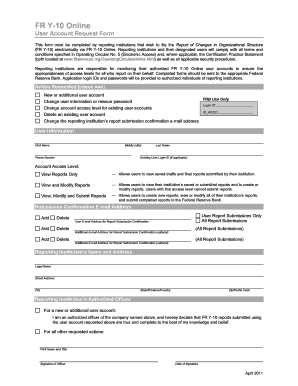
- Click the ‘Get Form’ button to obtain the form and open it in the appropriate format for editing.
- Select the action you wish to request by checking one of the available options, such as ‘New or additional user account’ or ‘Change user information or reissue password’.
- Fill out the user information section, including the first name, middle initial, last name, phone number, and existing user login ID if applicable.
- Determine the account access level needed for the user, which could be ‘View Reports Only’, ‘View and Modify Reports’, or ‘View, Modify and Submit Reports’.
- Provide the submission confirmation e-mail address and any additional e-mail addresses for confirmation as required.
- Complete the reporting institution’s name and address fields, ensuring to include the legal name, street address, city, state or province, and zip or postal code.
- Include information about the reporting institution’s authorized officer by printing their name, title, and providing a signature along with the date.
- After verifying all information for accuracy, save your changes, and choose whether to download, print, or share the completed form.
Complete the Fr Y 10 form online today to ensure accurate reporting.
The FR Y-10 is a key reporting tool for financial institutions, outlining the structure and relationships within bank holding companies. This report captures vital information that regulators need to assess the banks' compliance and health. A thorough understanding of the FR Y-10 is fundamental for all bank holding companies. With tools available from platforms like USLegalForms, you can ensure accurate and timely reporting.