Loading
Get Subway Fax In Request Form
How it works
-

Open form follow the instructions
-

Easily sign the form with your finger
-

Send filled & signed form or save
How to fill out the Subway Fax In Request Form online
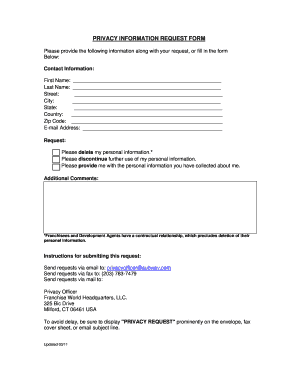
The Subway Fax In Request Form is an essential document for individuals looking to exercise their privacy rights regarding personal information. This guide will take you through each step to ensure that your request is processed efficiently.
Follow the steps to complete your request accurately.
- Click 'Get Form' button to obtain the form and open it in the editor.
- Begin by entering your contact information in the provided fields. Start with your first name and last name.
- Input your email address in the designated field. This will be used for correspondence regarding your request.
- Indicate your specific request by selecting one or more options: Delete my personal information, discontinue further use of my personal information, or provide me with the personal information you have collected about me.
- If you have any additional comments or information that may assist in processing your request, please enter it in the optional comments section.
- Review all the entered information for accuracy. Ensure that your entries are complete before proceeding.
- Once you have completed the form, you can save your changes, download the document, print it, or share it, depending on your preference for submission.
Complete your Subway Fax In Request Form online to protect your privacy rights.
Subway communicates with customers through a variety of channels, including phone, email, and social media. They prioritize customer feedback and inquiries, ensuring that responses are timely. For formal requests or issues, utilizing the Subway Fax In Request Form can be an excellent way to document your questions or concerns clearly. This method helps ensure that your voice is heard.