Loading
Get Federal Communications Commission Form 161 ... - Fcc - Fcc
How it works
-

Open form follow the instructions
-

Easily sign the form with your finger
-

Send filled & signed form or save
How to fill out the FEDERAL COMMUNICATIONS COMMISSION FORM 161 online
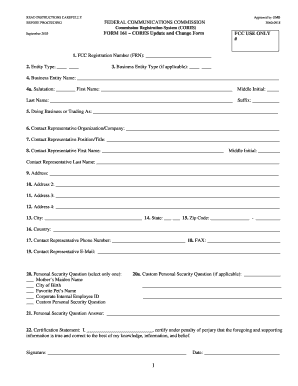
The FCC Form 161, also known as the CORES Update/Change Form, is essential for updating or changing previously registered information with the Federal Communications Commission. This guide will provide you with clear, step-by-step instructions to complete the form online effectively.
Follow the steps to successfully complete the FCC Form 161.
- Click the ‘Get Form’ button to obtain the form and access it in the editor.
- Enter your FCC Registration Number (FRN), which is a ten-digit unique identifier assigned by CORES.
- Select your entity type from the provided list, such as individual, private sector, federal, state, local, or foreign.
- If you are a private sector entity, specify your business entity type, such as corporation, partnership, or non-profit.
- For businesses, provide the official business entity name. Individuals should enter their name along with any salutation, middle initial, and suffix.
- If applicable, enter any Doing Business As (DBA) name.
- Input the name of the contact representative organization or company.
- Supply the position/title of the contact representative if applicable.
- Enter the first name, middle initial, and last name of the contact representative.
- Provide the mailing address where correspondence should be sent, including city, state, and zip code. If outside the U.S., use the country field.
- Include optional secondary address lines if necessary for additional address identification.
- Fill out the daytime phone number for the contact representative, including area codes.
- Provide an optional fax number and email address for further correspondence.
- Select a personal security question and provide an answer to it for verification purposes.
- Read the certification statement and sign if you agree to the terms, including recording the date.
- Once you have filled out the form completely, check for accuracy before saving changes, and choose to download, print, or share the form as necessary.
Start completing your FCC Form 161 online today.
To file a complaint with the FCC, start by gathering necessary information about your issue with telecommunications services. You can then submit your complaint online, through mail, or by calling the FCC directly. Using the proper forms, like the FEDERAL COMMUNICATIONS COMMISSION FORM 161 ... - FCC - Fcc, will aid in streamlining the process and ensuring your concerns reach the right department.
Industry-leading security and compliance
US Legal Forms protects your data by complying with industry-specific security standards.
-
In businnes since 199725+ years providing professional legal documents.
-
Accredited businessGuarantees that a business meets BBB accreditation standards in the US and Canada.
-
Secured by BraintreeValidated Level 1 PCI DSS compliant payment gateway that accepts most major credit and debit card brands from across the globe.