We use cookies to improve security, personalize the user experience, enhance our marketing activities (including cooperating with our marketing partners) and for other business use.
Click "here" to read our Cookie Policy. By clicking "Accept" you agree to the use of cookies. Read less
Read more
Accept
Loading
Form preview
  • US Legal Forms
  • Form Library
  • More Forms
  • More Uncategorized Forms
  • Firm Name Street City Telephone Number E-mail Name Of Firms Principal Contact State Fax Number

Get Firm Name Street City Telephone Number E-mail Name Of Firms Principal Contact State Fax Number

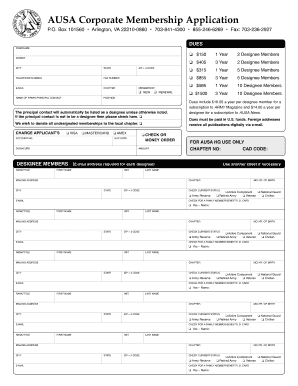
AUSA Corporate Membership Application FIRM NAME STREET CITY TELEPHONE NUMBER E-MAIL NAME OF FIRMS PRINCIPAL CONTACT STATE FAX NUMBER CHAPTER POSITION MEMBERSHIP ZIP + 4 CODE P.O. Box 101560 Arlington,.

How it works

  1. Open form

    Open form follow the instructions

  2. Easily sign form

    Easily sign the form with your finger

  3. Share form

    Send filled & signed form or save

How to fill out the FIRM NAME STREET CITY TELEPHONE NUMBER E-MAIL NAME OF FIRMS PRINCIPAL CONTACT STATE FAX NUMBER online

Completing the FIRM NAME STREET CITY TELEPHONE NUMBER E-MAIL NAME OF FIRMS PRINCIPAL CONTACT STATE FAX NUMBER form is essential for submitting your application effectively. This guide provides a clear, step-by-step approach to help you through the process of filling out this important document online.

Follow the steps to successfully complete your application form.

  1. Click ‘Get Form’ button to obtain the form and open it in your preferred web browser.
  2. In the 'Firm Name' section, input the official name of your firm. Ensure this matches your registration documents for accuracy.
  3. Next, fill out the 'Street' field with the complete street address of your firm. Include suite or unit numbers if applicable.
  4. Enter the 'City' where your firm is located immediately after the street address.
  5. In the 'State' box, select or enter the two-letter postal abbreviation for your state.
  6. Provide your firm's 'Telephone Number' for contact purposes. Ensure the format is correct for ease of communication.
  7. Fill in the 'Fax Number' of your firm if applicable. This is optional but helpful for document transmission.
  8. Enter a valid 'E-Mail' address for further correspondence related to your application.
  9. In the 'Name of Firm's Principal Contact' section, list the person who will be the primary representative for your firm. Include their 'Position' within the firm.
  10. Indicate if this application is for 'New' membership or a 'Renewal' by checking the appropriate box.
  11. If the principal contact is not to be listed as a designee, check the provided box for clarification.
  12. Fill out the payment information section by selecting your preferred method of payment and include the 'Amount.'
  13. If applicable, list any 'Designee Members' who should also receive membership benefits. Provide their details as required.
  14. Once all sections are thoroughly completed, review your information for accuracy. You can then save changes, download, print, or share the form as needed.

Complete your application today by filling out the document online!

Get form

Experience a faster way to fill out and sign forms on the web. Access the most extensive library of templates available.
Get form

Related content

Contact Information :: California Secretary of...
Mailing Address and Agency Location. California Secretary of State: [Include division or...
Learn more
construction manager's qualification statement...
questions made hereinafter. Company Name. Address. City/State. Zip Code. Corporation...
Learn more
BellSouth - Wikipedia
Any incoming call originating from a Sprint PCS cell phone will usually display the City...
Learn more

Related links form

IPI-Consultation-Request-form-new-updated-05.24.11.doc - Inova Breast Cancer Exhibit Application - Inova Health System - Inova IPI-Consultation-Request-form-new.doc - Inova 7?IM!n - Inova

Questions & Answers

Get answers to your most pressing questions about US Legal Forms API.

Contact support

To find contact properties in HubSpot, sign in to your account and go to the 'Contacts' dashboard. Click on a specific contact to view their details, which will display various properties like FIRM NAME, STREET, CITY, TELEPHONE NUMBER, and E-MAIL. For a broader review, you can explore the properties settings to see all available fields, aiding in your data management strategy.

Properties in HubSpot are the individual data fields that contain specific details about your contacts, companies, and deals. Examples of properties include FIRM NAME, STREET, TELEPHONE NUMBER, and E-MAIL, which collectively provide critical insights into your business interactions. By managing these properties effectively, you can maintain accurate records that enhance your customer engagement and data-driven decision-making.

HubSpot is an all-in-one marketing, sales, and service platform that helps businesses grow and build meaningful relationships with customers. It offers tools for CRM, email marketing, landing pages, and much more, allowing you to manage FIRM NAME, STREET, CITY, TELEPHONE NUMBER, E-MAIL, NAME OF FIRMS PRINCIPAL CONTACT, STATE, and FAX NUMBER efficiently. This comprehensive approach ensures businesses have everything needed to succeed in one place.

HubSpot properties are the specific attributes that define your contacts, companies, deals, and tickets. These attributes could include FIRM NAME, STREET, CITY, and telefphone numbers, among others. Properties help you organize and retrieve essential data, streamlining your interactions and communications for optimal engagement and tracking.

In HubSpot, properties refer to the specific pieces of information that relate to objects, such as contacts or companies. While properties, like FIRM NAME, STREET, and TELEPHONE NUMBER, help you describe the details of a contact or organization, objects are broader categories that house these properties. Understanding this distinction is crucial for effective data management and utilization within the platform.

To view all properties in HubSpot, first log into your HubSpot account. Navigate to your account settings and select the 'Properties' section under 'Data Management'. Here, you will see a complete list of properties that includes your FIRM NAME, STREET, CITY, TELEPHONE NUMBER, E-MAIL, NAME OF FIRMS PRINCIPAL CONTACT, STATE, and FAX NUMBER, making it easy to access vital information.

The address in a business letter is typically found in the heading. This section provides essential contact details, including FIRM NAME STREET CITY TELEPHONE NUMBER E-MAIL. Having this information clearly displayed at the top of your letter allows the recipient to identify your organization immediately. An accurate address fosters professional communication and trust.

To write an address with a business name, start with the business name followed by the street address. Next, include the city name, followed by the state, and end with the zip code. Always add your contact number such as TELEPHONE NUMBER E-MAIL for clarity. This formatting ensures that anyone can quickly locate and reach out to your firm.

When addressing a firm, begin with the official name of the company and, if applicable, mention the principal contact person. For example, you may start with 'To the team at FIRM NAME.' It's important to clearly delineate your relationship and context to ensure professionalism. Including the complete contact information such as STREET CITY TELEPHONE NUMBER E-MAIL instills confidence and clarity in your communication.

The heading part of the letter contains important contact details, including the email address, telephone number, and fax number. This section serves as a quick reference for the recipient, guiding them on how to connect with your firm. Ensure to include FIRM NAME STREET CITY TELEPHONE NUMBER E-MAIL for comprehensive contact information. Accurate and accessible contact details facilitate smoother communication.

Get This Form Now!

Use professional pre-built templates to fill in and sign documents online faster. Get access to thousands of forms.
Get form
If you believe that this page should be taken down, please follow our DMCA take down processhere.

Industry-leading security and compliance

US Legal Forms protects your data by complying with industry-specific security standards.
  • In businnes since 1997
    25+ years providing professional legal documents.
  • Accredited business
    Guarantees that a business meets BBB accreditation standards in the US and Canada.
  • Secured by Braintree
    Validated Level 1 PCI DSS compliant payment gateway that accepts most major credit and debit card brands from across the globe.
Get FIRM NAME STREET CITY TELEPHONE NUMBER E-MAIL NAME OF FIRMS PRINCIPAL CONTACT STATE FAX NUMBER
Get form
Form Packages
Adoption
Bankruptcy
Contractors
Divorce
Home Sales
Employment
Identity Theft
Incorporation
Landlord Tenant
Living Trust
Name Change
Personal Planning
Small Business
Wills & Estates
Packages A-Z
Form Categories
Affidavits
Bankruptcy
Bill of Sale
Corporate - LLC
Divorce
Employment
Identity Theft
Internet Technology
Landlord Tenant
Living Wills
Name Change
Power of Attorney
Real Estate
Small Estates
Wills
All Forms
Forms A-Z
Form Library
Customer Service
Terms of Service
Privacy Notice
Legal Hub
Content Takedown Policy
Bug Bounty Program
About Us
Help Portal
Legal Resources
Blog
Affiliates
Contact Us
Delete My Account
Site Map
Industries
Forms in Spanish
Localized Forms
State-specific Forms
Forms Kit
Legal Guides
Real Estate Handbook
All Guides
Prepared for You
Notarize
Incorporation services
Our Customers
For Consumers
For Small Business
For Attorneys
Our Sites
US Legal Forms
USLegal
FormsPass
pdfFiller
signNow
airSlate WorkFlow
DocHub
Instapage
Social Media
Call us now toll free:
+1 833 426 79 33
As seen in:
  • USA Today logo picture
  • CBC News logo picture
  • LA Times logo picture
  • The Washington Post logo picture
  • AP logo picture
  • Forbes logo picture
© Copyright 1997-2025
airSlate Legal Forms, Inc.
3720 Flowood Dr, Flowood, Mississippi 39232
Form Packages
Adoption
Bankruptcy
Contractors
Divorce
Home Sales
Employment
Identity Theft
Incorporation
Landlord Tenant
Living Trust
Name Change
Personal Planning
Small Business
Wills & Estates
Packages A-Z
Form Categories
Affidavits
Bankruptcy
Bill of Sale
Corporate - LLC
Divorce
Employment
Identity Theft
Internet Technology
Landlord Tenant
Living Wills
Name Change
Power of Attorney
Real Estate
Small Estates
Wills
All Forms
Forms A-Z
Form Library
Customer Service
Terms of Service
Privacy Notice
Legal Hub
Content Takedown Policy
Bug Bounty Program
About Us
Help Portal
Legal Resources
Blog
Affiliates
Contact Us
Delete My Account
Site Map
Industries
Forms in Spanish
Localized Forms
State-specific Forms
Forms Kit
Legal Guides
Real Estate Handbook
All Guides
Prepared for You
Notarize
Incorporation services
Our Customers
For Consumers
For Small Business
For Attorneys
Our Sites
US Legal Forms
USLegal
FormsPass
pdfFiller
signNow
airSlate WorkFlow
DocHub
Instapage
Social Media
Call us now toll free:
+1 833 426 79 33
As seen in:
  • USA Today logo picture
  • CBC News logo picture
  • LA Times logo picture
  • The Washington Post logo picture
  • AP logo picture
  • Forbes logo picture
© Copyright 1997-2025
airSlate Legal Forms, Inc.
3720 Flowood Dr, Flowood, Mississippi 39232