We use cookies to improve security, personalize the user experience, enhance our marketing activities (including cooperating with our marketing partners) and for other business use.
Click "here" to read our Cookie Policy. By clicking "Accept" you agree to the use of cookies. Read less
Read more
Accept
Loading
Form preview
  • US Legal Forms
  • Form Library
  • More Forms
  • More Uncategorized Forms
  • Baby Show Registration Form

Get Baby Show Registration Form

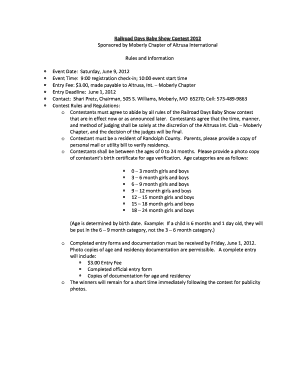
Ion check-in; 10:00 event start time Entry Fee: $3.00, made payable to Altrusa, Int. Moberly Chapter Entry Deadline: June 1, 2012 Contact: Shari Pretz, Chairman, 505 S. Williams, Moberly, MO 65270; Cell: 573-489-9863 Contest Rules and Regulations: o Contestants must agree to abide by all rules of the Railroad Days Baby Show contest that are in effect now or as announced later. Contestants agree that the time, manner, and method of judging shall be solely at the discretion of the Altrusa Int.

How it works

  1. Open form

    Open form follow the instructions

  2. Easily sign form

    Easily sign the form with your finger

  3. Share form

    Send filled & signed form or save

How to fill out the Baby Show Registration Form online

Filling out the Baby Show Registration Form online is a straightforward process that allows parents to register their young contestants for the exciting Railroad Days Baby Show. This guide will help you navigate through each section of the form, ensuring all necessary information is captured accurately.

Follow the steps to complete the online registration form.

  1. Click ‘Get Form’ button to access the form and open it in your preferred document editor.
  2. Select the appropriate category for your child by marking the appropriate box for either girls or boys, based on their age category.
  3. Provide the full name of the contestant clearly in the designated field.
  4. Include the contestant's nickname and the background of that nickname in the provided space.
  5. Complete the address section with the contestant's residence, including the city, state, and zip code.
  6. Fill in the county of residence and the contestant's age at the time of the event along with their date of birth in the specified format (MM/DD/YYYY).
  7. Enter the names of the parents or guardians in the designated field.
  8. List any brothers or sisters of the contestant if applicable.
  9. Provide the names of the contestant's grandparents as requested.
  10. Grant permission for your child to participate by printing the parent's name and signing the form in the spaces provided.
  11. Double-check all information for accuracy, save your changes, and ensure all required documentation, including the entry fee, is included before submission.

Complete the Baby Show Registration Form online today to ensure your child is part of this memorable event!

Get form

Experience a faster way to fill out and sign forms on the web. Access the most extensive library of templates available.
Get form

Related content

Forms for Family Child Care Providers | Office for...
Initial Application for Permit Forms; General Family Child Care Business Forms ... to show...
Learn more
How to Register to Vote | USAGov
Sep 14, 2020 — Learn how to register to vote and find the deadlines for voter...
Learn more
Form I-130 - USCIS
Child. Yes. No. Yes. No. â–». Part 2. Information About You (Petitioner). 1. Alien...
Learn more

Related links form

Survey Questions - Webmedia Unmc SPA Going Electronic Part I Eliminating Paper Checklists ... - UNMC - Unmc MEA 218-06-M - Nyc Shift - NYC . Gov - Nyc

Questions & Answers

Get answers to your most pressing questions about US Legal Forms API.

Contact support

There are several important firsts to record for your baby, including their first smile, first word, and first step. Additionally, you should note the first time they eat solid food or travel. These moments can be documented using a Baby Show Registration Form, which serves as a wonderful way to keep these memories organized and easily accessible.

Tracking a baby's firsts can be an exciting and fulfilling experience. Parents can use a dedicated journal, mobile app, or a Baby Show Registration Form that includes spaces for significant milestones. This way, you won't miss documenting those priceless moments, such as the first laugh or the first time they crawl.

To document your baby's first year, consider taking regular photos, jotting down notes of key events, and using a Baby Show Registration Form to record significant milestones. Include first words, first steps, and other notable achievements. By doing so, you create a narrative that reflects your baby's journey, which you can treasure for years to come.

Documenting a baby's first year involves capturing special moments and milestones. Parents can create a scrapbook, use a digital app, or fill out a Baby Show Registration Form that offers sections for each milestone. This documentation provides a cherished keepsake for families and helps track your child's development over time.

If a baby is not registered, it can lead to several complications later on. For instance, without registration, parents may face difficulties in obtaining a birth certificate, which is essential for healthcare, schooling, and legal identification. Completing a Baby Show Registration Form helps ensure that your child's identity is officially recognized and protected.

The 3 6 9 rule for babies provides a simple guideline for parents about developmental milestones. At three months, babies typically start to engage with their surroundings. At six months, they may begin to sit up and show more movement. Lastly, by nine months, they often explore more actively, which is a great time to consider completing a Baby Show Registration Form to celebrate these milestones.

To create a fillable Baby Show Registration Form in Word, start by opening a new document and using the 'Developer' tab to access form controls. You can insert text boxes, checkboxes, and other fields to gather the necessary information from participants. Once designed, save the document as a template and share it with your audience. Alternatively, tools like US Legal Forms can provide pre-made forms that you can easily modify and fill out digitally.

Creating your own Baby Show Registration Form involves a few straightforward steps. First, determine the key information you need from participants, then choose an appropriate platform, such as US Legal Forms, that allows you to customize your form. Utilize their templates to fill in your specific details and instructions. Finally, test your form with a few participants to ensure clarity and ease of use before launching.

A Baby Show Registration Form generally includes fields for personal information like name, age, contact number, and guardianship details. It may also ask about specific categories in the event, such as age groups or categories for the babies. Additionally, you might consider including a waiver or agreement section, so participants understand the rules of the event. Each field should be clear and concise to ensure smooth registration.

To create a simple Baby Show Registration Form, start by outlining the essential information you need from participants, such as names, ages, and contact details. Next, choose a form-building tool like US Legal Forms or Google Forms to bring your idea to life. These tools typically offer drag-and-drop functionality, making it easy for anyone to create and customize forms. Remember to test the form to ensure it captures all necessary details before distributing it.

Get This Form Now!

Use professional pre-built templates to fill in and sign documents online faster. Get access to thousands of forms.
Get form
If you believe that this page should be taken down, please follow our DMCA take down processhere.

Industry-leading security and compliance

US Legal Forms protects your data by complying with industry-specific security standards.
  • In businnes since 1997
    25+ years providing professional legal documents.
  • Accredited business
    Guarantees that a business meets BBB accreditation standards in the US and Canada.
  • Secured by Braintree
    Validated Level 1 PCI DSS compliant payment gateway that accepts most major credit and debit card brands from across the globe.
Get Baby Show Registration Form
Get form
Form Packages
Adoption
Bankruptcy
Contractors
Divorce
Home Sales
Employment
Identity Theft
Incorporation
Landlord Tenant
Living Trust
Name Change
Personal Planning
Small Business
Wills & Estates
Packages A-Z
Form Categories
Affidavits
Bankruptcy
Bill of Sale
Corporate - LLC
Divorce
Employment
Identity Theft
Internet Technology
Landlord Tenant
Living Wills
Name Change
Power of Attorney
Real Estate
Small Estates
Wills
All Forms
Forms A-Z
Form Library
Customer Service
Terms of Service
Privacy Notice
Legal Hub
Content Takedown Policy
Bug Bounty Program
About Us
Help Portal
Legal Resources
Blog
Affiliates
Contact Us
Delete My Account
Site Map
Industries
Forms in Spanish
Localized Forms
State-specific Forms
Forms Kit
Legal Guides
Real Estate Handbook
All Guides
Prepared for You
Notarize
Incorporation services
Our Customers
For Consumers
For Small Business
For Attorneys
Our Sites
US Legal Forms
USLegal
FormsPass
pdfFiller
signNow
airSlate WorkFlow
DocHub
Instapage
Social Media
Call us now toll free:
+1 833 426 79 33
As seen in:
  • USA Today logo picture
  • CBC News logo picture
  • LA Times logo picture
  • The Washington Post logo picture
  • AP logo picture
  • Forbes logo picture
© Copyright 1997-2025
airSlate Legal Forms, Inc.
3720 Flowood Dr, Flowood, Mississippi 39232
Form Packages
Adoption
Bankruptcy
Contractors
Divorce
Home Sales
Employment
Identity Theft
Incorporation
Landlord Tenant
Living Trust
Name Change
Personal Planning
Small Business
Wills & Estates
Packages A-Z
Form Categories
Affidavits
Bankruptcy
Bill of Sale
Corporate - LLC
Divorce
Employment
Identity Theft
Internet Technology
Landlord Tenant
Living Wills
Name Change
Power of Attorney
Real Estate
Small Estates
Wills
All Forms
Forms A-Z
Form Library
Customer Service
Terms of Service
Privacy Notice
Legal Hub
Content Takedown Policy
Bug Bounty Program
About Us
Help Portal
Legal Resources
Blog
Affiliates
Contact Us
Delete My Account
Site Map
Industries
Forms in Spanish
Localized Forms
State-specific Forms
Forms Kit
Legal Guides
Real Estate Handbook
All Guides
Prepared for You
Notarize
Incorporation services
Our Customers
For Consumers
For Small Business
For Attorneys
Our Sites
US Legal Forms
USLegal
FormsPass
pdfFiller
signNow
airSlate WorkFlow
DocHub
Instapage
Social Media
Call us now toll free:
+1 833 426 79 33
As seen in:
  • USA Today logo picture
  • CBC News logo picture
  • LA Times logo picture
  • The Washington Post logo picture
  • AP logo picture
  • Forbes logo picture
© Copyright 1997-2025
airSlate Legal Forms, Inc.
3720 Flowood Dr, Flowood, Mississippi 39232