Loading
Form preview
  • US Legal Forms
  • Form Library
  • More Forms
  • More Uncategorized Forms
  • Medical Security Program Claim Form

Get Medical Security Program Claim Form

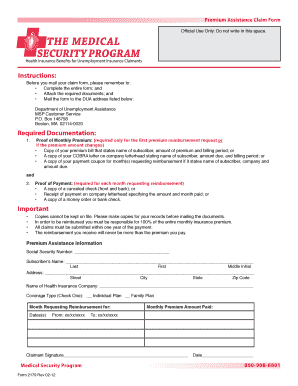
Premium Assistance Claim Form Official Use Only Do not write in this space. THE MEDICAL SECURITY PROGRAM Health Insurance Benefits for Unemployment Insurance Claimants Instructions Before you mail your claim form please remember to Complete the entire form and Attach the required documents and Mail the form to the DUA address listed below Department of Unemployment Assistance MSP Customer Service P. The reimbursement you receive will never be mor.

How it works

  1. Open form

    Open form follow the instructions

  2. Easily sign form

    Easily sign the form with your finger

  3. Share form

    Send filled & signed form or save

How to fill out the Medical Security Program Claim Form online

Filling out the Medical Security Program Claim Form online can streamline the process of obtaining reimbursement for health insurance premiums. This guide will provide clear and supportive instructions to help users complete the form accurately.

Follow the steps to successfully complete your claim form

  1. Click ‘Get Form’ button to obtain the form and open it in the editor.
  2. Begin by entering your Social Security Number in the designated field. This information is essential for processing your claim.
  3. Provide the subscriber’s name, filling in the fields for last name, first name, and middle initial as required.
  4. Fill out your complete address, including street, city, state, and zip code in the provided fields.
  5. Indicate the name of your health insurance company in the appropriate section.
  6. Select the type of coverage by checking the box for either 'Individual Plan' or 'Family Plan'.
  7. Specify the month for which you are requesting reimbursement. Ensure to enter the correct date range in the 'From' and 'To' fields.
  8. Enter the monthly premium amount that you have paid.
  9. Sign the form in the designated area to certify that the information provided is accurate.
  10. After completing the form, attach any required documentation as specified in the instructions and ensure all fields are filled out before submission.
  11. Finally, save any changes, download, print, or share the completed form as needed before mailing it to the designated address.

Complete your Medical Security Program Claim Form online today for fast and efficient processing.

Get form

Experience a faster way to fill out and sign forms on the web. Access the most extensive library of templates available.
Get form

Related content

Apply for MassHealth, the Health Safety Net, or...
... for MassHealth, Health Safety Net, and the Children's Medical Security Plan. ... Use...
Learn more
health insurance claim form - CDC
INSURANCE PLAN NAME OR PROGRAM NAME d. IS THERE ANOTHER ... payment of medical benefits to...
Learn more
FAA Form - Federal Aviation Administration
Integrated Airman Certification and Rating Application (IACRA). ... for the applicant's...
Learn more

Related links form

Inpatient Hyperemesis Admission - Fhshealth Dilation Infant Pupils Retina Exam - Fhshealth **NOT FOR USE IN STROKE** - Fhshealth Intractable Migraine Addendum - Fhshealth

Questions & Answers

Get answers to your most pressing questions about US Legal Forms API.

Contact support

To fill in an insurance claim, first gather all relevant documents such as medical bills and provider information. You can utilize the Medical Security Program Claim Form available on the US Legal Forms platform, which simplifies the process. Follow the instructions step-by-step to ensure your submission is thorough, increasing the likelihood of prompt approval.

To fill the medi assist reimbursement claim form online, start by visiting the designated section on the US Legal Forms platform. Here, you can easily access the Medical Security Program Claim Form. Ensure you have all necessary details ready, such as patient information and service codes, to effortlessly complete the online submission process.

The two main types of claims forms are the CMS 1500 form and the UB-04 form. The CMS 1500 form is typically used for outpatient services provided by non-institutional providers, while the UB-04 is for institutional care, such as hospitals. Understanding the difference can help you select the appropriate form, ensuring you efficiently use the Medical Security Program Claim Form for your specific needs.

To claim reimbursement for medical expenses, first, ensure you have all relevant bills and receipts organized. Fill out the Medical Security Program Claim Form with accurate details about the services received, your personal information, and the total costs. Submit the completed form along with your supporting documents to your insurer or the relevant program promptly to expedite the reimbursement process.

You can obtain CMS 1500 forms through various sources including the Centers for Medicare & Medicaid Services (CMS) website or your insurance provider. Additionally, many healthcare practices and medical facilities have them available at their offices. If you need assistance, consider the Medical Security Program Claim Form, which may have alternatives or specific instructions related to the CMS 1500 forms tailored to your claims.

To complete the CMS 1500 claim form, you need to provide the patient's demographic information, the provider's details, diagnostic codes, and procedure codes. Additionally, include the date of service and any relevant billing information. Having this information ready will help you accurately fill out the Medical Security Program Claim Form, ensuring timely processing of your claim.

Filling out a medical claim form involves several key steps. Start by entering your personal information, followed by details about your healthcare provider and the services received. Make sure to accurately complete the Medical Security Program Claim Form and double-check all entries before submitting to avoid delays in processing your claim.

To submit a claim in the Medi Assist app, first, log in to your account. Navigate to the claims section and select the option to submit a new claim. Fill out the Medical Security Program Claim Form as prompted, and upload any required documents, such as invoices or treatment records, for a smooth submission process.

To make a medical claim, gather your medical receipts and all related documentation. Next, complete the Medical Security Program Claim Form, ensuring that you provide accurate information regarding your treatment. After completing the form, submit it along with the necessary documents through the platform of your choice, such as the Medi Assist app or directly through your provider.

The UB-04 (CMS-1450) form is the claim form for institutional facilities such as hospitals or outpatient facilities. This would include things like surgery, radiology, laboratory, or other facility services. The HCFA-1500 form (CMS-1500) is used to submit charges covered under Medicare Part B.

Get This Form Now!

Use professional pre-built templates to fill in and sign documents online faster. Get access to thousands of forms.
Get form
If you believe that this page should be taken down, please follow our DMCA take down processhere.

Industry-leading security and compliance

US Legal Forms protects your data by complying with industry-specific security standards.
  • In businnes since 1997
    25+ years providing professional legal documents.
  • Accredited business
    Guarantees that a business meets BBB accreditation standards in the US and Canada.
  • Secured by Braintree
    Validated Level 1 PCI DSS compliant payment gateway that accepts most major credit and debit card brands from across the globe.
Get Medical Security Program Claim Form
Get form
  • Adoption
  • Bankruptcy
  • Contractors
  • Divorce
  • Home Sales
  • Employment
  • Identity Theft
  • Incorporation
  • Landlord Tenant
  • Living Trust
  • Name Change
  • Personal Planning
  • Small Business
  • Wills & Estates
  • Packages A-Z
  • Affidavits
  • Bankruptcy
  • Bill of Sale
  • Corporate - LLC
  • Divorce
  • Employment
  • Identity Theft
  • Internet Technology
  • Landlord Tenant
  • Living Wills
  • Name Change
  • Power of Attorney
  • Real Estate
  • Small Estates
  • Wills
  • All Forms
  • Forms A-Z
  • Form Library
  • Legal Hub
  • About Us
  • Help Portal
  • Legal Resources
  • Blog
  • Affiliates
  • Contact Us
  • Delete My Account
  • Site Map
  • Industries
  • Forms in Spanish
  • Localized Forms
  • State-specific Forms
  • Forms Kit
  • Real Estate Handbook
  • All Guides
  • Notarize
  • Incorporation services
  • For Consumers
  • For Small Business
  • For Attorneys
  • USLegal
  • FormsPass
  • pdfFiller
  • signNow
  • altaFlow
  • DocHub
  • Instapage
Form Packages
  • Adoption
  • Bankruptcy
  • Contractors
  • Divorce
  • Home Sales
  • Employment
  • Identity Theft
  • Incorporation
  • Landlord Tenant
  • Living Trust
  • Name Change
  • Personal Planning
  • Small Business
  • Wills & Estates
  • Packages A-Z
Form Categories
  • Affidavits
  • Bankruptcy
  • Bill of Sale
  • Corporate - LLC
  • Divorce
  • Employment
  • Identity Theft
  • Internet Technology
  • Landlord Tenant
  • Living Wills
  • Name Change
  • Power of Attorney
  • Real Estate
  • Small Estates
  • Wills
  • All Forms
  • Forms A-Z
  • Form Library
Customer Service
  • Legal Hub
  • About Us
  • Help Portal
  • Legal Resources
  • Blog
  • Affiliates
  • Contact Us
  • Delete My Account
  • Site Map
  • Industries
  • Forms in Spanish
  • Localized Forms
  • State-specific Forms
  • Forms Kit
Legal Guides
  • Real Estate Handbook
  • All Guides
Prepared for you
  • Notarize
  • Incorporation services
Our Customers
  • For Consumers
  • For Small Business
  • For Attorneys
Our Sites
  • USLegal
  • FormsPass
  • pdfFiller
  • signNow
  • altaFlow
  • DocHub
  • Instapage
Social Media
Call us now toll free:
+1 833 426 79 33
As seen in:
© Copyright 1999-2026 airSlate Legal Forms, Inc. 3720 Flowood Dr, Flowood, Mississippi 39232
  • Your Privacy Choices
  • Terms of Service
  • Privacy Notice
  • Content Takedown Policy
  • Bug Bounty Program