Loading
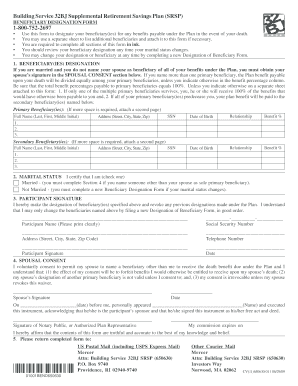
Get Mercer Beneficiary Form
How it works
-

Open form follow the instructions
-

Easily sign the form with your finger
-

Send filled & signed form or save
How to fill out the Mercer Beneficiary Form online
This guide provides step-by-step instructions on how to complete the Mercer Beneficiary Form online, ensuring you designate your beneficiaries accurately. By following these instructions, you can manage your beneficiary designations with confidence and clarity.
Follow the steps to complete your Mercer Beneficiary Form online.
- Click the ‘Get Form’ button to access the Mercer Beneficiary Form and open it in your chosen platform.
- Begin with the Beneficiary Designation section by filling in the full names, addresses, social security numbers, dates of birth, relationships, and benefit percentages of your primary beneficiaries. Ensure that the total benefit percentages equal 100%.
- If you are married and do not designate your spouse as a beneficiary for all benefits, you must complete the Spousal Consent section with your spouse's signature.
- Indicate your marital status by checking the appropriate box, either 'Married' or 'Not Married.' If you are married and designate someone other than your spouse as the sole primary beneficiary, complete Section 4.
- In the Participant Signature section, print your name clearly, provide your social security number, address, and telephone number. Sign and date the form.
- If applicable, your spouse should complete and sign the Spousal Consent section, acknowledging your beneficiary designation.
- Review all sections to ensure accuracy and completeness before submitting your form.
- Once finalized, save your changes, download, print, or share the completed form as needed.
Complete your Mercer Beneficiary Form online now to ensure your beneficiary designations are current and accurate.
Related links form
Choosing between a binding or non-binding beneficiary designation depends on your preferences. A binding nomination ensures that your wishes are followed strictly, while a non-binding nomination allows the trustee some discretion. Think about your situation and use the Mercer Beneficiary Form accordingly.