Get Zrd1 Form
How it works
-

Open form follow the instructions
-

Easily sign the form with your finger
-

Send filled & signed form or save
How to fill out the Zrd1 Form online
Filling out the Zrd1 Form online is a crucial step in requesting a zoning resolution determination. This guide provides a clear, step-by-step process for users to complete the form with confidence and accuracy.
Follow the steps to successfully complete the Zrd1 Form online.
- Click the ‘Get Form’ button to obtain the form and open it in your online editor.
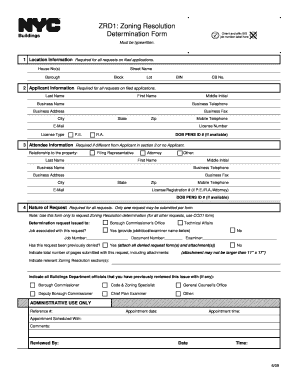
- In the first section, provide the location information. Input the house number(s), street name, borough, block, lot, building identification number (BIN), and community board number (CB No.). Ensure all fields are filled accurately.
- Complete the applicant information section. Fill in the last name, first name, middle initial, business name, business telephone, business address, business fax, city, state, zip code, mobile telephone, email, license type, and license number. Include P.E., R.A., or DOB PENS ID # if available.
- If there is an attendee who is different from the applicant, fill in their information in the designated section. This includes their relationship to the property, last name, first name, middle initial, business name, business telephone, business address, business fax, city, state, zip code, mobile telephone, license/registration number, and DOB PENS ID # if available.
- Indicate the nature of your request. State whether this is a zoning resolution determination request; only one request is allowed per form. If applicable, provide the job number, document number, and examiner's name associated with your request. Note whether the request was previously denied and attach any necessary documents.
- In the description of the request section, itemize all attachments that are included with the form. If your request is based on an objection from a plan examiner, include the objection text as it appears on the objection sheet.
- For the statements and signature section, print your name, affirm that the information provided is correct, and sign and date the form. If you are a P.E. or R.A., apply your seal over your signature.
- Finally, review all information for accuracy before saving changes, downloading, printing, or sharing the completed form.
Complete your Zrd1 Form online today to ensure your zoning resolution request is processed efficiently.
Zoning I-1 typically designates light industrial use areas, allowing for certain businesses and manufacturing activities. This zoning category helps foster economic development while minimizing disruptive impacts on nearby residential communities. Understanding what is permissible under I-1 zoning can help businesses plan accordingly. If you're exploring industrial options, the Zrd1 Form can guide you through the necessary zoning regulations.