Loading
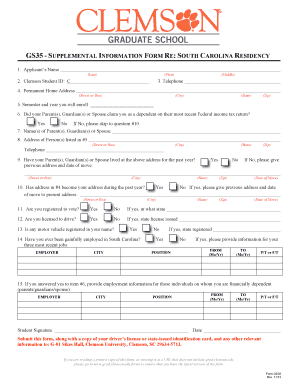
Get Gs35 - Supplemental Information Form Re - Grad Clemson
How it works
-

Open form follow the instructions
-

Easily sign the form with your finger
-

Send filled & signed form or save
How to fill out the GS35 - SUPPLEMENTAL INFORMATION FORM RE - Grad Clemson online
Filling out the GS35 - Supplemental Information Form RE for graduate residency verification at Clemson University is an important step for prospective students. This guide will help you navigate the form and provide the necessary information clearly and effectively.
Follow the steps to successfully complete the GS35 form online.
- Click ‘Get Form’ button to obtain the form and open it for completion.
- Enter your details in the Applicant's Name section, including your last name, first name, and middle name.
- Input your Clemson Student ID, beginning with the letter C, to help identify your records.
- Provide your telephone number for any required communication related to your residency verification.
- Fill in your permanent home address, ensuring accuracy in the street address, city, state, and zip code fields.
- Indicate the semester and year in which you plan to enroll at Clemson University.
- Answer whether your parent(s), guardian(s), or spouse claimed you as a dependent on their most recent Federal income tax return. If not, proceed to question #10.
- If applicable, provide the names of the parent(s), guardian(s), or spouse who claimed you as a dependent.
- Complete the address details of the person(s) listed in the previous section, including all relevant contact information.
- Confirm whether your parent(s), guardian(s), or spouse have lived at the provided address for the past year, or give the previous address and date of their move.
- Answer whether the address listed in question #4 has become your address during the past year. If it's changed, provide the former address and date of the move.
- Indicate your voter registration status. If registered, specify the state of registration.
- State whether you are licensed to drive and include the state that issued your license.
- Declare if any motor vehicle is registered in your name.
- If you have been gainfully employed in South Carolina, provide details of your three most recent jobs, specifying employer names, city, positions, and the dates of employment.
- If you were claimed as a dependent, provide employment information for your parent(s), guardian(s), or spouse as requested.
- Sign and date the form to confirm all information is correct before submission.
- Submit the completed form along with a copy of your driver’s license or state-issued identification card and any additional relevant information to the specified address at Clemson University.
Complete your GS35 form online today and take the next step towards your graduate education at Clemson University!
You can send transcripts to Clemson by requesting your institution to send them directly to the university. Ensure that you use the correct address provided on Clemson's admissions website. Sending transcripts accurately supports the processing of your application, particularly when tied with the GS35 - SUPPLEMENTAL INFORMATION FORM RE - Grad Clemson.
Industry-leading security and compliance
US Legal Forms protects your data by complying with industry-specific security standards.
-
In businnes since 199725+ years providing professional legal documents.
-
Accredited businessGuarantees that a business meets BBB accreditation standards in the US and Canada.
-
Secured by BraintreeValidated Level 1 PCI DSS compliant payment gateway that accepts most major credit and debit card brands from across the globe.