Loading
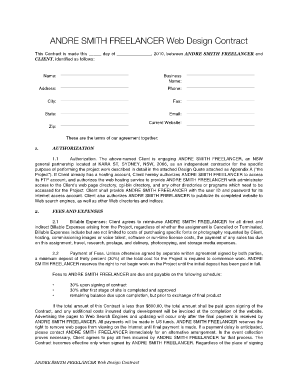
Get Web Design Contract Form
How it works
-

Open form follow the instructions
-

Easily sign the form with your finger
-

Send filled & signed form or save
How to fill out the Web Design Contract Form online
Filling out a web design contract form online is an essential step in formalizing the agreement between a client and the web designer. This guide provides detailed instructions to help you complete each section of the Web Design Contract Form with ease and confidence.
Follow the steps to fill out the Web Design Contract Form online effectively.
- Click the ‘Get Form’ button to access the Web Design Contract Form and open it in the online editor.
- Begin by entering the date at the top of the form, indicating the day you are completing the contract. This is crucial for establishing a timeline for the agreement.
- Fill in the client details, including the client's name, business name, address, phone number, city, state, zip code, email, and current website. Ensure all information is accurate to avoid issues later.
- Review the Authorization section, which details the client's engagement of the freelancer for the specific project. Ensure that the project description aligns with your expectations.
- In the Fees and Expenses section, clearly note the financial terms of the project, including the payment schedule. Make sure to understand the deposit requirements and any billable expenses that may arise.
- Proceed to the Completion of Project section, where the responsibilities of both the client and the freelancer should be outlined. Confirm that all terms for project completion and approval processes meet your needs.
- Check the Maintenance and Warranty section for details on service provided after project completion. Familiarize yourself with the grace periods and any additional maintenance contracts that are available.
- Review the Intellectual Property section to understand the ownership of the content and materials involved in the project. Ensure that you agree with the property rights assigned.
- Examine the Rights and Responsibilities section, paying close attention to any legalities that affect your project. It’s important to know your rights and the responsibilities you have as a client.
- Finally, ensure the Contract's overall compliance with the law and that you understand the entire agreement. After reviewing, sign the document to formalize the contract.
- Once all sections are completed and signed, you can save the changes, download, print, or share the form as needed.
Complete your web design contract form online today to ensure a smooth collaboration on your project!
Filling out a contract agreement, such as a Web Design Contract Form, involves several important steps. First, ensure that you provide clear information about both parties involved. Next, outline the project scope, including deliverables, timelines, and payment terms. Finally, make sure to review the completed form for accuracy before signing.
Industry-leading security and compliance
US Legal Forms protects your data by complying with industry-specific security standards.
-
In businnes since 199725+ years providing professional legal documents.
-
Accredited businessGuarantees that a business meets BBB accreditation standards in the US and Canada.
-
Secured by BraintreeValidated Level 1 PCI DSS compliant payment gateway that accepts most major credit and debit card brands from across the globe.