Loading
Form preview
  • US Legal Forms
  • Form Library
  • More Forms
  • More Uncategorized Forms
  • Sf 5510

Get Sf 5510

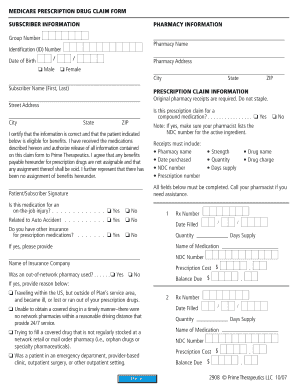
Ed. O NOT include charges for durable medical equipment. D Contact your pharmacist, if necessary, to provide the detailed drug information requested. Prescription receipts or a pharmacy-generated drug summary must be attached. Cash register receipts are not acceptable. Use your member ID card to obtain your identification number. A separate claim form must be used for each patient and pharmacy. If you are submitting more than two prescription claims, please use a.

How it works

  1. Open form

    Open form follow the instructions

  2. Easily sign form

    Easily sign the form with your finger

  3. Share form

    Send filled & signed form or save

How to fill out the Sf 5510 online

This guide will provide comprehensive instructions for completing the Sf 5510 form online. By following the outlined steps, users can efficiently navigate each section, ensuring all necessary information is accurately provided.

Follow the steps to complete the Sf 5510 form with ease.

  1. Select the ‘Get Form’ button to access the Sf 5510 form and open it within the online editor.
  2. Begin by filling in the subscriber information, including the subscriber's name, identification (ID) number, and group number, which can be found on the ID card.
  3. Complete the pharmacy information by providing the pharmacy's name, address, and relevant details related to the medication being claimed.
  4. Indicate the patient's date of birth and choose the appropriate checkbox for gender identification.
  5. For each prescription claim, enter the Rx number, date filled, quantity, days supply, name of the medication, NDC number, and prescription cost.
  6. If the claim is for a compound prescription, ensure the NDC number of the active ingredient is listed.
  7. Answer the questions regarding other insurance for prescription medications and whether the medication is related to an on-the-job injury or auto accident.
  8. Review all information for accuracy and completeness before signing and dating the signature area, certifying the information provided is correct.
  9. Finalize the process by saving your changes, and choose to download, print, or share the completed form as needed.

Complete your Sf 5510 online today for a seamless claims process.

Get form

Experience a faster way to fill out and sign forms on the web. Access the most extensive library of templates available.
Get form

Related content

Medicare Easy Pay - CMS
By completing and returning the Authorization Agreement for Preauthorized Payments form...
Learn more
Program: Organizational Management, BAS - Santa Fe...
Program Code: 5500 (5501, 5502, 5503, 5510, 5511, 5512, 5513) ... All transcripts must be...
Learn more
00 Cover_ML 551x_651x SF 4700 Ml 5510 6510 Error...
Messages appear on the Smart Panel program window or on the control panel to indicate...
Learn more

Related links form

R-210NRA (1/11) Underpayment Of Individual Income Tax Penalty Computation 2010 Taxable Year R-210NRA (1/12) Underpayment Of Individual Income Tax Penalty Computation 2011 Taxable Year GENERAL INFORMATION A. Louisiana Imposes An Underpayment ... Underpayment Of Individual Income Tax Penalty Computation 2005 Taxable Year Resident Filers

Questions & Answers

Get answers to your most pressing questions about US Legal Forms API.

Contact support

Making a payment to Medicare is simple and can be done online or by mail. If you prefer online, log into your Medicare account and follow the payment prompts. Consider using the Sf 5510 form for additional guidance, ensuring your payment processing is quick and correct.

To change your payment method for Medicare, fill out the SF 5510 form, including your preferred payment method and any updated banking details. Submit this form to Medicare's customer service. After processing, your payments will reflect your new method without delays, ensuring convenience in managing your Medicare payments.

You should send your Medicare Part B payments to the address provided on your Medicare billing statement. If your bank information has changed, ensure you have updated it with Medicare using the SF 5510 form. This will prevent any payment issues and ensure timely processing of your payments.

Making a Medicare payment online is easy. Simply visit the Medicare website and log into your account. Follow the prompts to enter your payment information, including the details from your SF 5510, if you have updated your bank account. This quick process allows you to manage your payments efficiently.

You can change your banking information with Medicare by using the SF 5510 form. Make sure to include all required details about your new account. Once submitted, Medicare will process the change and keep you informed. This will ensure that your payments are sent to the correct bank.

To update your bank information for Medicare, fill out the SF 5510 form with your new banking details. After you complete the form, submit it to Medicare's office as instructed. This update will help you receive your Medicare payments directly into your new account without any interruptions.

Changing your bank account for Medicare payments is straightforward. First, complete the SF 5510 form with your new bank information. Then, send this form to Medicare, ensuring you get confirmation of the update. This process helps ensure your payments are deposited into the correct account moving forward.

To change your direct deposit from one bank to another, you need to fill out SF 5510, which provides the necessary information for this process. Once completed, submit the form to your financial institution. Ensure that you also notify the agency handling your payments to avoid any delays. It’s a good practice to keep a record of your submission.

account number. Step 1: sign in. Sign in to myGov and select Medicare. ... Step 2: change your bank details. We'll display your current bank details. ... Step 3: sign out. From the homepage you can complete other transactions or select Return to myGov to go back to your myGov account.

With this free service, we'll automatically deduct your premium payments from your savings or checking account each month. Get details about Medicare Easy Pay.

Get This Form Now!

Use professional pre-built templates to fill in and sign documents online faster. Get access to thousands of forms.
Get form
If you believe that this page should be taken down, please follow our DMCA take down processhere.

Industry-leading security and compliance

US Legal Forms protects your data by complying with industry-specific security standards.
  • In businnes since 1997
    25+ years providing professional legal documents.
  • Accredited business
    Guarantees that a business meets BBB accreditation standards in the US and Canada.
  • Secured by Braintree
    Validated Level 1 PCI DSS compliant payment gateway that accepts most major credit and debit card brands from across the globe.
Get Sf 5510
Get form
  • Adoption
  • Bankruptcy
  • Contractors
  • Divorce
  • Home Sales
  • Employment
  • Identity Theft
  • Incorporation
  • Landlord Tenant
  • Living Trust
  • Name Change
  • Personal Planning
  • Small Business
  • Wills & Estates
  • Packages A-Z
  • Affidavits
  • Bankruptcy
  • Bill of Sale
  • Corporate - LLC
  • Divorce
  • Employment
  • Identity Theft
  • Internet Technology
  • Landlord Tenant
  • Living Wills
  • Name Change
  • Power of Attorney
  • Real Estate
  • Small Estates
  • Wills
  • All Forms
  • Forms A-Z
  • Form Library
  • Legal Hub
  • About Us
  • Help Portal
  • Legal Resources
  • Blog
  • Affiliates
  • Contact Us
  • Delete My Account
  • Site Map
  • Industries
  • Forms in Spanish
  • Localized Forms
  • State-specific Forms
  • Forms Kit
  • Real Estate Handbook
  • All Guides
  • Notarize
  • Incorporation services
  • For Consumers
  • For Small Business
  • For Attorneys
  • USLegal
  • FormsPass
  • pdfFiller
  • signNow
  • altaFlow
  • DocHub
  • Instapage
Form Packages
  • Adoption
  • Bankruptcy
  • Contractors
  • Divorce
  • Home Sales
  • Employment
  • Identity Theft
  • Incorporation
  • Landlord Tenant
  • Living Trust
  • Name Change
  • Personal Planning
  • Small Business
  • Wills & Estates
  • Packages A-Z
Form Categories
  • Affidavits
  • Bankruptcy
  • Bill of Sale
  • Corporate - LLC
  • Divorce
  • Employment
  • Identity Theft
  • Internet Technology
  • Landlord Tenant
  • Living Wills
  • Name Change
  • Power of Attorney
  • Real Estate
  • Small Estates
  • Wills
  • All Forms
  • Forms A-Z
  • Form Library
Customer Service
  • Legal Hub
  • About Us
  • Help Portal
  • Legal Resources
  • Blog
  • Affiliates
  • Contact Us
  • Delete My Account
  • Site Map
  • Industries
  • Forms in Spanish
  • Localized Forms
  • State-specific Forms
  • Forms Kit
Legal Guides
  • Real Estate Handbook
  • All Guides
Prepared for you
  • Notarize
  • Incorporation services
Our Customers
  • For Consumers
  • For Small Business
  • For Attorneys
Our Sites
  • USLegal
  • FormsPass
  • pdfFiller
  • signNow
  • altaFlow
  • DocHub
  • Instapage
Social Media
Call us now toll free:
+1 833 426 79 33
As seen in:
© Copyright 1999-2026 airSlate Legal Forms, Inc. 3720 Flowood Dr, Flowood, Mississippi 39232
  • Your Privacy Choices
  • Terms of Service
  • Privacy Notice
  • Content Takedown Policy
  • Bug Bounty Program