Loading
Form preview
  • US Legal Forms
  • Form Library
  • More Forms
  • More Uncategorized Forms
  • 2000 Sc8453ol - Sctax

Get 2000 Sc8453ol - Sctax

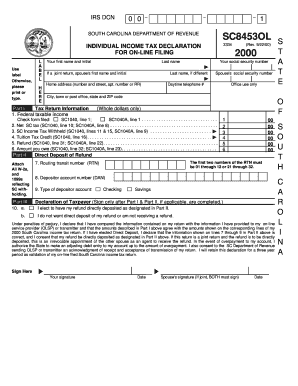
First name and initial 2000 Last name If a joint return, spouse's first name and initial Your social security number Last name, if different Home address (number and street, apt. number or RR) (Rev. 9/22/00) Spouse's social security number Office use only Daytime telephone # City, town or post office, state and ZIP code Part I Tax Return Information 1. Federal taxable income O F (Whole dollars only) Check form filed: SC1040, line 1; SC1040A, line 1 . . . . . . . . . . . . . . . . .

How it works

  1. Open form

    Open form follow the instructions

  2. Easily sign form

    Easily sign the form with your finger

  3. Share form

    Send filled & signed form or save

How to fill out the 2000 SC8453OL - Sctax online

Completing the 2000 SC8453OL - Sctax form online is an essential step for filing your South Carolina individual income tax return electronically. This guide will walk you through each section of the form, ensuring you have the necessary information and know-how to fill it out accurately and efficiently.

Follow the steps to complete your SC8453OL - Sctax form online.

  1. Press the ‘Get Form’ button to access the SC8453OL form and open it in your preferred editor.
  2. Begin by entering your personal information. Provide your first name, middle initial, and last name in the specified fields. If you are filing a joint return, include your spouse's details as well.
  3. Input your social security numbers in the corresponding fields for both you and your spouse, if applicable. Ensure that these are entered correctly, as they are crucial for identification purposes.
  4. Fill in your home address, including the street number, apartment number (if applicable), and ZIP code. Double-check to make sure this information is accurate.
  5. In Part I, provide the requested tax return information from your completed SC1040 or SC1040A. You will need to fill in details such as federal taxable income, net SC tax, and any tax withholdings.
  6. Attach copies of all relevant W-2 and 1099 forms reflecting your South Carolina tax withholdings in Part II of the form.
  7. If you wish to have your refund directly deposited, complete the Direct Deposit section by entering your routing transit number, depositor account number, and selecting the type of account (checking or savings).
  8. In Part III, sign and date the form after ensuring that all information entered is correct and agrees with your tax return. If filing jointly, both partners must sign.
  9. Once all information is filled out and verified, proceed to save your changes. You may choose to download, print, or share your form as needed.

Complete your SC8453OL form online today to ensure a smooth tax filing process.

Get form

Experience a faster way to fill out and sign forms on the web. Access the most extensive library of templates available.
Get form

Related content

2000 Form 8453-OL - IRS
U.S. Individual Income Tax Declaration for an IRS e-file On-Line Return. 8453-OL. Form...
Learn more
Revenue Procedure 2000-19 - IRS
May 2, 2015 — Forms 8543-NR and 8453-OL are now referenced in the section on ... A tax...
Learn more
2004 Instructions For Form 1040 (ALL) P 72 I1040
IRS approved tax preparation software is available for online use on the Internet, ... you...
Learn more

Related links form

Driving Indianas Economic Growth CERTIFIED HMA FIELD SUPERVISOR PROCEDURES And ... - In PROPERTY MANAGEMENT MANUAL - State Of Indiana - In Industrial Rail Service Fund Grant Application FY 2012 - In

Questions & Answers

Get answers to your most pressing questions about US Legal Forms API.

Contact support

In 1999, the federal income tax rates varied depending on the income brackets. The highest marginal rate was 39.6%, which applied to high-income earners. Understanding the tax rates during that year, including those impacting the 2000 SC8453OL - Sctax, can help you analyze past liabilities and assess your tax situation more accurately. Consult tax professionals or reliable resources for specific calculations related to your circumstances.

The transitional tax year is a specific period that allows for a shift between old and new tax regulations. For taxpayers working with form 2000 SC8453OL - Sctax, this year may impact how you report income and expenses. It's important to refer to IRS guidelines for this year to ensure compliance and correct filings. Having the right information can prevent misunderstandings and potential penalties.

The old tax rule refers to the taxation laws that were in place before the changes enacted in the late 1990s. For instance, many taxpayers utilized form 2000 SC8453OL - Sctax under these regulations. Understanding these rules could help you gain clarity on your final tax obligations. Knowing how they differ from current regulations is crucial for accurate filing and compliance.

Downloading a tax statement is easy through uslegalforms. After logging in, head to the tax documents area where all your statements are located. You can find your needed tax statement readily, including your 2000 SC8453OL - Sctax for quick access.

To download your AIS and TIS statements, log into your account on the uslegalforms platform. Navigate to the financial documents section where you can easily find and select your AIS and TIS options. Downloading these statements, including details regarding your 2000 SC8453OL - Sctax, is simple and efficient.

To download an income statement, visit the uslegalforms platform and log into your account. Look for the income statements tab where various documents are organized. You can download your required income statement easily, including the 2000 SC8453OL - Sctax.

Downloading an income tax statement is straightforward on uslegalforms. Simply log in, and under the documentation section, select your desired income tax statement. This process will allow you to securely download your 2000 SC8453OL - Sctax statement effortlessly.

To download your income tax statement, log into your uslegalforms account. After accessing your profile, navigate to the tax documents section where your statements are stored. You should easily find and download your 2000 SC8453OL - Sctax income tax statement.

You can check your South Carolina tax refund status online through the SC Department of Revenue website. By entering your personal information, you will receive updates on your refund status. For specifics related to your 2000 SC8453OL - Sctax, having your information handy will streamline the process.

To obtain a PDF copy of your tax return, visit the uslegalforms platform. You can access your tax records by logging into your account and locating the documents section. The system provides an easy download option for your return, ensuring you receive your 2000 SC8453OL - Sctax quickly.

Get This Form Now!

Use professional pre-built templates to fill in and sign documents online faster. Get access to thousands of forms.
Get form
If you believe that this page should be taken down, please follow our DMCA take down processhere.

Industry-leading security and compliance

US Legal Forms protects your data by complying with industry-specific security standards.
  • In businnes since 1997
    25+ years providing professional legal documents.
  • Accredited business
    Guarantees that a business meets BBB accreditation standards in the US and Canada.
  • Secured by Braintree
    Validated Level 1 PCI DSS compliant payment gateway that accepts most major credit and debit card brands from across the globe.
Get 2000 SC8453OL - Sctax
Get form
  • Adoption
  • Bankruptcy
  • Contractors
  • Divorce
  • Home Sales
  • Employment
  • Identity Theft
  • Incorporation
  • Landlord Tenant
  • Living Trust
  • Name Change
  • Personal Planning
  • Small Business
  • Wills & Estates
  • Packages A-Z
  • Affidavits
  • Bankruptcy
  • Bill of Sale
  • Corporate - LLC
  • Divorce
  • Employment
  • Identity Theft
  • Internet Technology
  • Landlord Tenant
  • Living Wills
  • Name Change
  • Power of Attorney
  • Real Estate
  • Small Estates
  • Wills
  • All Forms
  • Forms A-Z
  • Form Library
  • Legal Hub
  • About Us
  • Help Portal
  • Legal Resources
  • Blog
  • Affiliates
  • Contact Us
  • Delete My Account
  • Site Map
  • Industries
  • Forms in Spanish
  • Localized Forms
  • State-specific Forms
  • Forms Kit
  • Real Estate Handbook
  • All Guides
  • Notarize
  • Incorporation services
  • For Consumers
  • For Small Business
  • For Attorneys
  • USLegal
  • FormsPass
  • pdfFiller
  • signNow
  • altaFlow
  • DocHub
  • Instapage
Form Packages
  • Adoption
  • Bankruptcy
  • Contractors
  • Divorce
  • Home Sales
  • Employment
  • Identity Theft
  • Incorporation
  • Landlord Tenant
  • Living Trust
  • Name Change
  • Personal Planning
  • Small Business
  • Wills & Estates
  • Packages A-Z
Form Categories
  • Affidavits
  • Bankruptcy
  • Bill of Sale
  • Corporate - LLC
  • Divorce
  • Employment
  • Identity Theft
  • Internet Technology
  • Landlord Tenant
  • Living Wills
  • Name Change
  • Power of Attorney
  • Real Estate
  • Small Estates
  • Wills
  • All Forms
  • Forms A-Z
  • Form Library
Customer Service
  • Legal Hub
  • About Us
  • Help Portal
  • Legal Resources
  • Blog
  • Affiliates
  • Contact Us
  • Delete My Account
  • Site Map
  • Industries
  • Forms in Spanish
  • Localized Forms
  • State-specific Forms
  • Forms Kit
Legal Guides
  • Real Estate Handbook
  • All Guides
Prepared for you
  • Notarize
  • Incorporation services
Our Customers
  • For Consumers
  • For Small Business
  • For Attorneys
Our Sites
  • USLegal
  • FormsPass
  • pdfFiller
  • signNow
  • altaFlow
  • DocHub
  • Instapage
Social Media
Call us now toll free:
+1 833 426 79 33
As seen in:
© Copyright 1999-2026 airSlate Legal Forms, Inc. 3720 Flowood Dr, Flowood, Mississippi 39232
  • Your Privacy Choices
  • Terms of Service
  • Privacy Notice
  • Content Takedown Policy
  • Bug Bounty Program