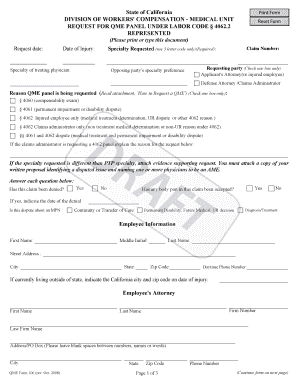
Get Qme Request Represented Fillable Form
How it works
-

Open form follow the instructions
-

Easily sign the form with your finger
-

Send filled & signed form or save
How to fill out the Qme Request Represented Fillable Form online
Filling out the Qme Request Represented Fillable Form is an essential step in requesting a Qualified Medical Evaluation (QME) panel. This guide provides a detailed walkthrough of each section, ensuring that users can complete the form accurately and efficiently.
Follow the steps to complete the Qme Request Represented Fillable Form effectively.
- Press the ‘Get Form’ button to obtain the form and open it in your preferred document editor.
- Enter the request date and the date of injury in the specified fields to establish the timeline of the claim.
- Specify the specialty requested using the 3-letter code provided in the specialty codes section.
- Indicate the specialty of the treating physician, if applicable. This helps in associating the request with the relevant medical expertise.
- Provide the claim number. This is crucial for tracking the specific case associated with the request.
- Select a requesting party by checking only one box indicating whether the applicant's attorney or the defense attorney/claims administrator is making the request.
- Detail the opposing party's specialty preference, if there is one, ensuring clarity in the requested evaluations.
- Clearly state the reason for requesting a QME panel by checking the appropriate box from the provided options. If further explanation is needed, fill in the details in the provided section.
- Answer all questions regarding the claim's status, including whether it has been denied and if any body part has been accepted.
- Fill in the employee's information, including their first name, last name, address, city, state, zip code, and daytime phone number.
- If the employee is currently living outside of California, indicate the California city and zip code related to the date of injury.
- Complete the employee's attorney information with their first name, last name, law firm name, address, and phone number.
- Provide the employer and claims administrator information, including the employer's name, claims administrator name, adjustor name, addresses, and phone numbers.
- Complete the prior QME panel information if applicable, detailing any previous QME panels the employee may have received.
- Ensure all required attachments are included, such as correspondence sent to the injured employee and any supporting documents regarding specialty requests.
- Upon completion, you can save changes, download, print, or share the form as necessary.
Complete your Qme Request Represented Fillable Form online today to ensure proper processing of your request.
The DWC 1 form is a Claim Form used in California for workers' compensation claims. It initiates the process for obtaining benefits after a workplace injury. Completing this form accurately is essential for successful claim processing, and you can use resources like the Qme Request Represented Fillable Form for a smoother experience. Always ensure you provide all required details to avoid delays.