Loading
Form preview
  • US Legal Forms
  • Form Library
  • More Forms
  • More Uncategorized Forms
  • Psira Registration Requirements Form

Get Psira Registration Requirements Form

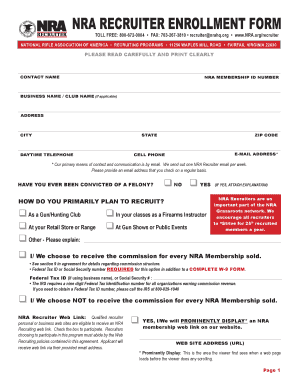
X, VIRGINIA 22030 PLEASE READ CAREFULLY AND PRINT CLEARLY CONTACT NAME NRA MEMBERSHIP ID NUMBER BUSINESS NAME / CLUB NAME (if applicable) ADDRESS CITY STATE DAYTIME TELEPHONE ZIP CODE E-MAIL ADDRESS* CELL PHONE * Our primary means of contact and communication is by email. We send out one NRA Recruiter email per week. Please provide an email address that you check on a regular basis. HAVE YOU EVER BEEN CONVICTED OF A FELONY? q NO q YES HOW DO YOU PRIMARILY PLAN TO RECRUIT? q As a.

How it works

  1. Open form

    Open form follow the instructions

  2. Easily sign form

    Easily sign the form with your finger

  3. Share form

    Send filled & signed form or save

How to fill out the Psira Registration Requirements Form online

Filling out the Psira Registration Requirements Form online is a straightforward process that enables you to complete your registration efficiently. This guide outlines each section of the form, providing clear instructions to help you submit your application accurately and successfully.

Follow the steps to complete the Psira Registration Requirements Form online

  1. Click the ‘Get Form’ button to obtain the Psira Registration Requirements Form and open it in the editor.
  2. Begin by providing your contact name, ensuring that it is clearly printed. Input your membership ID number and business or club name if applicable.
  3. Fill in your address, including city, state, and zip code. This information is vital for your application processing.
  4. Enter your daytime telephone number and email address. Remember, your email will be the primary mode of communication, so provide one that you check regularly.
  5. Indicate whether you have ever been convicted of a felony by selecting the appropriate option.
  6. Describe how you primarily plan to recruit, choosing from options such as as a gun/hunting club or at your retail store. Include additional explanations if needed.
  7. If applicable, specify whether you choose to receive a commission for every NRA Membership sold and provide either your Federal Tax ID number or Social Security number.
  8. Decide if you will participate in the NRA recruiter web link program by selecting the appropriate option and providing your website address, if you have one.
  9. Review the Terms of Agreement carefully. Ensure that you understand and are willing to abide by the terms mentioned.
  10. Sign and date the application, ensuring you print your name and title clearly. If you are submitting on behalf of a company, include the trading or company name.
  11. Finally, save your changes to the form. You may also download, print, or share the application as required.

Complete your registration by filling out the Psira Registration Requirements Form online today!

Get form

Experience a faster way to fill out and sign forms on the web. Access the most extensive library of templates available.
Get form

Related content

Crime Prevention, Partnership Policing and the...
number of private security officers, and the changing forms of public-private policing...
Learn more
Psira Grades Training Manual Pdf |...
Right here, we have countless ebook psira grades training manual pdf and ... Manual...
Learn more
Closed-circuit television - Wikipedia
Closed-circuit television (CCTV), also known as video surveillance, is the use of video...
Learn more

Related links form

Partner 's Directory - 2004. Partner 's Directory - List All Partners, Including Principal Address Partnership Instructions 2006. Instructions For Partnership Form 1065 - State Nj 11 Short Title NJ-1040X - 1997 NJ-1040X 1997 Amended Income Tax Resident Return And Instructions - Nj

Questions & Answers

Get answers to your most pressing questions about US Legal Forms API.

Contact support

When preparing your PSiRA registration requirements form, be sure to include your national ID or passport, proof of residence, and your latest criminal record check certificate. Additionally, include any relevant qualifications related to the security industry. Having all these documents organized will help you streamline your application process.

The approval process for PSiRA can vary, but typically it takes between two to four weeks after submitting your Psira Registration Requirements Form. This timeframe depends on the completeness of your application and the current workload of the PSiRA office. Regularly checking the status on their website can help keep you informed.

When renewing your PSIRA registration, you need to fill out the PSiRA Registration Requirements Form again and submit your renewed identification and proof of residence. Remember to provide any updated training or qualifications since your last registration. Keeping these documents ready will help avoid last-minute issues.

For new registration with PSiRA, you must complete the PSiRA Registration Requirements Form and submit documents such as identification, proof of residence, and a criminal record check. It's crucial to ensure that all information is up-to-date and accurate. This will help you navigate the registration process smoothly.

To book for PSiRA for the first time, access the online registration portal and fill out the PSiRA Registration Requirements Form. Make sure to provide all necessary information and upload required documents. After submitting, you will receive a confirmation of your booking, which you should keep for your records.

When applying for security through the PSiRA Registration Requirements Form, you need essential documents such as a valid identification, proof of residence, and a clear criminal record. Additionally, prepare any certificates or qualifications relevant to your application. Having these documents ready will streamline the application process.

The approval process for the PSiRA Registration Requirements Form typically takes between two to four weeks. During this period, PSiRA reviews your application and verifies the submitted documents. To expedite your approval, ensure all information is complete and correct when submitting your form.

To fill the PSiRA Registration Requirements Form, start by gathering the necessary personal and business information. Make sure you have your identification documents, proof of address, and any relevant supporting documents. Carefully follow the instructions provided on the form, ensuring all details are accurate to avoid delays.

To be eligible for a Private Security Contractor license, all of the following must be true: Minimum 21 years of age. No felony convictions in the last 10 years. Not currently suffering from alcohol or substance abuse.

To open a security company, an owner must be or must hire a qualified manager and apply for a company license. The state requires photos and criminal background checks on all owners, partners and corporate officers. All company employees must be licensed and carry their licenses with them at all times.

Get This Form Now!

Use professional pre-built templates to fill in and sign documents online faster. Get access to thousands of forms.
Get form
If you believe that this page should be taken down, please follow our DMCA take down processhere.

Industry-leading security and compliance

US Legal Forms protects your data by complying with industry-specific security standards.
  • In businnes since 1997
    25+ years providing professional legal documents.
  • Accredited business
    Guarantees that a business meets BBB accreditation standards in the US and Canada.
  • Secured by Braintree
    Validated Level 1 PCI DSS compliant payment gateway that accepts most major credit and debit card brands from across the globe.
Get Psira Registration Requirements Form
Get form
  • Adoption
  • Bankruptcy
  • Contractors
  • Divorce
  • Home Sales
  • Employment
  • Identity Theft
  • Incorporation
  • Landlord Tenant
  • Living Trust
  • Name Change
  • Personal Planning
  • Small Business
  • Wills & Estates
  • Packages A-Z
  • Affidavits
  • Bankruptcy
  • Bill of Sale
  • Corporate - LLC
  • Divorce
  • Employment
  • Identity Theft
  • Internet Technology
  • Landlord Tenant
  • Living Wills
  • Name Change
  • Power of Attorney
  • Real Estate
  • Small Estates
  • Wills
  • All Forms
  • Forms A-Z
  • Form Library
  • Legal Hub
  • About Us
  • Help Portal
  • Legal Resources
  • Blog
  • Affiliates
  • Contact Us
  • Delete My Account
  • Site Map
  • Industries
  • Forms in Spanish
  • Localized Forms
  • State-specific Forms
  • Forms Kit
  • Real Estate Handbook
  • All Guides
  • Notarize
  • Incorporation services
  • For Consumers
  • For Small Business
  • For Attorneys
  • USLegal
  • FormsPass
  • pdfFiller
  • signNow
  • altaFlow
  • DocHub
  • Instapage
Form Packages
  • Adoption
  • Bankruptcy
  • Contractors
  • Divorce
  • Home Sales
  • Employment
  • Identity Theft
  • Incorporation
  • Landlord Tenant
  • Living Trust
  • Name Change
  • Personal Planning
  • Small Business
  • Wills & Estates
  • Packages A-Z
Form Categories
  • Affidavits
  • Bankruptcy
  • Bill of Sale
  • Corporate - LLC
  • Divorce
  • Employment
  • Identity Theft
  • Internet Technology
  • Landlord Tenant
  • Living Wills
  • Name Change
  • Power of Attorney
  • Real Estate
  • Small Estates
  • Wills
  • All Forms
  • Forms A-Z
  • Form Library
Customer Service
  • Legal Hub
  • About Us
  • Help Portal
  • Legal Resources
  • Blog
  • Affiliates
  • Contact Us
  • Delete My Account
  • Site Map
  • Industries
  • Forms in Spanish
  • Localized Forms
  • State-specific Forms
  • Forms Kit
Legal Guides
  • Real Estate Handbook
  • All Guides
Prepared for you
  • Notarize
  • Incorporation services
Our Customers
  • For Consumers
  • For Small Business
  • For Attorneys
Our Sites
  • USLegal
  • FormsPass
  • pdfFiller
  • signNow
  • altaFlow
  • DocHub
  • Instapage
Social Media
Call us now toll free:
+1 833 426 79 33
As seen in:
© Copyright 1999-2026 airSlate Legal Forms, Inc. 3720 Flowood Dr, Flowood, Mississippi 39232
  • Your Privacy Choices
  • Terms of Service
  • Privacy Notice
  • Content Takedown Policy
  • Bug Bounty Program