Loading
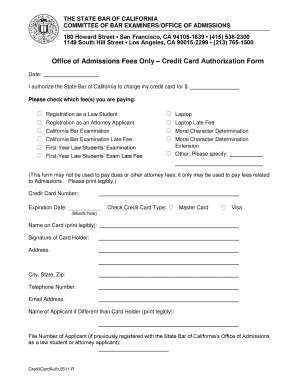
Get Mycreditcarddoc Form
How it works
-

Open form follow the instructions
-

Easily sign the form with your finger
-

Send filled & signed form or save
How to fill out the Mycreditcarddoc Form online
Filling out the Mycreditcarddoc Form can seem daunting, but with clear guidance, you can complete it efficiently. This guide provides step-by-step instructions to help you navigate each section of the form with confidence.
Follow the steps to complete the form accurately.
- Click the 'Get Form' button to access the form and open it in the provided tool.
- Begin by entering the date at the top of the form. This is important for record-keeping purposes.
- In the payment authorization section, enter the amount you are authorizing the State Bar of California to charge to your credit card.
- Select the fees you are paying by checking the appropriate box(es) for options such as registration as a law student, California Bar Examination, or any other relevant fees provided in the list.
- Fill in your credit card number and expiration date. Ensure the information is accurate to avoid processing issues.
- Indicate the type of credit card you are using by checking either MasterCard or Visa.
- Print your name on the card where indicated, and provide your signature to authorize the payment.
- Complete the address section by filling in your address, including city, state, and zip code.
- Add your telephone number and email address for confirmation and communication purposes.
- If the applicant's name differs from the cardholder's name, provide the applicant's name in the designated area.
- If applicable, enter the file number of the applicant if you have been previously registered with the State Bar of California.
- Once all sections are completed, save any changes you have made, and choose to download, print, or share the form as necessary.
Complete your documents online today for a hassle-free experience.
To create a credit card authorization form, gather the necessary information such as cardholder details and payment authorization language. The Mycreditcarddoc Form simplifies this process by providing a template that includes all essential elements. This helps ensure that your form complies with legal and security standards.