Loading
Form preview
  • US Legal Forms
  • Other Templates
  • More Forms
  • More Uncategorized Forms
  • St Joseph Hospital Maternity Registration

Get St Joseph Hospital Maternity Registration

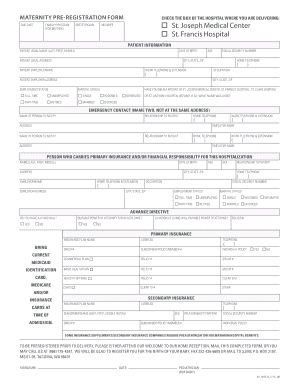
Ital MIDWIFE Patient information PATIENT LEGAL NAME (LAST, FIRST, MIDDLE) DATE OF BIRTH PATIENT LEGAL ADDRESS AGE SOCIAL SECURITY NUMBER CITY, STATE, ZIP PATIENT EMPLOYER NAME HOME TELEPHONE ( WORK TELEPHONE & EXTENSION ( ) OCCUPATION ) PATIENT EMPLOYER ADDRESS CITY, STATE, ZIP EMPLOYMENT STATUS MARITAL STATUS HAVE YOU BEEN A PATIENT AT ST. JOSEPH MEDICAL CENTER, ST. FRANCIS HOSPITAL, ST. clare HOSPITAL FULL-TIME UNEMPLOYED SINGLE WIDOWED.

How it works

  1. Open form

    Open form follow the instructions

  2. Easily sign form

    Easily sign the form with your finger

  3. Share form

    Send filled & signed form or save

How to fill out the St Joseph Hospital Maternity Registration online

Filling out the St Joseph Hospital Maternity Registration form online is a vital step in ensuring a smooth admission process for your upcoming delivery. This guide provides step-by-step instructions to help you complete the registration with ease and confidence.

Follow the steps to successfully complete your maternity registration online.

  1. Use the ‘Get Form’ button to access the maternity registration form and open it in the designated editor.
  2. Begin by entering your family physician's name, followed by your obstetrician’s details. Check the box corresponding to the hospital where you plan to deliver: St. Joseph Medical Center or St. Francis Hospital.
  3. Provide information under 'Patient information', including your legal name (last, first, middle), date of birth, legal address, age, and social security number.
  4. Fill in your contact details, including your city, state, ZIP code, home and work telephone numbers, as well as your occupation and employer name.
  5. Indicate your employment status and marital status by selecting the appropriate options. Additionally, note if you have been a patient at the specified hospitals before, and if applicable, provide the name you used.
  6. Under 'Emergency Contact', list two individuals who can be notified in case of an emergency, along with their relationship to you, contact numbers, and addresses.
  7. Enter the information for the person who carries primary insurance and/or is financially responsible for the hospitalization, including their name, date of birth, address, sex, relationship to you, and employer details.
  8. Indicate if you have an advance directive such as a living will or durable power of attorney for healthcare and provide the location of any relevant documents.
  9. Fill out the primary insurance information, providing the insurance plan name, address, subscriber details, and plan numbers. Bring your current insurance identification at the time of admission.
  10. If you have secondary insurance, repeat the previous step to provide its details.
  11. Finally, review all the provided information for accuracy, sign the form, and add the date. Save your changes and choose your preferred method to submit or share the completed document.

Complete your maternity registration form online today to ensure a smooth and prepared experience for your delivery.

Get form

Experience a faster way to fill out and sign forms on the web. Access the most extensive library of templates available.
Get form

Related content

St. Joseph Hospital Historic District - National...
Register of Historic Places Registration Form (National Register Bulletin 16A). ... The...
Learn more
Class Registration | Upstate Family Birth Center |...
Best Beginnings Childbirth and New Family Classes Registration. To register for a classes...
Learn more
Adoption - Wikipedia
Sister Irene of New York Foundling Hospital with children. Sister Irene is among the...
Learn more

Related links form

United American Insurance Company DISCL1 2007 OH Gallipolis City School District Application For Employment 2011 TX WorldVentures Marketing Membership/Representative Application Form 2018 TX WorldVentures Marketing Membership/Representative Application Form 2009

Questions & Answers

Get answers to your most pressing questions about US Legal Forms API.

Contact support

St Joseph Hospital offers a patient portal that facilitates easy access to your health information. While a specific app may or may not exist, the portal allows you to manage appointments, view medical records, and follow up on maternity registration statuses. Staying connected through the portal enhances your overall experience. It’s worth exploring these digital resources for convenience.

Yes, the phone number for St Joseph Hospital is readily available on their website. It's advisable to check their contact page for the most accurate and updated information. This number can connect you to the maternity department, where staff can assist with your maternity registration inquiries. Having direct communication can help clarify any questions you may have.

You can contact St Joseph Hospital through their main phone line, which is available on their official website. Additionally, you can find various departmental contacts, including maternity services. For any questions regarding the maternity registration process, reaching out directly is recommended. The staff are eager to assist you with any concerns.

Typically, St Joseph Hospital allows a few visitors per room after birth, aiming to balance support with patient privacy. However, actual policies can vary based on current health guidelines and patient needs. It’s always best to check with hospital staff after completing your St Joseph Hospital Maternity Registration for specific visitor rules. This ensures you have an enjoyable experience with your loved ones.

St Joseph Hospital is known for its commitment to quality care, particularly in maternity services. Their staff includes experienced professionals dedicated to supporting expectant mothers. Many families have expressed satisfaction with their experiences, especially during maternity registration and the birthing process. Evaluating reviews and ratings can give you better insight into what to expect.

To get admitted to St Joseph Hospital, you need to go through the maternity registration process. Start by contacting the hospital or visiting their website for forms and guidelines. Ensure you have your insurance details and other pertinent information ready. Completing St Joseph Hospital Maternity Registration in advance can smooth the process when you arrive.

To register at St Joseph Hospital before giving birth, you can visit their website for online registration or call their maternity department directly. This process allows you to provide necessary information like your due date and insurance details. Completing your St Joseph Hospital Maternity Registration in advance gives you peace of mind as your delivery date approaches.

The pre-registration process at St Joseph Hospital involves filling out necessary forms before your arrival. This can typically be done either online or in person, and it streamlines your admission. By pre-registering, you reduce waiting times and enhance your overall experience on the day of delivery.

For your hospital birth at St Joseph Hospital, the essential paperwork includes your identification, insurance details, and any doctor’s referrals. Completing your St Joseph Hospital Maternity Registration ahead of time simplifies the process on the day of your delivery. Confirm with your healthcare provider to ensure you have all required documents in order.

It’s a good practice to book your bed at St Joseph Hospital during your third trimester. This timing allows for necessary arrangements and ensures that you have a spot reserved when your labor begins. Early planning helps you avoid any last-minute complications during this crucial time.

Get This Form Now!

Use professional pre-built templates to fill in and sign documents online faster. Get access to thousands of forms.
Get form
If you believe that this page should be taken down, please follow our DMCA take down processhere.
Get St Joseph Hospital Maternity Registration
Get form
  • Adoption
  • Bankruptcy
  • Contractors
  • Divorce
  • Home Sales
  • Employment
  • Identity Theft
  • Incorporation
  • Landlord Tenant
  • Living Trust
  • Name Change
  • Personal Planning
  • Small Business
  • Wills & Estates
  • Packages A-Z
  • Affidavits
  • Bankruptcy
  • Bill of Sale
  • Corporate - LLC
  • Divorce
  • Employment
  • Identity Theft
  • Internet Technology
  • Landlord Tenant
  • Living Wills
  • Name Change
  • Power of Attorney
  • Real Estate
  • Small Estates
  • Wills
  • All Forms
  • Forms A-Z
  • Other Templates
  • Legal Hub
  • About Us
  • Help Portal
  • Legal Resources
  • Blog
  • Affiliates
  • Contact Us
  • Delete My Account
  • Site Map
  • Industries
  • Forms in Spanish
  • Localized Forms
  • State-specific Forms
  • Forms Kit
  • Real Estate Handbook
  • All Guides
  • Notarize
  • Incorporation services
  • For Consumers
  • For Small Business
  • For Attorneys
  • USLegal
  • FormsPass
  • pdfFiller
  • signNow
  • altaFlow
  • DocHub
  • Instapage
Form Packages
  • Adoption
  • Bankruptcy
  • Contractors
  • Divorce
  • Home Sales
  • Employment
  • Identity Theft
  • Incorporation
  • Landlord Tenant
  • Living Trust
  • Name Change
  • Personal Planning
  • Small Business
  • Wills & Estates
  • Packages A-Z
Form Categories
  • Affidavits
  • Bankruptcy
  • Bill of Sale
  • Corporate - LLC
  • Divorce
  • Employment
  • Identity Theft
  • Internet Technology
  • Landlord Tenant
  • Living Wills
  • Name Change
  • Power of Attorney
  • Real Estate
  • Small Estates
  • Wills
  • All Forms
  • Forms A-Z
  • Other Templates
Customer Service
  • Legal Hub
  • About Us
  • Help Portal
  • Legal Resources
  • Blog
  • Affiliates
  • Contact Us
  • Delete My Account
  • Site Map
  • Industries
  • Forms in Spanish
  • Localized Forms
  • State-specific Forms
  • Forms Kit
Legal Guides
  • Real Estate Handbook
  • All Guides
Prepared for you
  • Notarize
  • Incorporation services
Our Customers
  • For Consumers
  • For Small Business
  • For Attorneys
Our Sites
  • USLegal
  • FormsPass
  • pdfFiller
  • signNow
  • altaFlow
  • DocHub
  • Instapage
Social Media
Call us now toll free:
+1 833 426 79 33
As seen in:
© Copyright 1999-2026 airSlate Legal Forms, Inc. 17 Station Street, Ste. 203, Brookline, MA 02445
  • Your Privacy Choices
  • Terms of Service
  • Privacy Notice
  • Content Takedown Policy
  • Bug Bounty Program