Loading
Get Isu Web For Parent Form
How it works
-

Open form follow the instructions
-

Easily sign the form with your finger
-

Send filled & signed form or save
How to fill out the Isu Web For Parent Form online
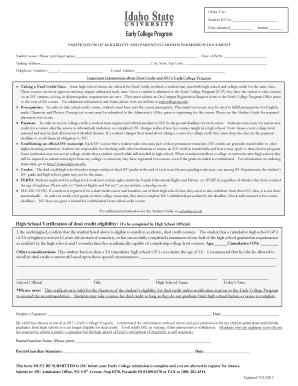
Filling out the Isu Web For Parent Form is essential for students seeking to participate in ISU's Early College Program. This guide provides a detailed overview of the form's components along with step-by-step instructions to ensure a smooth online submission process.
Follow the steps to successfully complete the form.
- Click the ‘Get Form’ button to access the form and open it in your preferred online document editor.
- Begin by entering the student's name in the designated field. Ensure that you print the legal name as indicated.
- Fill in the mailing address fields completely, including the city, state, and zip code. Accurate contact details are vital for communication.
- Complete the important information section accurately. Pay close attention to eligibility, prerequisites, and payment details as they contain vital information about the dual credit and Early College program.
- The high school official must confirm the student's eligibility by filling in their section. This includes the cumulative GPA and age. Make sure this is signed and dated appropriately.
- Finally, review all entered information for accuracy. Once confirmed, save any changes made to the document.
Complete your Isu Web For Parent Form online today to ensure your participation in ISU's Early College Program.
The school code for Illinois State University is 001692. This code is crucial when filling out the FAFSA and CSS Profile, as it directs your financial information to the right institution. Make sure to include this code when completing the ISU Web For Parent Form to ensure your child’s application is processed correctly.