Get Alohacare Online Form
How it works
-

Open form follow the instructions
-

Easily sign the form with your finger
-

Send filled & signed form or save
How to use or fill out the Alohacare Online Form online
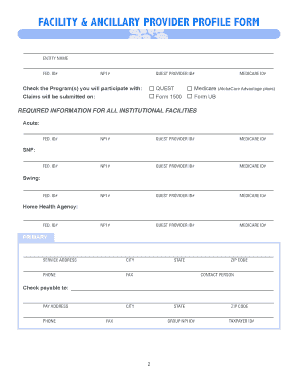
The Alohacare Online Form is essential for individuals seeking to join AlohaCare’s Provider Network. This guide offers a step-by-step approach to efficiently and accurately filling out the form, ensuring that users can complete the process with confidence.
Follow the steps to efficiently complete the Alohacare Provider Profile Form
- Press the ‘Get Form’ button to access and open the Alohacare Online Form in your preferred editor.
- Begin by providing your entity name and Federal ID number in the specified fields. Ensure that all information is accurate to facilitate the credentialing process.
- Fill in the required identification numbers such as your National Provider Identifier (NPI) and QUEST provider ID, along with your Medicare ID if applicable.
- Indicate the programs you will participate with by checking the appropriate boxes (i.e., QUEST or Medicare). This is crucial for processing your application.
- Complete the claims submission method by selecting either Form 1500 or Form UB. This helps AlohaCare to understand how you handle billing.
- Provide detailed information for each institutional facility type (acute, skilled nursing facility, swing bed, home health agency), including federal ID, NPI, QUEST provider ID, and Medicare ID.
- Enter your primary service address along with the contact details such as phone and fax numbers. This information is vital for AlohaCare correspondence.
- Complete the payment address section. Ensure that it matches your intended payee and includes relevant contact information.
- If there are additional service addresses, list them on a separate attachment as instructed, ensuring clarity and compliance with requirements.
- Indicate your regular correspondence address, choosing from the provided options or specifying another address as needed.
- Review and complete the agreement section, providing your signature, printed name, and date to ensure acknowledgment of terms and compliance.
- Once all sections are completed, save your changes, and consider downloading or printing the completed form for your records.
- Return the completed provider profile along with the required documentation via fax or mail to the specified AlohaCare addresses.
Start the process of completing and submitting your documents online to join AlohaCare’s Provider Network today!
For questions regarding AlohaCare Quest integration, you can reach their customer service at 1-888-737-7763. They offer knowledgeable representatives who are ready to help you with any questions related to coverage and benefits. It's an excellent resource if you're looking to understand how to maximize your health care options. Additionally, you can start your inquiry through the AlohaCare Online Form to streamline your experience.
Industry-leading security and compliance
-
In businnes since 199725+ years providing professional legal documents.
-
Accredited businessGuarantees that a business meets BBB accreditation standards in the US and Canada.
-
Secured by BraintreeValidated Level 1 PCI DSS compliant payment gateway that accepts most major credit and debit card brands from across the globe.