Loading
Get Ngr 37 111
How it works
-

Open form follow the instructions
-

Easily sign the form with your finger
-

Send filled & signed form or save
How to fill out the Ngr 37 111 online
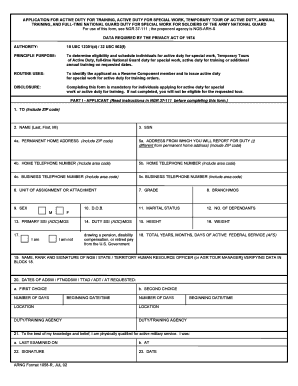
Filling out the Ngr 37 111 form online can facilitate your application for active duty and training opportunities. This guide provides clear, step-by-step instructions to ensure you complete the form accurately and efficiently.
Follow the steps to complete the Ngr 37 111 form online.
- Press the 'Get Form' button to retrieve the Ngr 37 111 form and launch it in your preferred online editor.
- Begin by filling out Part I - Applicant. Start with the 'TO' field by entering the recipient's address, including the ZIP code.
- In the 'NAME' section, enter your last name, first name, and middle initial. Then, include your Social Security Number in the provided field.
- Fill in your permanent home address, including ZIP code, in the 'PERMANENT HOME ADDRESS' field. If your reporting address differs, complete the 'ADDRESS FROM WHICH YOU WILL REPORT FOR DUTY' section.
- Provide your home and business telephone numbers, making sure to include the area codes.
- Complete the sections regarding your unit of assignment, grade, and branch/MOS. Be accurate and ensure your rank is current.
- Indicate your sex, date of birth, marital status, and the number of dependents in the required fields.
- In the 'PRIMARY SSI (AOC)/ MOS' and 'DUTY SSI (AOC)/ MOS' sections, provide the necessary details related to your military service.
- Complete the height and weight sections accurately, followed by declaring if you are drawing pension, disability compensation, or retired pay.
- Verify and sign block 22, confirming you are physically qualified for active military service. Also, include the date.
- In the section for requested dates of duty, list your preferences for first and second choices along with the corresponding dates, times, and duty/training agencies.
- Proceed to complete any required remarks or notes in the designated area, ensuring all necessary information is provided.
- Finish by confirming the details provided in Part II, including the name and signature of the unit commander, and the dates as needed.
- Once you have filled out all sections of the form, review your entries for accuracy. You can then save changes, download, print, or share the completed form.
Start your application process now by completing the Ngr 37 111 form online.
To fill out a DA31 form, start by entering your name, rank, and unit information. Next, specify the exact leave dates and the reason for your absence. It is essential to ensure that all required fields are completed accurately to comply with Ngr 37 111 regulations. For a smooth experience, uslegalforms can provide you with a precise template, making the process straightforward and compliant.