Loading
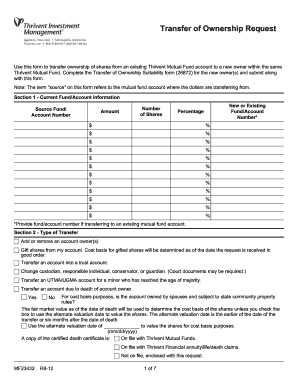
Get Thrivent For Lutherans Form
How it works
-

Open form follow the instructions
-

Easily sign the form with your finger
-

Send filled & signed form or save
How to fill out the Thrivent For Lutherans Form online
This guide provides a comprehensive overview of the steps necessary to complete the Thrivent For Lutherans Form online. With detailed instructions for each section, users can confidently navigate the form to ensure accurate submissions.
Follow the steps to successfully complete the Thrivent For Lutherans Form.
- Press the ‘Get Form’ button to access the Thrivent For Lutherans Form and open it in the digital editor.
- Begin with Section 1, Current Fund/Account Information. Input the source fund/account number from which shares will be transferred. Fill in the number of shares, the amount, and if applicable, the new or existing fund/account number and corresponding percentage values for each entry.
- Move to Section 2, Type of Transfer. Indicate the type of transfer you are requesting by selecting one of the available options, such as adding or removing an account owner. Ensure to check any relevant boxes that apply to your situation.
- For Section 3, complete the Cost Basis Override for Transaction Source Account only if your account is reportable under IRS Form 1099-B. Choose the desired cost basis method from the options provided.
- In Section 4, New Account Registration, fill out necessary details like individual or business name, address, Social Security number or Tax Identification Number, and contact information for all parties involved, including joint owners or authorized persons.
- Proceed to Section 5, Successor Custodian or Responsible Individual Information. Add the required information for a successor custodian or responsible individual if applicable.
- In Section 6, denote your cost basis election method for covered shares and complete the chart as necessary.
- For Section 7, review any specific account options, including dividend plans or systematic withdrawal options, and indicate selections as needed.
- Complete Section 8, Special Instructions, if any additional information or requests are required.
- Read through all sections thoroughly, then move to Section 11 for the required signatures. All current shareholders must sign and date the form ensuring compliance with the signature requirements.
- Finally, save your changes. You can opt to download, print, or share the completed form as needed.
Start completing your Thrivent For Lutherans Form online today for a smooth experience.
To open a Thrivent account, visit their official website and follow the instructions for account creation. You’ll likely need to complete the Thrivent For Lutherans Form, which collects necessary information. If you encounter any questions during the process, Thrivent offers support to help you every step of the way. Engaging with their customer service can enhance your onboarding experience.