Get Texas Employees Group Benefits Program (gbp) Supplemental ... - Depts Ttu
How it works
-

Open form follow the instructions
-

Easily sign the form with your finger
-

Send filled & signed form or save
How to fill out the Texas Employees Group Benefits Program (GBP) Supplemental Information Form online
Filling out the Texas Employees Group Benefits Program (GBP) Supplemental Information Form is an essential step for employees of the Texas Employees Retirement System. This guide will provide clear instructions to ensure you successfully complete the form online and manage your benefits effectively.
Follow the steps to fill out the form correctly.
- Click ‘Get Form’ button to access the Texas Employees Group Benefits Program (GBP) Supplemental Information Form and open it in the online editor.
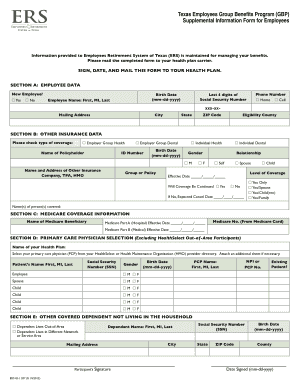
- In Section A, provide your employee data. Indicate if you are a new employee by selecting 'Yes' or 'No', and fill in your birth date in the required format (mm-dd-yyyy). Enter your full name, contact phone number, last four digits of your Social Security number, mailing address, city, state, ZIP code, and eligibility county.
- In Section B, indicate any other insurance coverage you may have. Check the appropriate types of coverage you possess (employer group health, employer group dental, individual health, or individual dental) and provide the policyholder's name, ID number, and birth date. If applicable, include other insurance companies' names and addresses.
- In Section C, complete the Medicare coverage information if relevant. Specify the name of the Medicare beneficiary, fill in the Medicare part A and part B effective dates, and include the Medicare number from your Medicare card.
- In Section D, select your primary care physician from your health plan. Enter your health plan name and write the full name and provider code of your chosen PCP for yourself and any covered dependents. Indicate whether you are an existing patient for each person listed.
- In Section E, provide information about any other covered dependents not living in your household. Indicate if they live out-of-area or in a different network or service area and write the dependent's mailing address.
- After completing all sections, review the information for accuracy. Print your name, sign, date, and mail the form to your health plan carrier as instructed.
Complete the Texas Employees Group Benefits Program (GBP) Supplemental Information Form online today to manage your benefits efficiently.
The Texas Employees Group Benefits Program (GBP) is a state-sponsored initiative designed to provide employee benefits, including health insurance, to Texas state employees. This program focuses on ensuring that employees have access to vital healthcare resources and financial protection. Additionally, GBP simplifies the enrollment process for employees, making it easier to navigate benefits options. By providing quality coverage, the program supports a healthy and productive workforce.