Loading
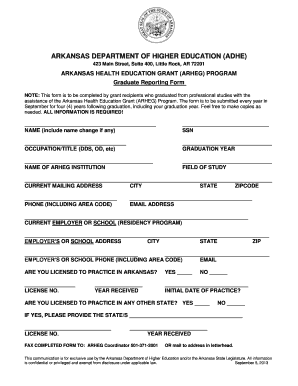
Get Arheg Graduate Reporting Form
How it works
-

Open form follow the instructions
-

Easily sign the form with your finger
-

Send filled & signed form or save
How to fill out the Arheg Graduate Reporting Form online
This guide offers clear and supportive instructions on how to accurately complete the Arheg Graduate Reporting Form online. By following these steps, users will ensure that they provide all necessary information in a timely manner.
Follow the steps to successfully complete your form.
- Click ‘Get Form’ button to obtain the form and open it for editing.
- Begin by entering your full name in the designated field. Include any name changes, if applicable.
- Provide your Social Security Number (SSN) in the section marked for it.
- In the occupation/title field, specify your professional designation, such as DDS or OD.
- Enter your graduation year in the appropriate field. This information is crucial for record-keeping.
- Indicate the name of the institution from which you graduated under the ARHEG program.
- Specify your field of study in the next available section.
- Complete your current mailing address, ensuring that you include the city, state, and zip code.
- Provide a contact phone number, including the area code, in the designated field.
- Enter your email address in the specified area to ensure further communication.
- List your current employer or the name of the school if you are in a residency program.
- Fill out the employer’s or school’s address, including city, state, and zip code.
- Provide the phone number of your employer or school, including the area code, and the email address if applicable.
- Answer whether you are licensed to practice in Arkansas by marking 'Yes' or 'No.' If 'Yes,' fill in your license number and the initial date of practice.
- If you have practices in other states, indicate this in the provided section and include the corresponding license numbers.
- After completing all fields, review your information for accuracy. Save your changes, and you may choose to download, print, or share the form.
Complete the Arheg Graduate Reporting Form online today to ensure your information is submitted correctly.
Industry-leading security and compliance
US Legal Forms protects your data by complying with industry-specific security standards.
-
In businnes since 199725+ years providing professional legal documents.
-
Accredited businessGuarantees that a business meets BBB accreditation standards in the US and Canada.
-
Secured by BraintreeValidated Level 1 PCI DSS compliant payment gateway that accepts most major credit and debit card brands from across the globe.