Get Vt In Reduced Tuition Request Form
How it works
-

Open form follow the instructions
-

Easily sign the form with your finger
-

Send filled & signed form or save
How to fill out the Vt In Reduced Tuition Request Form online
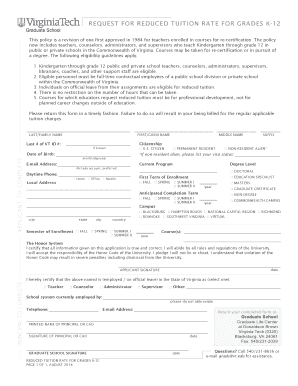
This guide provides step-by-step instructions for successfully completing the Vt In Reduced Tuition Request Form online. Designed for educators in Virginia, this form helps eligible personnel request reduced tuition rates for professional development courses.
Follow the steps to complete the form accurately and efficiently.
- Use the ‘Get Form’ button to access the Vt In Reduced Tuition Request Form and open it in your preferred online editor.
- Begin by entering your last and first name in the designated fields. If applicable, include your middle name for proper identification.
- Select your suffix, if applicable, and provide your date of birth in the format of month/day/year.
- Indicate your citizenship status by selecting one of the options: U.S. Citizen, Permanent Resident, or Non-Resident Alien. If you are a Non-Resident Alien, specify your visa status.
- Fill in your current email address, preferably the @vt.edu account, and ensure it is correct for any communications.
- Select your current program and degree level from the provided options, including options for Doctoral, Education Specialist, Masters, Graduate Certificate, or Non-Degree.
- Provide your local address, including city, state, zip code, and country. This addresses your current residential location.
- Indicate your first term of enrollment by choosing Fall, Spring, Summer I, or Summer II. Also, select your anticipated completion term.
- Select your campus location from the list provided, such as Blacksburg, Hampton Roads, National Capital Region, Richmond, Roanoke, Southwest Virginia, or Virtual.
- List the course(s) you plan to take during your enrollment period. Ensure this complies with the eligibility guidelines for professional development.
- Review and affirm your commitment to the Honor System by signing and dating the application, confirming that all information is true and correct.
- Provide the principal's details, including their printed name, signature, position, school system, and contact information. Ensure this section is completed accurately.
- Finally, save your changes, download, print, or share the completed form as required to submit your request promptly.
Complete your Vt In Reduced Tuition Request Form online today and take a step towards professional development.
To ask for a discount on tuition fees, start by preparing your case, demonstrating financial need or extenuating circumstances. Utilize the Vt In Reduced Tuition Request Form to formally present your request. This structured approach will ensure that the admissions office thoroughly considers your situation. Lastly, be patient while waiting for their response, as these requests are carefully reviewed.
Industry-leading security and compliance
-
In businnes since 199725+ years providing professional legal documents.
-
Accredited businessGuarantees that a business meets BBB accreditation standards in the US and Canada.
-
Secured by BraintreeValidated Level 1 PCI DSS compliant payment gateway that accepts most major credit and debit card brands from across the globe.