Loading
Get Dr 8442
How it works
-

Open form follow the instructions
-

Easily sign the form with your finger
-

Send filled & signed form or save
How to fill out the Dr 8442 online
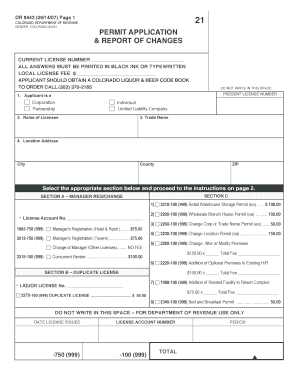
The Dr 8442 is a vital document for individuals and entities seeking permits related to liquor and beer licensing in Colorado. This guide will provide you with step-by-step instructions to help you complete the form confidently and accurately.
Follow the steps to successfully complete the Dr 8442 online.
- Press the ‘Get Form’ button to obtain the Dr 8442 form and open it in your preferred editor.
- Begin by filling out the current license number and ensure all answers are printed in black ink or typed.
- For question one, select the appropriate applicant type, such as Corporation, Partnership, Individual, or Limited Liability Company.
- In question two, enter the full name of the licensee as it appears on official documents.
- For question three, provide the trade name or the name under which the business operates.
- Next, input the location address including the city, county, and ZIP code for the premises where the license will apply.
- Refer to Section A, B, or C depending on the type of application you are submitting and check the appropriate box. Follow the specific instructions outlined in the related section on page two.
- Complete section-specific questions, providing any additional required information, such as changes in management or facility details, as specified.
- After completing all sections, move to the Oath of Applicant. Ensure the declaration is signed and dated appropriately, affirming the accuracy of the information provided.
- Finally, review your form for completeness, then save changes, and proceed to download, print, or share the filled form as required.
Complete your documents online and ensure compliance with the necessary regulations.