Loading
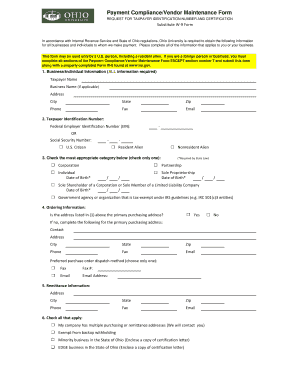
Get Ohio Vendor Maintenance Form
How it works
-

Open form follow the instructions
-

Easily sign the form with your finger
-

Send filled & signed form or save
How to fill out the Ohio Vendor Maintenance Form online
Filling out the Ohio Vendor Maintenance Form is essential for businesses and individuals who wish to receive payments from Ohio University. This guide will provide you with clear, step-by-step instructions to help you complete the form online accurately and efficiently.
Follow the steps to successfully complete the form online.
- Click ‘Get Form’ button to obtain the form and open it in the editor.
- Complete the 'Business/Individual Information' section, ensuring all fields such as Taxpayer Name, Business Name (if applicable), Address, City, State, Zip, Phone, Fax, and Email are filled out accurately.
- In the 'Taxpayer Identification Number' section, select and enter either your Federal Employer Identification Number (EIN) or Social Security Number. Indicate whether you are a U.S. Citizen, Resident Alien, or Nonresident Alien.
- Check the appropriate category that describes your business. You can select from Corporation, Partnership, Individual, Sole Proprietorship, Sole Shareholder of a Corporation, Government agency, or Tax-exempt organization. If required, provide your Date of Birth.
- Fill out the 'Ordering Information' section. Confirm if the address listed is your primary purchasing address. If not, provide details for your primary purchasing address including Contact, Address, City, State, Zip, Phone, Fax, and Email, along with your preferred purchase order dispatch method.
- In the 'Remittance Information' section, provide any necessary information regarding payment addresses, ensuring all fields are completed accurately.
- Check all applicable boxes in the 'Check all that apply' section to indicate if your company has multiple purchasing or remittance addresses or if you qualify as an exempt or minority business.
- Read and complete the 'Certification' section, which requires you to affirm your taxpayer identification number and confirm your status concerning backup withholding. Provide your signature, date, and title if applicable.
- Once you have completed all sections, review your information for accuracy. You can then save your changes, download, print, or share the completed form as needed.
Fill out the Ohio Vendor Maintenance Form online today to ensure smooth processing of your payments.
A vendor maintenance form is a document used to manage and update vendor information within a company. It captures essential details like contact information, payment terms, and business qualifications. Utilizing the Ohio Vendor Maintenance Form ensures you keep your vendor database current and accurate, ultimately supporting better business relationships and compliance.